![[H]ard|Forum](/styles/hardforum/xenforo/logo_dark.png)
Navigation
Install the app
How to install the app on iOS
Follow along with the video below to see how to install our site as a web app on your home screen.
Note: This feature may not be available in some browsers.
More options
-
Some users have recently had their accounts hijacked. It seems that the now defunct EVGA forums might have compromised your password there and seems many are using the same PW here. We would suggest you UPDATE YOUR PASSWORD and TURN ON 2FA for your account here to further secure it. None of the compromised accounts had 2FA turned on.
Once you have enabled 2FA, your account will be updated soon to show a badge, letting other members know that you use 2FA to protect your account. This should be beneficial for everyone that uses FSFT.
You are using an out of date browser. It may not display this or other websites correctly.
You should upgrade or use an alternative browser.
You should upgrade or use an alternative browser.
The Nintendo Switch 2 Thread
- Thread starter MrGuvernment
- Start date

- Joined
- Aug 7, 2004
- Messages
- 7,139
If you want one GameStop is your best bet since scalpers have a harder time returning product to them. Even in a big metro area they’ve had stock since Thursday. By late next week the supply will be pretty steady I think in store. Online might still be a while, but if you want one you should be able to get one at this point.
i was somehow able to snag one from walmart online, not sure if it was a mistake as now they are listed for walmart+ members only (except for 3rd party ones). as for gamestop, they are now all out around me in 75 mile radius according to popfindr.com. i think most stores around major cities seem to be out, or at least the few i checked for fun.
As of Sunday, walmart and best buy finally have no stock according to online. I was just at walmart yesterday grocery shopping so unsure if true or not. Gamestop stores all over town have in store stock according to online, with a few much farther than me having limited stock.
Nintendo has done a good job with stock levels and availability. I also got my nintendo online email AND amazon email indicating I can buy and got 1 of them. The local scalping scene is pretty desperate at the moment with the local facebook just trying to net $20 or cost now. A few new posts indicating 25% markups but those were around day 1 and dropped quickly with the local stock being so available. I picked my amazon allocation as even if I pick free shipping, the warehouse is 10 min drive and I usually get next day.
Nintendo has done a good job with stock levels and availability. I also got my nintendo online email AND amazon email indicating I can buy and got 1 of them. The local scalping scene is pretty desperate at the moment with the local facebook just trying to net $20 or cost now. A few new posts indicating 25% markups but those were around day 1 and dropped quickly with the local stock being so available. I picked my amazon allocation as even if I pick free shipping, the warehouse is 10 min drive and I usually get next day.

Domingo
Fully [H]
- Joined
- Jul 30, 2004
- Messages
- 24,204
Just curious - anybody have a Switch 2 case that they're especially happy with? Just looking for something to protect this thing in the event that I do end up lugging it on a long flight.
- Joined
- Mar 19, 2003
- Messages
- 11,099
I have a gamertek case. I have had these for switch 1 as well. Serviceable, cheap and has space for quite a few games and minor accessories (like USB C cable).Just curious - anybody have a Switch 2 case that they're especially happy with? Just looking for something to protect this thing in the event that I do end up lugging it on a long flight.
Domingo
Fully [H]
- Joined
- Jul 30, 2004
- Messages
- 24,204
I have a gamertek case. I have had these for switch 1 as well. Serviceable, cheap and has space for quite a few games and minor accessories (like USB C cable).
That works. I had a large'ish Switch 1 case that would hold an AC adapter since USB-C wasn't so common back then. With this thing, I really just need room for 1-2 USB-C cables.
- Joined
- Mar 19, 2003
- Messages
- 11,099
You can just type switch 2 case on amazon and get like 30 different options in all shapes and sizes and what you want to spend from 15-50$. My gamertek is I think about 23 bucks in UAE.That works. I had a large'ish Switch 1 case that would hold an AC adapter since USB-C wasn't so common back then. With this thing, I really just need room for 1-2 USB-C cables.
I checked out the cases at GameStop at lunch and the Biogenik brand most stores have would just hold the case console and a game case and a cord and some extra joycons. I think the space was too tight to hold the AC adapter without it pressing on the console. I picked up the swith minecraft case for my son as I'm passing my switch to him and he's a fan.
GameStop says Nintendo has been regularly shipping them stock so anyone wanting one doesn't have to resort to scalpers, just be patient and stores should restock soon. I saw 4 on in the cabinet behind the counter.
The botw case I used before has the height, but not the width to hold the switch 2. I can disconnect a joycon and it'll work for now until I find a case I like for the S2.
GameStop says Nintendo has been regularly shipping them stock so anyone wanting one doesn't have to resort to scalpers, just be patient and stores should restock soon. I saw 4 on in the cabinet behind the counter.
The botw case I used before has the height, but not the width to hold the switch 2. I can disconnect a joycon and it'll work for now until I find a case I like for the S2.
Attachments


Last edited:
Domingo
Fully [H]
- Joined
- Jul 30, 2004
- Messages
- 24,204
Since USB-C is so ever-present these days, I don't think I'll need to lug around an AC adapter anymore. I figure a C-to-C and a C-to-A cable should cover my bases 99% of the time. I lug around a power adapter for my phone/earbuds in my luggage should I ever end up in a scenario where a plug is essential.
This thing seems pretty ideal, although it seems priced higher than it probably should be: https://www.amazon.com/CoBak-Carrying-Case-Nintendo-Switch-Console/dp/B0DJ2W38WK?th=1
I think I'm probably going to poke my head into Best Buy and maybe Target just so I can get a better look. Ideally I want the smallest case possible that'll still hold 2 cables. I'm assuming I could coil 'em up in those cases that hold games, but I'm not 100% certain.
This thing seems pretty ideal, although it seems priced higher than it probably should be: https://www.amazon.com/CoBak-Carrying-Case-Nintendo-Switch-Console/dp/B0DJ2W38WK?th=1
I think I'm probably going to poke my head into Best Buy and maybe Target just so I can get a better look. Ideally I want the smallest case possible that'll still hold 2 cables. I'm assuming I could coil 'em up in those cases that hold games, but I'm not 100% certain.
As an Amazon Associate, HardForum may earn from qualifying purchases.

- Joined
- Jun 7, 2007
- Messages
- 14,350
I got a hori soft case for my og Switch, it's pretty nice. Has space for everything except the base, and is a bit padded to prevent damage from small bumps. Survived in my backpack fine on the way out, and in my backpack in my luggage on the way back.
Need to double check your typical charging brick vs the switch 2 one. The power demand of a switch would outstrip my samsung fast charge mini blocks and plugged in was more of a batter extender rather than keeping it properly AC powered. I ended up carrying around a spare switch block when traveling instead of my normal phone block charger.

- Joined
- Apr 8, 2009
- Messages
- 21,174
I watched a few vids on most available cases and went with dBrand's Killswitch case. I really like the cover you can just slap on the front for protection and also wanted grips because using the Joycons attached to it make my hands go numb after a while, just like with the previous Switch and I had to get grips for it as well. And also the dock adapter so I don't have to remove the case to dock it as well. Unfortunately it seems to be on backorder for now and I haven't got it yet, but will report back when I do.Just curious - anybody have a Switch 2 case that they're especially happy with? Just looking for something to protect this thing in the event that I do end up lugging it on a long flight.
I watched a few vids on most available cases and went with dBrand's Killswitch case. I really like the cover you can just slap on the front for protection and also wanted grips because using the Joycons attached to it make my hands go numb after a while, just like with the previous Switch and I had to get grips for it as well. And also the dock adapter so I don't have to remove the case to dock it as well. Unfortunately it seems to be on backorder for now and I haven't got it yet, but will report back when I do.
Be careful with this
It seems to have severe issues and the joycons are falling off with this case
- Joined
- Apr 8, 2009
- Messages
- 21,174
I saw, they've already responded and are likely revising it. Maybe why mine hasn't shipped yet. I saw another vid on how to fit it properly though so it's not an issue as well. I'm not too worried about it and am sure they'll make it right if need be given their reputation and price of the case.Be careful with this
It seems to have severe issues and the joycons are falling off with this case

Armenius
Extremely [H]
- Joined
- Jan 28, 2014
- Messages
- 54,179
Their reaction and explanation was textbook of how not to interact with customers, saying "nobody holds their Switch like that" and accusing people of just making videos to attack the company. The few times I have used my Switch in handheld mode I have never used my fingers to support the back of the console. They later apologized, but it still sounded like they were blaming customers for the issue.Be careful with this
It seems to have severe issues and the joycons are falling off with this case
https://www.videogameschronicle.com...s-to-claims-its-killswitch-detaches-joy-cons/
https://www.videogameschronicle.com...ularly-terrible-response-to-detaching-claims/
Not a company I would do business with again.
- Joined
- May 20, 2025
- Messages
- 478
I don’t know, the initial response was awful but at least they didn’t double down when provided with direct evidence and a mountain of justifiable rancor.Their reaction and explanation was textbook of how not to interact with customers, saying "nobody holds their Switch like that" and accusing people of just making videos to attack the company. The few times I have used my Switch in handheld mode I have never used my fingers to support the back of the console. They later apologized, but it still sounded like they were blaming customers for the issue.
https://www.videogameschronicle.com...s-to-claims-its-killswitch-detaches-joy-cons/
https://www.videogameschronicle.com...ularly-terrible-response-to-detaching-claims/
Not a company I would do business with again.
There are plenty of companies that go full on retaliatory mode (*cough* Nvidia) or worse yet basically hold broken items hostage (looking at you Asus) and would never admit fault. Is that also a company you’d be willing to swear off, or is it only non-essential accessory brands?
Not looking to excuse Dbrand, but just wanted to see if the principle of moral divestment over poor initial customer service was universal or only circumstantial.

Comixbooks
Fully [H]
- Joined
- Jun 7, 2008
- Messages
- 26,344
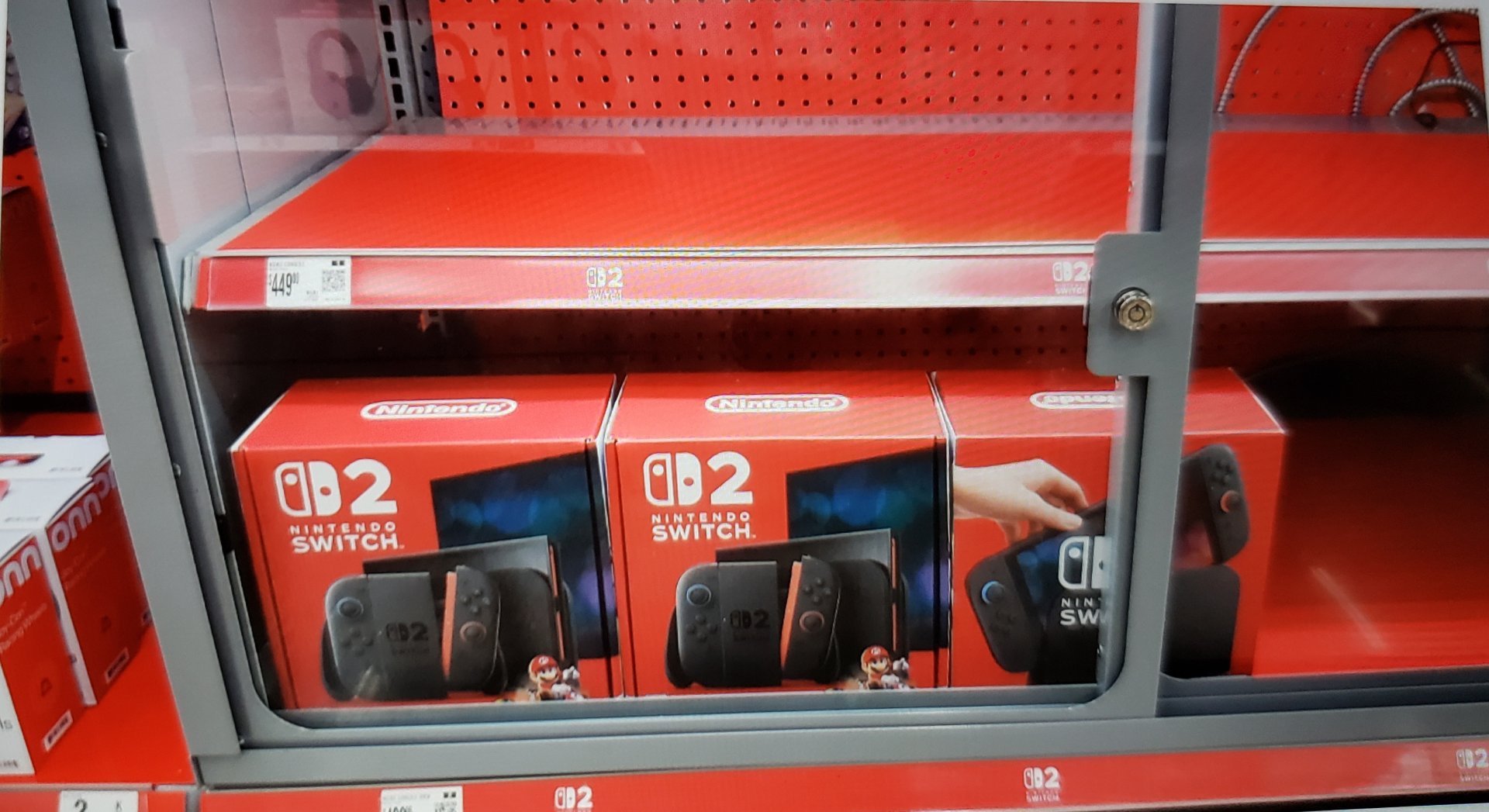
Finally scoped some I'm definitely waiting for the Oled version and some exclusives everything I want to play is on the original Switch. 499.00 was the price I suspect these will be sold before the 4th.

- Joined
- Dec 12, 2008
- Messages
- 5,130
Got my invite from Nintendo to purchase a Switch 2 + Super Mario Kart World bundle directly from them (have until the 30th to make the purchase.)
Comixbooks
Fully [H]
- Joined
- Jun 7, 2008
- Messages
- 26,344
Guy in electronics said they were all sold out in the morning.

bizzmeister
2[H]4U
- Joined
- Apr 26, 2010
- Messages
- 2,454
They arent really that hard to find anymore around here in SoCal.
- Joined
- Mar 19, 2003
- Messages
- 11,099
I am not buying another switch.
- Joined
- Aug 7, 2004
- Messages
- 7,139
I wasn’t, but the new donkey Kong game looks really good. Basically the new 3d Mario game.I am not buying another switch.
- Joined
- Mar 19, 2003
- Messages
- 11,099
Yes my son wants it so I will get it day 1. However, as a principle I really didn't like how Nintendo botched the new Switch 2 with a sub par screen and increased price massively.I wasn’t, but the new donkey Kong game looks really good. Basically the new 3d Mario game.
Domingo
Fully [H]
- Joined
- Jul 30, 2004
- Messages
- 24,204
With Mario Kart World already heading toward my rearview mirror, I probably won't mess with with my Switch 2 much until Duskbloods comes out. I guess it's also good when friends come over (Mario Party and such) or if I have a flight over an ocean, but that's it. Hopefully they'll end up patching Mario Kart World with some additional content sooner than later.

- Joined
- Dec 2, 2004
- Messages
- 32,882
I've barely even touched Mario kart yet. Is the multiplayer really that bad? That's where I figure I'll spend most of my time with it anyway.With Mario Kart World already heading toward my rearview mirror, I probably won't mess with with my Switch 2 much until Duskbloods comes out. I guess it's also good when friends come over (Mario Party and such) or if I have a flight over an ocean, but that's it. Hopefully they'll end up patching Mario Kart World with some additional content sooner than later.
Yeah, I'm liking how that looks! Catching up on some switch 1 games still since I never owner one. I snagged Zelda link's awakening, Mario 3d world, and Mario odyssey for $40 each digitally.I wasn’t, but the new donkey Kong game looks really good. Basically the new 3d Mario game.
Domingo
Fully [H]
- Joined
- Jul 30, 2004
- Messages
- 24,204
I've barely even touched Mario kart yet. Is the multiplayer really that bad? That's where I figure I'll spend most of my time with it anyway.
It's more of the same from MK8 for the most part, although even more chaotic. You're either near the front and praying that you can stay there...or you're getting pummeled by artillery from 4th place all the way to 24th. Since the CPU players get the full range of powerups, you're just getting hit from all angles until you can (hopefully) mushroom your way out of there and repeat the process. It's fun for shits and gigs, but it's tough to have any level of consistency online. Face to face you can play with modifiers and "house rules" to keep things a little more fair, but online is a different animal.
- Joined
- Dec 2, 2004
- Messages
- 32,882
The last Mario kart I played was mk64. I had no ideaIt's more of the same from MK8 for the most part, although even more chaotic. You're either near the front and praying that you can stay there...or you're getting pummeled by artillery from 4th place all the way to 24th. Since the CPU players get the full range of powerups, you're just getting hit from all angles until you can (hopefully) mushroom your way out of there and repeat the process. It's fun for shits and gigs, but it's tough to have any level of consistency online. Face to face you can play with modifiers and "house rules" to keep things a little more fair, but online is a different animal.
 . EDIT: I bought mk8 for the wii u but never opened it.
Domingo
Fully [H]
- Joined
- Jul 30, 2004
- Messages
- 24,204
That's the one I played the most, but it was busted in a lot of ways, too. Still, I love that one. One of the main things that made the older games less chaotic is that the CPU racers couldn't use all of the items...shells included. That allowed players to use the CPU characters as a buffer and it kept things from being as insane in the back. Now you have 23 other racers (including other real-life players) unleashing pure chaos any time they aren't in first place. It adds an element of Mario Party to things. All the skill mechanics and shortcuts in the world can't protect you from it.The last Mario kart I played was mk64. I had no idea
- Joined
- Dec 2, 2004
- Messages
- 32,882
Bleh, sounds like I'll get a lot less mileage out of it. Thanks for all the info!That's the one I played the most, but it was busted in a lot of ways, too. Still, I love that one. One of the main things that made the older games less chaotic is that the CPU racers couldn't use all of the items...shells included. That allowed players to use the CPU characters as a buffer and it kept things from being as insane in the back. Now you have 23 other racers (including other real-life players) unleashing pure chaos any time they aren't in first place. It adds an element of Mario Party to things. All the skill mechanics and shortcuts in the world can't protect you from it.
Pre-ordered but didn't open it yet. Ended up getting it originally just because how hard releases started getting. Kids didn't seem that interested since they barely ever touched our regular switch.
Ended up returning it since nothing really strikes me as a must play. Played BOTW in 4k, won't play TOTK again and while Mario Kart seems fun, didn't seem worth $525 just for that.
We'll see if I get it down the line.
Ended up returning it since nothing really strikes me as a must play. Played BOTW in 4k, won't play TOTK again and while Mario Kart seems fun, didn't seem worth $525 just for that.
We'll see if I get it down the line.
- Joined
- Apr 8, 2009
- Messages
- 21,174
DK Bonanza got a 10 from IGN, haven't watched any other reviews on it yet, including the DF tech review of it out now.
I still haven't played through Mario Odyssey, lol. I messed with it a little more on S2 since it was upgraded and think I'll chew on that and MK World for a while still. And wait for Bonanza to go on a $10 off sale in a few years to pick it up .
.
I still haven't played through Mario Odyssey, lol. I messed with it a little more on S2 since it was upgraded and think I'll chew on that and MK World for a while still. And wait for Bonanza to go on a $10 off sale in a few years to pick it up
.
Armenius
Extremely [H]
- Joined
- Jan 28, 2014
- Messages
- 54,179
Famitsu gave it 38/40.DK Bonanza got a 10 from IGN, haven't watched any other reviews on it yet, including the DF tech review of it out now.
I still haven't played through Mario Odyssey, lol. I messed with it a little more on S2 since it was upgraded and think I'll chew on that and MK World for a while still. And wait for Bonanza to go on a $10 off sale in a few years to pick it up

- Joined
- Oct 7, 2000
- Messages
- 78,414
better, nothing is perfect.
- Joined
- Apr 8, 2009
- Messages
- 21,174
IGN emphasizes that 10/10 doesn't mean perfect, hence the title "masterpiece" for the score. They had a couple small criticisms still, but not big enough to detract from what the game is delivering to subtract a point for.better, nothing is perfect.
- Joined
- Oct 7, 2000
- Messages
- 78,414
shouldnt be 10/10 then.IGN emphasizes that 10/10 doesn't mean perfect, hence the title "masterpiece" for the score. They had a couple small criticisms still, but not big enough to detract from what the game is delivering to subtract a point for.
Domingo
Fully [H]
- Joined
- Jul 30, 2004
- Messages
- 24,204
LOL this is a pretty constant debate in the world of booze. Can a beer/wine/spirit be a 10/10 with any flaws and is a perfect score so unachievable that all reviews should be capped at 9.5 and it's all opinions and blah blah blah. I don't think there's a right answer. What seems to matter is that anything, no matter the product category, should be really damn good if it's scoring above 90%.
- Joined
- Apr 8, 2009
- Messages
- 21,174
Maybe if they still did the decimal system, I'd agree. Because of it was and he gave it a 9.5 or higher, it rounds to a 10. It's a trade-off of not being on a more granular 100-point system like they used to be. So for their scale, I'd disagree. But many people, like you seemingly, take scores too literally or seriously. To me or serves the point that the game is definitely worth buying regardless.shouldnt be 10/10 then.
Anyways, I just also got an email update from D-Brand on my KillSwitch case; they've updated the Joycon grips now to fix the magnet issue and also the dock sticking to the case so you can easily un-dock it now without holding the adapter down like people were reporting as well. But I'll have to wait until mid-August now for it to arrive.
- Joined
- Oct 7, 2000
- Messages
- 78,414
still not a 10/10 and there no need to try and make it personal... "people like you"...Maybe if they still did the decimal system, I'd agree. Because of it was and he gave it a 9.5 or higher, it rounds to a 10. It's a trade-off of not being on a more granular 100-point system like they used to be. So for their scale, I'd disagree. But many people, like you seemingly, take scores too literally or seriously. To me or serves the point that the game is definitely worth buying regardless.