• Some users have recently had their accounts hijacked. It seems that the now defunct EVGA forums might have compromised your password there and seems many are using the same PW here. We would suggest you UPDATE YOUR PASSWORD and TURN ON 2FA for your account here to further secure it. None of the compromised accounts had 2FA turned on.
    Once you have enabled 2FA, your account will be updated soon to show a badge, letting other members know that you use 2FA to protect your account. This should be beneficial for everyone that uses FSFT.
Raptorep

n00b
Joined
Aug 10, 2020
Messages
2
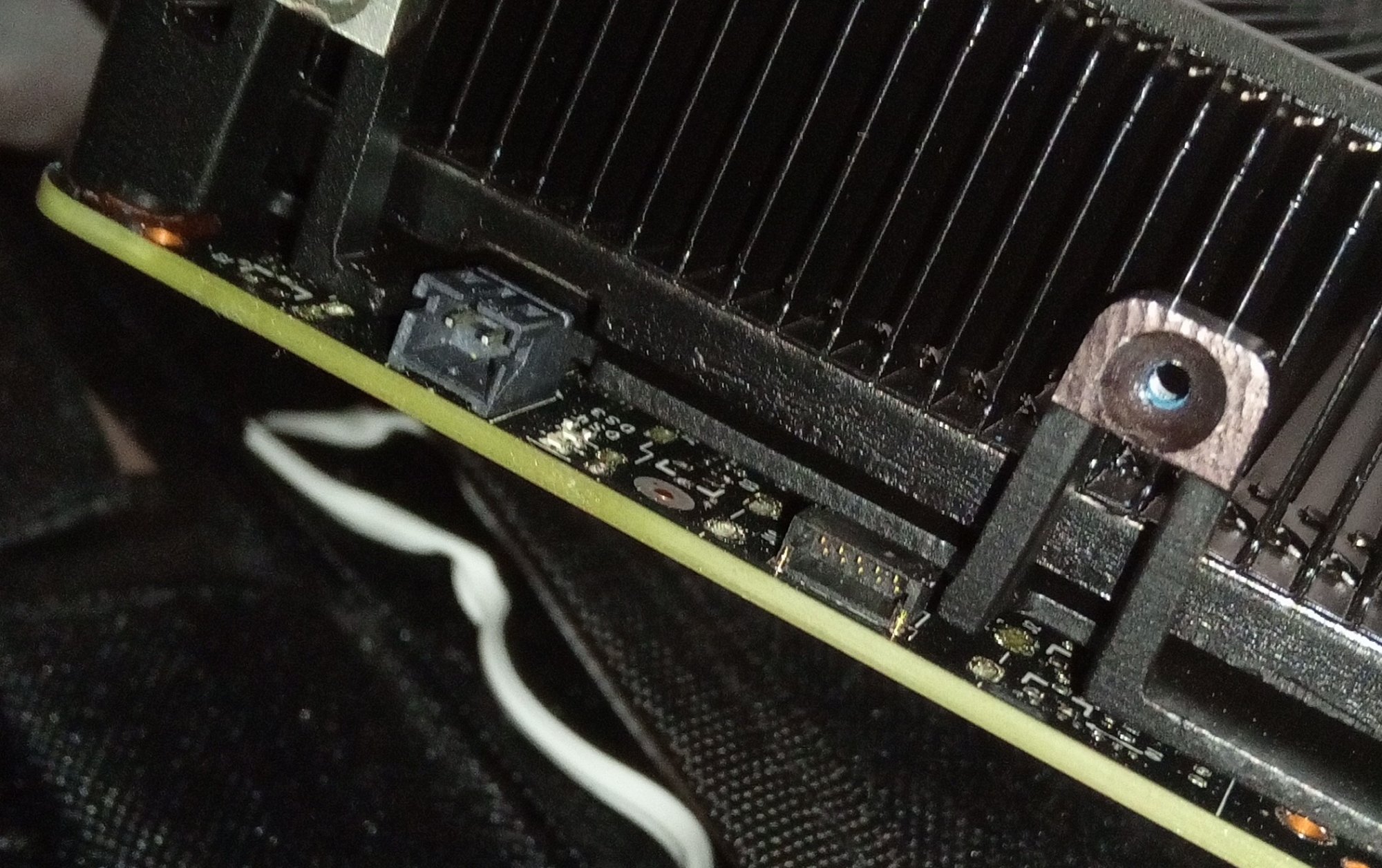
Hi I got a used TESLA K80 and I can't find a manual or anything useful document wise. I see 2 connectors on the bracket side of the GPU motherboard. Does anyone know what they do? Thanks. P.S. If someone has the user manual i would appreciate it also.
IMG_20200810_155622_1.jpg
 
What are you trying to do with it?

You should be able to install the drivers and get to CUDA'ing, although you'll obviously need to set up some sort of airflow situation over its heatsink, as these were mainly meant for rack chassis use, with forced air.
 
What are you trying to do with it?

You should be able to install the drivers and get to CUDA'ing, although you'll obviously need to set up some sort of airflow situation over its heatsink, as these were mainly meant for rack chassis use, with forced air.

Adobe Premiere Pro and After Effects primarily, found amazing deal $160 for a card msrp at $7K, I got a 3D printed duct for a 60mm fan, power adapter cable, and a ATX bracket. Just wanting some documentation and what those connectors do to see what I can do with them.

The latest drivers still support it do I'm looking forward to experimenting also. A Tesla card has always been a bucket list item for me
 
Last I checked, those don't have video out - it's not designed for use as a video card in the traditional sense... does yours have a video out?
 
Just google Nvidia Tesla K80 manual, it's available for free from Nvidia's site.

EDIT: it will be called the board spec pdf, or something like that. Bing is appending some referral cashback URL to the link I have.

As for the connectors, no clue, they are usually covered up by the bracket, afaik.

Also, the manual claims the 8pin is an EPS (CPU style plug with 225W limit) instead of a PCIe (GPU style plug with 150W limit).
 
Back
Top