Truenas = NAS platformI have this a like even though I didn't know about half of those words.
Proxmox = hypervisor platform
Unraid = NAS platform

![[H]ard|Forum](/styles/hardforum/xenforo/logo_dark.png)
Follow along with the video below to see how to install our site as a web app on your home screen.
Note: This feature may not be available in some browsers.
Truenas = NAS platformI have this a like even though I didn't know about half of those words.
It was pretty mainstream back in the triple channel days.48 and 96GB will be mainstream for a while. 12 GB has long been an oddball (as for anything under 8GB).
I always thought ddr4 should have gotten the triple channel treatment with B550/X570. 24GB would have been perfect for mainstream machines and the extra bandwidth would have been great for APUs and even given the rest of Zen 3 a little boost.It was pretty mainstream back in the triple channel days.

I hope so too. And also that all versions of core get archived before they all disappear kinda like freenas did. Those older isos are still great to make backup nas units out of basically scrap systems.I hope the zvault project takes off.
I would be more concerned with someone giving uncle sam such a large interest free loan for the year. ;-)Anybody got a 512 GB Mac Studio M3 Ultra with their tax return yet?


I have 4GB in my xp machines.I'm the only one with 4GB lol
Somebody has 512GB RAM. I've just got an old laptop atm, and that's my HDD size. The battery has a dead cell, so it's only about 20 minutes without AC.
The PC part mnufacturers must be buddies with the Software manufacturers, they probably roll on the floor laughing everytime they manage to require another 4GB for the same task. My second PC was 2MB ram and ran Win 3.11 ok, when we got it up to 8MB that was huge.
To be fair, XP only let you use 3.25 GB of it, anyway, unless you went for the PAE kernel hack.I have 4GB in my xp machines.
I think it's more to do with OS and GUI overhead than anything else. Just opened a txt and Notepad was using 2MB (the program file remains at under 200k in size). In college and my teaching years, I wrote text-based qb64 math demonstration programs for my classes where the code was sometimes less than 1 or 2 kb, balloned to 4 or 5 MB on compilation (libraries, I assume) and used 12MB of memory. There were maybe half a dozen 64 bit variables.What gets me about win 3.11 is that does notepad really require so much more ram than it did in win 3.11? Like really?
Yep, but it's still super fast looking at pdfs with a gpu.To be fair, XP only let you use 3.25 GB of it, anyway, unless you went for the PAE kernel hack.
I think it's more to do with OS and GUI overhead than anything else. Just opened a txt and Notepad was using 2MB (the program file remains at under 200k in size). In college and my teaching years, I wrote text-based qb64 math demonstration programs for my classes where the code was sometimes less than 1 or 2 kb, balloned to 4 or 5 MB on compilation (libraries, I assume) and used 12MB of memory. There were maybe half a dozen 64 bit variables.
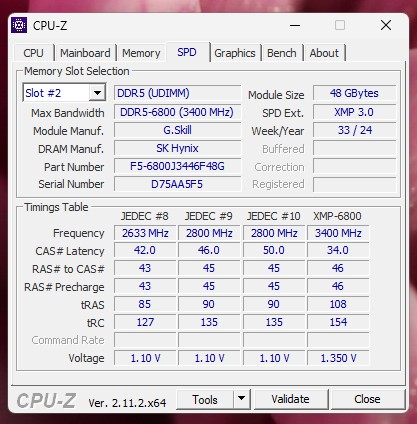
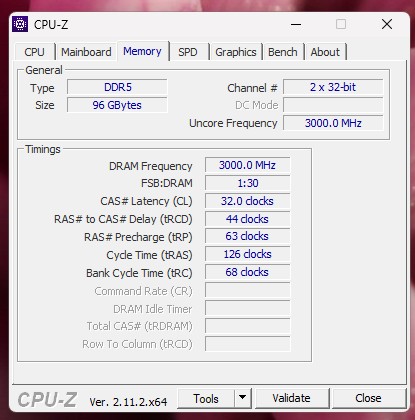

Finally got my last ramkit for the epyc local AI node, now running 12x 96GB DDR5 ECC at JEDEC timings/speeds (locked by supermicro motherboard).
Gaming system hanging out with 64GB (2x32); plenty for what it needs to do
Yessir -- the idea is to tackle some large mixture of expert models locally. I was really aiming for the 400B-ish ones, but future proofing, the price/capacity breakpoint, and just [H] got the better of me.More than 1TB of RAM?!
Ladies and gentlemen, we got him.Finally got my last ramkit for the epyc local AI node, now running 12x 96GB DDR5 ECC at JEDEC timings/speeds (locked by supermicro motherboard).
Gaming system hanging out with 64GB (2x32); plenty for what it needs to do
![Zarathustra[H]](/data/avatars/m/9/9298.jpg?1723407683)

Choices... choices... lol. If I pick my Voodoo 5 PC, I have 1GB in that, so less than 4GB!Time for a little update for me.
Main workstation: (Threadripper 3960x)
128GB (4x32GB) DDR4-3200 Unbuffered ECC
Game Machine*: (Ryzen 9950x3D)
64GB (2x32GB) DDR5-6000
Backup Workstation / Testbench / Old Decommed Server Board: (Dual Xeon E5-2697 v2's)
256GB (16x16GB) DDR3-1600 Registered ECC
Main Server: (Epyc 7543)
512GB (8x64GB) DDR4-3200 Registered ECC
Secondary Server: (Xeon E-2314)
32GB (2x16GB) DDR4-3200 Unbuffered ECC
Old (but still serviceable for my needs) Laptop: (Core i7-4810mq)
16GB (2x8GB) DDR3-1600
*Game Machine parts are all here in boxes. Have not had the time to assemble them yet.
So... Which one should I list in the survey?
I probably spend most of my time on the main workstation, so 128GB? Then again, I will be doing most performance/gaming type of stuff on the game machine, so 64GB? Or should I just go for impressing everyone and choose the server, so 512GB? Or should I just stay understated and go with the Laptop's 16GB?
Or maybe I should just add all of them up?
For now I've just put myself down as 128GB.


How much RAM you got?


Hah! And I was toying with the idea of jumping to a 96GB kit myself, but also don’t feel like spending that much in doing so. There’s really no real world difference jumping from CL30 down to CL28 on an AMD rig unless you really, really enjoy running and graphing RAM benchmarks as a side hobby.Kit I am thinking it might be time for me to grab a 64 GB kit. Thoughts?
Just don't feel like spending 250 smokes for a decent CL28 kit.
Thanks bud, I appreciate it!Hah! And I was toying with the idea of jumping to a 96GB kit myself, but also don’t feel like spending that much in doing so. There’s really no real world difference jumping from CL30 down to CL28 on an AMD rig unless you really, really enjoy running and graphing RAM benchmarks as a side hobby.
Tell you what, I’ll sell you my 64GB kit for $175 if you want - would help offset my upgrading to a 96GB kit and you’d be able to jump to 64GB kit and save a few smokes in the process as well as sell your 32GB kit to further offset cost. Mine’s a G.SKILL Trident Z5 Neo RGB Series kit (AMD Expo) DDR5 RAM 64GB (2x32GB) 6000MT/s CL30-40-40-96 1.40V - Matte Black (F5-6000J3040G32GX2-TZ5NR).
No RGB? It's RGB.Thanks bud, I appreciate it!
but
No RGB no buy
Also need CL28 at least
Ah, you wrote matte black. There are some kits with that name that are just black.No RGB? It's RGB.
No idea… I’ve always just run it at stock Expo settings. This is the kit I have: https://www.amazon.com/dp/B0BJNTLJ5XAh, you wrote matte black. There are some kits with that name that are just black.
Can you run CL28 on the kit and is it A die or M die?
.
