• Some users have recently had their accounts hijacked. It seems that the now defunct EVGA forums might have compromised your password there and seems many are using the same PW here. We would suggest you UPDATE YOUR PASSWORD and TURN ON 2FA for your account here to further secure it. None of the compromised accounts had 2FA turned on.
    Once you have enabled 2FA, your account will be updated soon to show a badge, letting other members know that you use 2FA to protect your account. This should be beneficial for everyone that uses FSFT.

Home Server

pdwatermelon

Weaksauce
Joined
Nov 7, 2007
Messages
73
I would like to build a Home Server that is ideal for storage and lets the rest of my five computers on the network share easily. I was looking at WHS because it is the cheapest. Ideally I would like to have around 4.5 TB of Space for storage on a Raid 5 Aray. ( I guess the total storage would be much smaller than that on Raid 5). Then I would Like my OS on a different Raid 1 aray on two smaller hard drives...80gb. What raid cards or controllers would I need for this? Do I need an extremely fast processor. Or will my Athlon 5600 x2 work? I have plenty of ram laying around. Thanks
 
WHS does not support raid. Instead it uses its own built-in software raid-ish solution.
 
WHS does not support raid. Instead it uses its own built-in software raid-ish solution.

True but not true.

1. WHS operates in a pool mode. Which means any "drive" is basically borged into the pool. The advantage of this method is makes is stupid easy to add more space (plug in a drive)

2. However, a RAID5 array, in terms of how the WHS views it is nothing more than a "drive". Therefore it is possible (and easy) to do something like RAID5 in WHS. However, you lose the real benefit of adding more to the pool.

3. There are many people who install WHS on a smaller drive and then put in a nice RAID5 array and then add the ARRAY to the pool. Because of how WHS operates, it will take first "drive" that is not the system drive (in this case array) and start to fill it. Therefore all data added to and from the server will go in and out of the main RAID5 array and the system drive is basically ignored.

4. Since you have RAID5 array, folder duplication isn't really that critical (you do have single drive redundancy) because WHS will not put any data on the system drive until the RAID5 array is nearly full (less than 10GB of space).
 
True but not true.

3. There are many people who install WHS on a smaller drive and then put in a nice RAID5 array and then add the ARRAY to the pool. Because of how WHS operates, it will take first "drive" that is not the system drive (in this case array) and start to fill it. Therefore all data added to and from the server will go in and out of the main RAID5 array and the system drive is basically ignored.


That isnt how I understood WHS to work...WHS takes your "Main" drive and makes two partitions, A system partition and a Data Partition. When you add another drive to the system it adds it to the "data pool" usings WHS Drive Extender, a feature for WHS. When you transfer a file to the WHS it goes to the "main" drives Data partition. From there WHS software distributes it to the other drives in the Data Pool.

Heres Microsofts explanation.
Hard Drive Partitioning
In a single hard-drive system, Windows Home Server is configured with a 20-gigabyte system partition for the Windows Home Server operating system, and the remainder of the primary hard drive is allocated to the primary data partition. Each subsequent (or secondary) hard drive is logically added to the data partition. It appears to the user as one large hard drive; however, these drives are considered to be part of the secondary data partition. In reality, your home server consists of multiple hard drives of varying sizes.
The primary data partition is used to store a unique entry for each file. If a home server has more than one hard drive, these files become “tombstones.” Tombstones are NTFS file system reparse points that Windows Home Server Drive Extender understands. They are tiny files that redirect to one or two “shadow” files on the hard drives that make up the secondary data partition. The shadow files are where your data is really stored. If folder
9
duplication is enabled for a Shared Folder, there will be two shadow files. If duplication is Off, there will be one shadow file.
Note The primary data partition in a home server should be as large as possible for two reasons:
 You want to provide sufficient space to grow the file table for all of the files that you will store on your home server.
 Windows Vista® and other home computer operating systems check to see if there is adequate space on the primary data partition prior to starting a copy operation.
You can add additional internal and external hard drives to your home server if you need more storage space for your folders and files. There is no need to use equal capacity hard drives—Windows Home Server will add the additional capacity of the new hard drive to the available storage on your home server.
Note In a home server with three or more hard drives, Windows Home Server Drive Extender will attempt to move all of the files off the primary data partition onto the secondary hard drives to maximize the amount of free space on the primary data partition.
Caution It is highly recommended that you not use hardware RAID technologies for your home server. Recovering from hard-drive failures becomes increasingly complex when hardware RAID systems are used. The recommended approach is to use multiple hard drives that are configured as Just a Bunch of Disks (JBOD).
 
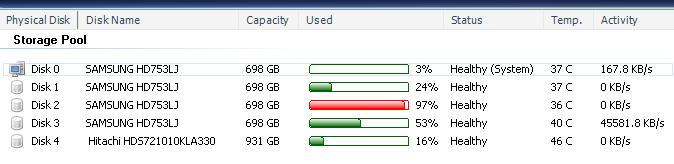
I have WHS right now and running it with PP1. Therefore almost all stuff written on WHS in regards to the extender/pool is wrong. It changed quite a bit with PP1. Just to double verify...I did a large move...just for you.

whs_data_writing.jpg


As you can see, the data is going straight to drive 3. The new rules for the extender are as follow:

i.Use the volume with the least amount of free space but greater than 10GB

ii.Use the volume with the most amount of free space so long as it has more space than the Primary Volume (D volume)

iii.Use the Primary Volume (D volume)

Therefore as I said, install WHS with the single drive, then add the RAID. It will put all data on the RAID until it is filled and use a smaller system drive. Most people don't realize what PP1 really did for WHS, it was much stronger change than most people realize....it actually made using a RAID 5 type setup a better scenario. However, the last line of that quote was correct...not using raid and effecitvely JBOD is the most simple method. But as anyone knows...RAID isn't backup...it is uptime. ;)

EDIT: need to state this clearly.

If you want to do RAID 5 with WHS it can only be a small system drive and the RAID5 array w/ PP1. Trying to added extra drives to the pool or duplication once up and running will probably only screw things up. You have been warned.
 
3. There are many people who install WHS on a smaller drive and then put in a nice RAID5 array and then add the ARRAY to the pool. Because of how WHS operates, it will take first "drive" that is not the system drive (in this case array) and start to fill it. Therefore all data added to and from the server will go in and out of the main RAID5 array and the system drive is basically ignored.


Is this array on a separate controller or is it connected directly to the the MB that has the same OS drive on it?

Would it be better then as well not to use any form of raid with WHS. I would like to add as much storage as possible?

So how does the redundancy work in this pool then if (when) one of my drives fails?
 
Is this array on a separate controller or is it connected directly to the the MB that has the same OS drive on it?

Why is your DISK 0 So large ...looks like 750GB if you are not using it for anything but WHS? Would it be better then as well not to use any form of raid with WHS. I would like to add as much storage as possible?

So how does the redundancy work in this pool then if (when) one of my drives fails?

Because DISK0 is where the OS resides which is C:\ partition which is small. The other partion which is D:\ is where the pool starts resides on DISK0 is the rest of the space. Therefore, the logic I stated is valid. DISK0 will begin to fill once all the disks are effectively filled. Yes you are right...WHS is designed for NO raid. But some people really really like the uptime of RAID5 and don't not want to give up the space required for folder duplication system. To me, RAID5 is a siren. I think in the disk storage forum you will see a post of a person who is having issues with his RAID5.

As for data recovery (assuming no RAID) and folder duplication is turn on it is just a matter of swapping the drive if it is not the system drive or doing a recovery install if it is the system drive. If you don't have folder duplicaiton..well duh, you are fucked.

If you are just looking to store a bunch of DVD's (like 100's), then a RAID5 controller with something like FreeNAS might be the best choice. WHS really is a server with significant features. Not as many as 2003 or 2008, but still powerful none the less.
 
Because DISK0 is where the OS resides which is C:\ partition which is small. The other partion which is D:\ is where the pool starts resides on DISK0 is the rest of the space. Therefore, the logic I stated is valid. DISK0 will begin to fill once all the disks are effectively filled. Yes you are right...WHS is designed for NO raid. But some people really really like the uptime of RAID5 and don't not want to give up the space required for folder duplication system. To me, RAID5 is a siren. I think in the disk storage forum you will see a post of a person who is having issues with his RAID5.

As for data recovery (assuming no RAID) and folder duplication is turn on it is just a matter of swapping the drive if it is not the system drive or doing a recovery install if it is the system drive. If you don't have folder duplicaiton..well duh, you are fucked.

If you are just looking to store a bunch of DVD's (like 100's), then a RAID5 controller with something like FreeNAS might be the best choice. WHS really is a server with significant features. Not as many as 2003 or 2008, but still powerful none the less.


Well put but if your system drive fails its not that big of a deal...it happend to me and i swapped it out put in my WHS install dvd and did a repair install and I was back up and running in no time. I lost most of my pc-backups but that was not a big deal, as they get created every night.
 
I love my WHS server with PP1. I'm not running a RAID array on the back side, just straight up feeding it disks when I need more space (like now).

WHS just works and I don't have to think about it.
 
I love my WHS server with PP1. I'm not running a RAID array on the back side, just straight up feeding it disks when I need more space (like now).

WHS just works and I don't have to think about it.

WHS makes everything just st00pid simple
 
So they remove the whole "you need to have all drives equal or larger in capacity to the OS drive (meaning OS drive is 500 gigs and the second is 750, WHS will only see 500 gigs of the second drive)?
 
Sounds like a great solution. Definitely the best route for me to go with my media setup and my file sharing.
 
One more question real quick. Is there a tutorial somewhere on how to RDP into a vista home premium OS Thanks
 
So they remove the whole "you need to have all drives equal or larger in capacity to the OS drive (meaning OS drive is 500 gigs and the second is 750, WHS will only see 500 gigs of the second drive)?

Huh? I've never heard this before, or seen it for that matter.

The first incarnation of my WHS (pre PP1) had a 300 gig OS drive and 300's, 320's, 500's, and a 750, and all were read at max capacity.
 
my whs with pp1 just has 3 160s in it. I mostly use it for backups now because that pc doesnt have sata and my 2 400s are sata. I really enjoy whs so far. I havent fully used it for my sharing videos and music though yet. But i have tried some to my 360 and it worked great.
 
So they remove the whole "you need to have all drives equal or larger in capacity to the OS drive (meaning OS drive is 500 gigs and the second is 750, WHS will only see 500 gigs of the second drive)?

WHS supports any sized drive, you can toss in a 250gb drive or you can toss in a 1.5tb drive, it adds all the capacity to the pool.

It's an awesome and brainless system.
 
Sorry this is a little off subject but does WHS need to be up 24/7 or can it be put to sleep and use Wake-On LAN to power up? I gots to save on my energy costs!:D
 
That only enables RDP however WHS will still see the PC as Not a Supported system. If you do a search you will find a REG hack to force support to a non-RDP supported OS and a trick to keep the change even after reboot. I won't go into how to do it or details however, Google is your friend..;)
 
Huh? I've never heard this before, or seen it for that matter.

The first incarnation of my WHS (pre PP1) had a 300 gig OS drive and 300's, 320's, 500's, and a 750, and all were read at max capacity.

RC1 (the last time I played with WHS) had this problem. Your OS drive needed to be the largest drive in order to "see" other large drives. If the OS drive was a 500 gig drive and you added in a 750 gig or anything over 500 gigs WHS (RC1) would only see 500 gigs of it.
 
RC1 (the last time I played with WHS) had this problem. Your OS drive needed to be the largest drive in order to "see" other large drives. If the OS drive was a 500 gig drive and you added in a 750 gig or anything over 500 gigs WHS (RC1) would only see 500 gigs of it.

Ive been using WHS since the early betas and I installed mine on a 80gb Raptor that I had and added two 400gb WHS pre-RC1 read the drives at full capacity just fine.

Now it doesnt matter what happened back then...but you can add any size drive up to 2Tb due to max size of a MBR disk to WHS and it will see it at full capacity.
 
Is there any reason why aren't looking at FreeNAS or Openfiler? They're based on BSD and Linux, so if thats not your cup of tea thats cool, but they're pretty good solutions for home server needs.

I'm a fan of FreeNAS 0.7 which is what I use on my home server, mostly because of the ZFS support that is built in. Both of them run through web interfaces and there really isn't anything on the command line to do once you install them.

www.freenas.org
www.openfiler.com

ZFS: http://en.wikipedia.org/wiki/ZFS

Its sweet.
 
Is there any reason why aren't looking at FreeNAS or Openfiler? They're based on BSD and Linux, so if thats not your cup of tea thats cool, but they're pretty good solutions for home server needs.

I'm a fan of FreeNAS 0.7 which is what I use on my home server, mostly because of the ZFS support that is built in. Both of them run through web interfaces and there really isn't anything on the command line to do once you install them.

www.freenas.org
www.openfiler.com

ZFS: http://en.wikipedia.org/wiki/ZFS

Its sweet.

I think you don't give people here enough credit. Many of us HAVE looked at and used Linux based systems. The reason why WHS is being so heavily promoted now is because it is...that good.
 
I think you don't give people here enough credit. Many of us HAVE looked at and used Linux based systems. The reason why WHS is being so heavily promoted now is because it is...that good.

+1 not to mention even for a computer novices like my parents(who set on up without my help) it makes it just st00pid simple.
 
I think you don't give people here enough credit. Many of us HAVE looked at and used Linux based systems. The reason why WHS is being so heavily promoted now is because it is...that good.

Thats not the case at all, I was just providing a possible solution based on what I was reading. Its entirely possible that people have never heard of OpenFiler or FreeNAS as is it entirely possible that they've tried them and didn't like them. The OP expressed that he was looking to build a home server and what's the harm in providing possible choices?

I used to run a WHS server (actually still do, in the process of copying) before I moved to FreeNAS. When I sat down and looked at what I had WHS doing, FreeNAS did that as well, but I had the ability to not rely on Drive Extender.

Basically it started when I was looking for a way I could move away from DE. The data corruption bug, that was around for 7 months, not withstanding, I didn't like that I was restricted to basically RAID 1 unless I went to an unsupported configuration.

When I started reading about bit rot and raid 5 write holes, I started looking at ZFS. Then it came down to Solaris, FreeNAS and FreeBSD of which I went with FreeNAS for its ease of use.

I do miss out on the built in computer backup, but I've started using Arconis True Image and have been happy with it so far.
 
Glad you found a good solution. But, based upon your own statements, you aren't the average user. While many of the people on the [H] are enthusiasts, they are not technically savvy nor have the time to gain the level of knowledge you have. This is probably why as of late I push "user experience" almost over everything else.

Nice that you listed it out for him though.
 
It is important to note that WHS does NOT support RAID. Using something that is unsupported with important data is just too risky. Having RAID store data the way it does and then WHS moving that data around, you're just asking for trouble.

Let WHS do it's thing, it works well. If you want RAID then i'd get unraid.
 
RC1 (the last time I played with WHS) had this problem. Your OS drive needed to be the largest drive in order to "see" other large drives. If the OS drive was a 500 gig drive and you added in a 750 gig or anything over 500 gigs WHS (RC1) would only see 500 gigs of it.

Not true at all. I originally had(yes, in RC1) a 74gb raptor as my main drive. I also had 750gb drives in the computer and had no problem seeing them.
 
Is there any reason why aren't looking at FreeNAS or Openfiler? They're based on BSD and Linux, so if thats not your cup of tea thats cool, but they're pretty good solutions for home server needs.

I'm a fan of FreeNAS 0.7 which is what I use on my home server, mostly because of the ZFS support that is built in. Both of them run through web interfaces and there really isn't anything on the command line to do once you install them.

www.freenas.org
www.openfiler.com

ZFS: http://en.wikipedia.org/wiki/ZFS

Its sweet.

From what I read FreeNAS 0.7 is still in alpha. But it sounds nice. I see that it can pool storage like WHS but does it allow you to use drives of any size without losing space?
 
Not true at all. I originally had(yes, in RC1) a 74gb raptor as my main drive. I also had 750gb drives in the computer and had no problem seeing them.

I think the problem he was referring to was when you start copying stuff to the drives. WHS uses your first drive as a staging area for DE to copy to the other drives. I was using a raptor too for my boot drive, when you look at the free space on any of the file shares you probably see something like 50Gb or close to it.

When you copy something to that share you notice it doesn't actually decrease in size. The problem arises when you try to copy more than 50GB at once to the server (with windows at least). I had a bunch of DVDs that I wanted to copy from my desktop to my server, they were like 100Gb total. When windows went to copy, it saw there was only 50Gb available on the share (even though there is much more free) and wouldn't copy it all at once. Thats why they say to use your largest drive as your boot drive.
 
I think the problem he was referring to was when you start copying stuff to the drives. WHS uses your first drive as a staging area for DE to copy to the other drives. I was using a raptor too for my boot drive, when you look at the free space on any of the file shares you probably see something like 50Gb or close to it.

When you copy something to that share you notice it doesn't actually decrease in size. The problem arises when you try to copy more than 50GB at once to the server (with windows at least). I had a bunch of DVDs that I wanted to copy from my desktop to my server, they were like 100Gb total. When windows went to copy, it saw there was only 50Gb available on the share (even though there is much more free) and wouldn't copy it all at once. Thats why they say to use your largest drive as your boot drive.

Ah, yes I see. That is true. Perhaps I misunderstood his post.
 
From what I read FreeNAS 0.7 is still in alpha. But it sounds nice. I see that it can pool storage like WHS but does it allow you to use drives of any size without losing space?

It is still in alpha, but it is pretty stable, there's a bug where if you install the version for compact flash it doesn't import ZFS pools correct, but if you install to a hard drive you're fine. FreeBSD has a 7.0 release that has ZFS built in too. The important part, ZFS, is stable and you can import your ZFS pool to any computer that supports ZFS.

As for the pool storage thing, it does sort of do it. You can add dissimilar drives to a ZFS pool but they won't be protected, like WHS. You can set one of the ZFS properties to copies=2 and it will keep 2 copies of the data in the file system, kinda like WHS.
 
I think the problem he was referring to was when you start copying stuff to the drives. WHS uses your first drive as a staging area for DE to copy to the other drives. I was using a raptor too for my boot drive, when you look at the free space on any of the file shares you probably see something like 50Gb or close to it.

When you copy something to that share you notice it doesn't actually decrease in size. The problem arises when you try to copy more than 50GB at once to the server (with windows at least). I had a bunch of DVDs that I wanted to copy from my desktop to my server, they were like 100Gb total. When windows went to copy, it saw there was only 50Gb available on the share (even though there is much more free) and wouldn't copy it all at once. Thats why they say to use your largest drive as your boot drive.

Sorry...since PP1, you are wrong.

whs_data_writing.jpg


Rules for data writes are as follows:

i.Use the volume with the least amount of free space but greater than 10GB

ii.Use the volume with the most amount of free space so long as it has more space than the Primary Volume (D volume)

iii.Use the Primary Volume (D volume)

This blog, really explains the system WHS uses VERY clearly.

http://blogs.msdn.com/chrisgray/arc...ms-used-in-power-pack-1-s-drive-extender.aspx

EDIT: The 1 TB drive was added post initial build.
 
Sorry...since PP1, you are wrong.

whs_data_writing.jpg


Rules for data writes are as follows:


This blog, really explains the system WHS uses VERY clearly.

http://blogs.msdn.com/chrisgray/arc...ms-used-in-power-pack-1-s-drive-extender.aspx

EDIT: The 1 TB drive was added post initial build.

I don't think you are understanding what you are reading. The D parition on the system drive, the system drive itself should be your largest drive, this hasen't changed. And this is essentially what he is talking about. The loading zone, the D partition is what is reported to other computers on your network and where data is loaded when you transfer to it.
The rules you have posted for the data writes are what WHS follows internally to move data off of the D parition to it's final destination, any of the other drives based upon those rules. They aren't for the D partition itself. So you still want that drive to be the largest and everything coldzero just posted is still true
 
Back
Top