• Some users have recently had their accounts hijacked. It seems that the now defunct EVGA forums might have compromised your password there and seems many are using the same PW here. We would suggest you UPDATE YOUR PASSWORD and TURN ON 2FA for your account here to further secure it. None of the compromised accounts had 2FA turned on.
    Once you have enabled 2FA, your account will be updated soon to show a badge, letting other members know that you use 2FA to protect your account. This should be beneficial for everyone that uses FSFT.

Graphical IDE to develop KSH/Bash Scripts while integrating with Azure DevOps

Stugots

Supreme [H]ardness
Joined
Feb 25, 2004
Messages
7,301
First and foremost, I am not a developer. Or at least I don't consider myself one. The development work I do is almost exclusively KSH and Bash scripting. KSH on AIX, and Bash on Linux.

My company is starting to use Azure DevOps for it's other development teams and I've been asked to start using it for my teams work.

We've been using a local hosted Git repository within for a while, and I'm familiar with how to use Git from the command line. But I was hoping I might be able to shift to something a little more capable rather than command line Git and vi.

Does anyone know of an IDE where I can write KSH/Bash scripts on Windows, test/run them on remote AIX/Linux systems, AND integrate using Git with Azure DevOps?
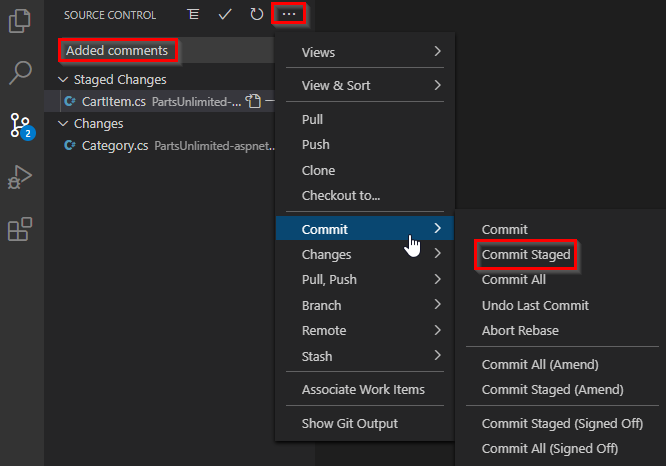
 
It depend on what you want to do with GIT, vscode, visual studio, etc.. come with some GIT support (embedded and/or extension) for doing commit, create branch, etc....

025_new.png


There a bit of microsoft to microsoft synergies, but it will tend to be generic (more than TFS) GIT could be hosted anywhere by anyone experience.

VsCode will tend to have an extension for pretty much anything dev wise.
 
I have VS Code on my workstation, but I am not very familiar with it. From the tinkering I've done already, I was able to get a Remote SSH extension to work enough so I could develop and test remotely against a *nix system. And I was able to connect to Azure DevOps to check code. But I can't figure out how to bridge the gap.
 
What step you are missing, committing/pushing your change from vscode or before that ?
 
Visual studio Code is going to be most people's go to. Some elitist types will say "use a real ide not a text editor" (like full visual studio) but code has got support, libraries and plugins of all types, code is really the best option.
 
Funny. Because most elitist I've asked this question tell me to use vi and not an IDE.
There are people around who want to work on large code bases in vi... I think they're nuts. Things like "Find Usages" in an IDE are way too useful.

I use vi but not for software development. Short scripts sure, but not for a serious program. At a minimum I want find usages, go to definition, list implementations... stuff like that and, also very important, a gui debugger.

For OP's use case the first thing that comes to mind is Visual Studio Code. IMHO that thing should be in just about everyone's toolbox. I will 100% reach for real IDE when working on a serious program, but VS Code is a Swiss Army Knife to use for all the small stuff. Also it has a ton of plugins including AI plugins.

Git is where I'm old school. Command line. I work in multiple languages and with multiple tools, and sometimes I'm logged into a Linux box over ssh. The problem with GUI tools is they all work a bit differently. They're fine and sometimes even nice if you're focused on one thing, but if you need to use git over ssh to some remote Linux box and work with multiple tools IMHO it's worth learning command line git.
 
Back
Top