• Some users have recently had their accounts hijacked. It seems that the now defunct EVGA forums might have compromised your password there and seems many are using the same PW here. We would suggest you UPDATE YOUR PASSWORD and TURN ON 2FA for your account here to further secure it. None of the compromised accounts had 2FA turned on.
    Once you have enabled 2FA, your account will be updated soon to show a badge, letting other members know that you use 2FA to protect your account. This should be beneficial for everyone that uses FSFT.

ESXI 8.x GPU passthrough issue with windows10

oloco

n00b
Joined
Jun 23, 2013
Messages
9
Hi,
I'm using ESXI 8.0.2 (no vcenter) as a home lab. I configured a Windows 10 VM, connected to multiple pci boards, like my Old graphic card Nvidia Gforce 210 via passthrough. This way, I'm able to use the computer as a ESXI hipervisor, and also, make use of the VM like a regular computer, using a monitor, keyboards, mouse and USB sound card. Everything works quite fine, but I'm facing one "small" issue. When I try to use an app that needs hardware access to my Nvidia GPU, it doesn't work. In this case, I need OBS Stuidio to be able to render videos directly with the nvidia gpu, but I can ONLY see SOFTWARE rendering.
I think the only "exotic" config in my setup was setting hypervisor.cpuid.v0 = "False" in the .vmx file
Another thing to be aware of is that I disabled the vmware tools driver for the graphic card, as you can see in the picture. A read somewhere I needed to do this in order to make it work fine:
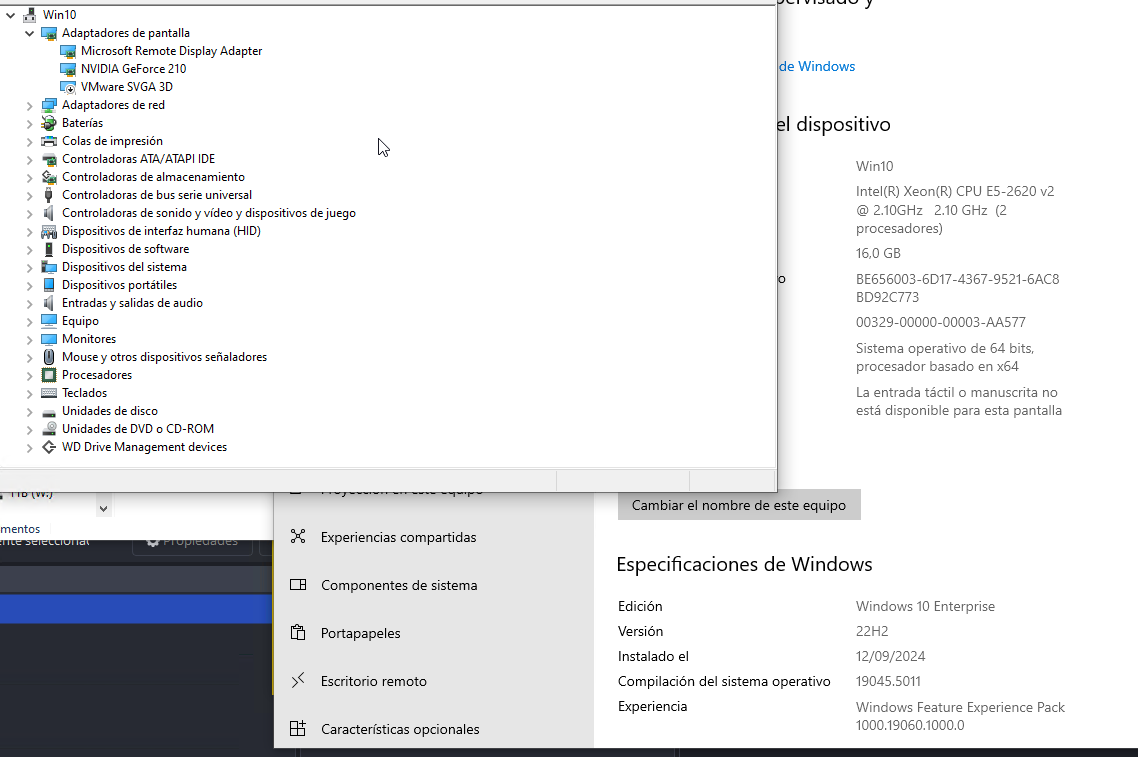
win10.png


Also, I add alink to with my .vmx config file here:
View: https://pastebin.com/JiQzEznN , so that you can have a look and check if I need to change something.
It's an old graphic card, but I think that hardware access should be available, as I'm using passthrough..
I'd be very pleased to get any kind of advices from you. Please, ask me any question you can have regarding my setup

Thanks in advance!!
 
quick google said this... hope it helps.. said by

Yes, you can enable GPU passthrough in VMware ESXi without vCenter:
  1. Log in to the ESXi web client
  2. Expand the host listing and select Manage
  3. Select the Hardware tab
  4. Select the checkbox for the device you want to enable GPU passthrough for
  5. Click Toggle Passthrough
  6. Reboot the host
  7. Select the GPU you want to share and click Toggle Passthrough again
  8. Verify that GPU passthrough is enabled

GPU passthrough, also known as VMDirectPath I/O, allows a virtual machine to directly access a physical GPU card. This allows the virtual machine to fully use the GPU's capabilities, making it suitable for compute-intensive tasks.


You can also use a combination of virtual GPU (vGPU) and passthrough modes to address different GPUs from different VMs. The best practice is to use these two modes of access in separate VMs on one or more host servers with separate GPU devices.
 
quick google said this... hope it helps.. said by

Yes, you can enable GPU passthrough in VMware ESXi without vCenter:
  1. Log in to the ESXi web client
  2. Expand the host listing and select Manage
  3. Select the Hardware tab
  4. Select the checkbox for the device you want to enable GPU passthrough for
  5. Click Toggle Passthrough
  6. Reboot the host
  7. Select the GPU you want to share and click Toggle Passthrough again
  8. Verify that GPU passthrough is enabled
GPU passthrough, also known as VMDirectPath I/O, allows a virtual machine to directly access a physical GPU card. This allows the virtual machine to fully use the GPU's capabilities, making it suitable for compute-intensive tasks.


You can also use a combination of virtual GPU (vGPU) and passthrough modes to address different GPUs from different VMs. The best practice is to use these two modes of access in separate VMs on one or more host servers with separate GPU devices.
Hi, thanks for your answer

Actually, that ways is the normal way to just activate passthrough... so nothing new:

Thanks a lot for your help anyway

Regards!
 
Actually, it's a weird behaving, as I've realized that I can use the Nvidia driver options trough the nvidia control panel... So, I think that the driver is working. But... why I'm not being able to use the hardware acceleration in my apps, like OBS Studio?
 
OBS Studio - what options does it show for enabling hardware acceleration?
Hi,

You usually can choose between HArd encoding and Software. In my casen, I can only select Software. No more opciones ara available in this system
 
The GeForce 210 is from circa 2009, and the last driver that supports Windows 10 64-bit is 341.92 from Q4 2015.
Might want to uninstall whatever newer driver is installed and install the older one.
 
The GeForce 210 is from circa 2009, and the last driver that supports Windows 10 64-bit is 341.92 from Q4 2015.
Might want to uninstall whatever newer driver is installed and install the older one.
Hi Red Falcon . Thanks for your answer

So, using the nvidia driver version 341.92 you think that should work?

I'll try as soon as possible.

Thanks a lot for your helps and time

Regards
 
The GeForce 210 doesn’t have NVENC. It will never do hardware encoding.
Hi LodeRunner. Thanks a lot for your answer.
I'd say, but not sure at all, that I was able to use hardware support in OBS Studio using that card and a not virtualized computer. But it makes sense not to be able to use it if you are right

Is there any other thing I'd be aware of in order to choose another cheap card and be able to use hardware encoding in a virtualized computer?

Thanks a lot!!
 
bringing this back up... did you ever get it going?
so were you able to select the card for passthrough? I am gonna do my own thread as I cannot select my card.

passthrough.png
 
Back
Top
