![[H]ard|Forum](/styles/hardforum/xenforo/logo_dark.png)
Navigation
Install the app
How to install the app on iOS
Follow along with the video below to see how to install our site as a web app on your home screen.
Note: This feature may not be available in some browsers.
More options
-
Some users have recently had their accounts hijacked. It seems that the now defunct EVGA forums might have compromised your password there and seems many are using the same PW here. We would suggest you UPDATE YOUR PASSWORD and TURN ON 2FA for your account here to further secure it. None of the compromised accounts had 2FA turned on.
Once you have enabled 2FA, your account will be updated soon to show a badge, letting other members know that you use 2FA to protect your account. This should be beneficial for everyone that uses FSFT.
You are using an out of date browser. It may not display this or other websites correctly.
You should upgrade or use an alternative browser.
You should upgrade or use an alternative browser.
deleted.
- Thread starter JJYL13
- Start date
That's one of these cases where it's hard to even find a start. It's like someone asking how to tune their car and when you tell them, they reply that they know what a steering wheel is.
The "protocol" to find the domain is looking at your browser and see whether you can locate the URL of the video. If that doesn't work for some odd reason, tcpdump always works. You could then blackhole the second-level domain in your DNS server.
Additionally, you could resolve the hostname you find and check via whois whether its IP address is some content distribution network or registered to Hulu directly. If it belongs to Hulu directly, you could go ahead and block their complete network in your packet filter.
If all that didn't make sense, you should probably let someone else handle this.
I don't know anything about cars. That's why I don't mess with it. Why this simple rule doesn't work for computers and networks, I don't know.
The "protocol" to find the domain is looking at your browser and see whether you can locate the URL of the video. If that doesn't work for some odd reason, tcpdump always works. You could then blackhole the second-level domain in your DNS server.
Additionally, you could resolve the hostname you find and check via whois whether its IP address is some content distribution network or registered to Hulu directly. If it belongs to Hulu directly, you could go ahead and block their complete network in your packet filter.
If all that didn't make sense, you should probably let someone else handle this.
I don't know anything about cars. That's why I don't mess with it. Why this simple rule doesn't work for computers and networks, I don't know.
I have tried "Website Blocking by URL Address" and "Website Blocking by Keyword" in my router settings but neither seem to take effect.
I've used this on many sites and it works flawlessly, hell if you enter the URL or Keyword of Hulu it wont even connect to any site relating to it lol. It's kind of overkill the way DD-WRT has it with limited options.
Are you sure you're configuring it correctly? DD-WRT is very picky if you don't do certain steps in order and even to the point of clicking "Save" instead of "Apply" first to get it working.
thedocta45
[H]ard|Gawd
- Joined
- Oct 10, 2007
- Messages
- 1,325
Why does everyone flash their router with some custom firmware they don't understand how to operate?
I don't understand the advantage it seems to cause more problems, than it solves.
+1 to Liger88
Also yes what you did should have worked, not sure why it did not.
I don't understand the advantage it seems to cause more problems, than it solves.
+1 to Liger88
Also yes what you did should have worked, not sure why it did not.
The best solution is most likely the simplest one. Ask the person who is doing it to stop. If they want to access these sites bad enough they will find a way around your attempts to block.
I agree, especially with your lack of knowledge on networking this would be a good way to do it.
You could also use opendns as your dns provider, but then you would need to know where hulu streams from to put it in your opendns blocks like was mentioned earlier.
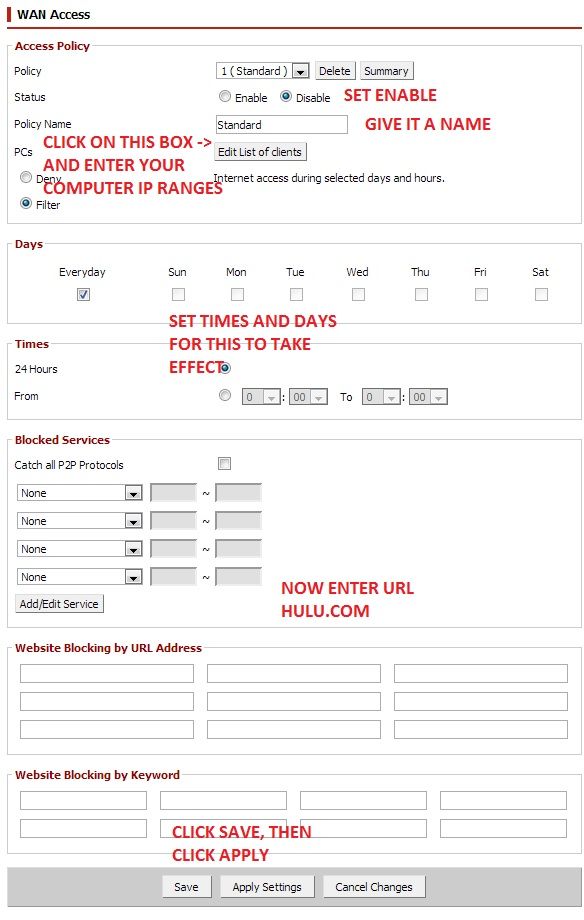
My network is running on a Linksys WRT160N router that has been flashed with DD-WRT v24-sp2 (04/23/10) std firmware.
I have tried "Website Blocking by URL Address" and "Website Blocking by Keyword" in my router settings but neither seem to take effect.
You need to enable Access Restrictions for this to take effect.
RocketTech
2[H]4U
- Joined
- Oct 7, 2009
- Messages
- 2,359
editing the lmhosts file may be more accessible for this individual. Google ' lmhosts ' for info on how to do it. Downside is each computer would need to be touched.
editing the lmhosts file may be more accessible for this individual. Google ' lmhosts ' for info on how to do it. Downside is each computer would need to be touched.
Trusting clients never works. If one thinks the users are too stupid to figure it out, it only shows his own stupidity.
RocketTech
2[H]4U
- Joined
- Oct 7, 2009
- Messages
- 2,359
Trusting clients never works. If one thinks the users are too stupid to figure it out, it only shows his own stupidity.
Admin permission is needed to edit the lmhosts file. Any administrator granting admin permissions to end users when trying to limit them at the same time is not thinking in a rational manner.
Admin permission is needed to edit the lmhosts file. Any administrator granting admin permissions to end users when trying to limit them at the same time is not thinking in a rational manner.
We know nothing about the clients and certainly not that the OP is having control over them. That's why we discuss network-level blocking in the first place.
RocketTech
2[H]4U
- Joined
- Oct 7, 2009
- Messages
- 2,359
We know nothing about the clients and certainly not that the OP is having control over them. That's why we discuss network-level blocking in the first place.
Which is why I posted what was clearly labeled as an alternative. Instead of offering opinions on posts of others, I've tried to post useful information.
My personal preference is to use pfSense, but that may be outside the means and abilities of OP. The original Linksys firmware may be the most accessible means to the OP to block the desired site(s).
- Joined
- Jun 28, 2004
- Messages
- 3,109
Did anyone suggest using OpenDNS to filter it?
http://forums.opendns.com/comments.php?DiscussionID=13353
http://forums.opendns.com/comments.php?DiscussionID=13353
Did anyone suggest using OpenDNS to filter it?
http://forums.opendns.com/comments.php?DiscussionID=13353
yes i posted it earlier in the thread