![[H]ard|Forum](/styles/hardforum/xenforo/logo_dark.png)
Hi All
I have been having problems with my pc, I was playing some GTA 3 Def Edition last night when after about 10 mins the audio started cutting out and my frame rate became choppy, I tried GTA 4 and also sleeping dogs and the same thing happened. I downloaded Latency Mon and I we as getting huge latency so i reinstalled windows 10 pro. Now the latency isn't as bad and the sound isn't cutting out but I'm still getting choppy frame rate. For example i played about 8 mins of Lego star wars the Sky Walker Saga even though the sound was fine and it said on the FPS counter I was getting 130 FPS it still felt choppy.
specs below
8700lK @ 4.7 GHz,
Asrock Taichi Z370 Mobo
1080 TI
32 GB of memory
Latency Mon dump after 8 Mins of Lego star wars the Sky Walker Saga
_________________________________________________________________________________________________________
CONCLUSION
_________________________________________________________________________________________________________
Your system appears to be having trouble handling real-time audio and other tasks. You are likely to experience buffer underruns appearing as drop outs, clicks or pops. One problem may be related to power management, disable CPU
throttling settings in Control Panel and BIOS setup. Check for BIOS updates.
LatencyMon has been analyzing your system for 0:08:16 (h:mm:ss) on all processors.
_________________________________________________________________________________________________________
SYSTEM INFORMATION
_________________________________________________________________________________________________________
Computer name: DESKTOP-EMM1LMB
OS version: Windows 10, 10.0, version 2009, build: 19045 (x64)
Hardware: To Be Filled By O.E.M., To Be Filled By O.E.M.
BIOS: P3.40
CPU: GenuineIntel Intel(R) Core(TM) i7-8700K CPU @ 3.70GHz
Logical processors: 12
Processor groups: 1
Processor group size: 12
RAM: 32691 MB total
_________________________________________________________________________________________________________
CPU SPEED
_________________________________________________________________________________________________________
Reported CPU speed (WMI): 3696 MHz
Reported CPU speed (registry): 3696 MHz
Note: reported execution times may be calculated based on a fixed reported CPU speed. Disable variable speed settings like Intel Speed Step and AMD Cool N Quiet in the BIOS setup for more accurate results.
_________________________________________________________________________________________________________
MEASURED INTERRUPT TO USER PROCESS LATENCIES
_________________________________________________________________________________________________________
The interrupt to process latency reflects the measured interval that a usermode process needed to respond to a hardware request from the moment the interrupt service routine started execution. This includes the scheduling and
execution of a DPC routine, the signaling of an event and the waking up of a usermode thread from an idle wait state in response to that event.
Highest measured interrupt to process latency (µs): 2221.60
Average measured interrupt to process latency (µs): 5.605419
Highest measured interrupt to DPC latency (µs): 2211.40
Average measured interrupt to DPC latency (µs): 2.390491
_________________________________________________________________________________________________________
REPORTED ISRs
_________________________________________________________________________________________________________
Interrupt service routines are routines installed by the OS and device drivers that execute in response to a hardware interrupt signal.
Highest ISR routine execution time (µs): 73.383658
Driver with highest ISR routine execution time: Wdf01000.sys - Kernel Mode Driver Framework Runtime, Microsoft Corporation
Highest reported total ISR routine time (%): 0.001169
Driver with highest ISR total time: Wdf01000.sys - Kernel Mode Driver Framework Runtime, Microsoft Corporation
Total time spent in ISRs (%) 0.001173
ISR count (execution time <250 µs): 104952
ISR count (execution time 250-500 µs): 0
ISR count (execution time 500-1000 µs): 0
ISR count (execution time 1000-2000 µs): 0
ISR count (execution time 2000-4000 µs): 0
ISR count (execution time >=4000 µs): 0
_________________________________________________________________________________________________________
REPORTED DPCs
_________________________________________________________________________________________________________
DPC routines are part of the interrupt servicing dispatch mechanism and disable the possibility for a process to utilize the CPU while it is interrupted until the DPC has finished execution.
Highest DPC routine execution time (µs): 691.808983
Driver with highest DPC routine execution time: nvlddmkm.sys - NVIDIA Windows Kernel Mode Driver, Version 582.53 , NVIDIA Corporation
Highest reported total DPC routine time (%): 0.048174
Driver with highest DPC total execution time: nvlddmkm.sys - NVIDIA Windows Kernel Mode Driver, Version 582.53 , NVIDIA Corporation
Total time spent in DPCs (%) 0.131495
DPC count (execution time <250 µs): 706627
DPC count (execution time 250-500 µs): 0
DPC count (execution time 500-10000 µs): 118
DPC count (execution time 1000-2000 µs): 0
DPC count (execution time 2000-4000 µs): 0
DPC count (execution time >=4000 µs): 0
_________________________________________________________________________________________________________
REPORTED HARD PAGEFAULTS
_________________________________________________________________________________________________________
Hard pagefaults are events that get triggered by making use of virtual memory that is not resident in RAM but backed by a memory mapped file on disk. The process of resolving the hard pagefault requires reading in the memory from disk
while the process is interrupted and blocked from execution.
NOTE: some processes were hit by hard pagefaults. If these were programs producing audio, they are likely to interrupt the audio stream resulting in dropouts, clicks and pops. Check the Processes tab to see which programs were hit.
Process with highest pagefault count: msmpeng.exe
Total number of hard pagefaults 3942
Hard pagefault count of hardest hit process: 3680
Number of processes hit: 10
_________________________________________________________________________________________________________
PER CPU DATA
_________________________________________________________________________________________________________
CPU 0 Interrupt cycle time (s): 15.506193
CPU 0 ISR highest execution time (µs): 73.383658
CPU 0 ISR total execution time (s): 0.068323
CPU 0 ISR count: 102935
CPU 0 DPC highest execution time (µs): 691.808983
CPU 0 DPC total execution time (s): 7.651763
CPU 0 DPC count: 679123
_________________________________________________________________________________________________________
CPU 1 Interrupt cycle time (s): 0.758158
CPU 1 ISR highest execution time (µs): 4.686147
CPU 1 ISR total execution time (s): 0.001550
CPU 1 ISR count: 1986
CPU 1 DPC highest execution time (µs): 185.694264
CPU 1 DPC total execution time (s): 0.061103
CPU 1 DPC count: 3062
_________________________________________________________________________________________________________
CPU 2 Interrupt cycle time (s): 0.570796
CPU 2 ISR highest execution time (µs): 2.300325
CPU 2 ISR total execution time (s): 0.000039
CPU 2 ISR count: 31
CPU 2 DPC highest execution time (µs): 59.796537
CPU 2 DPC total execution time (s): 0.030613
CPU 2 DPC count: 7251
_________________________________________________________________________________________________________
CPU 3 Interrupt cycle time (s): 0.336580
CPU 3 ISR highest execution time (µs): 0.0
CPU 3 ISR total execution time (s): 0.0
CPU 3 ISR count: 0
CPU 3 DPC highest execution time (µs): 40.843615
CPU 3 DPC total execution time (s): 0.006033
CPU 3 DPC count: 1060
_________________________________________________________________________________________________________
CPU 4 Interrupt cycle time (s): 0.573654
CPU 4 ISR highest execution time (µs): 0.0
CPU 4 ISR total execution time (s): 0.0
CPU 4 ISR count: 0
CPU 4 DPC highest execution time (µs): 82.963745
CPU 4 DPC total execution time (s): 0.023230
CPU 4 DPC count: 4928
_________________________________________________________________________________________________________
CPU 5 Interrupt cycle time (s): 0.338024
CPU 5 ISR highest execution time (µs): 0.0
CPU 5 ISR total execution time (s): 0.0
CPU 5 ISR count: 0
CPU 5 DPC highest execution time (µs): 65.360931
CPU 5 DPC total execution time (s): 0.004466
CPU 5 DPC count: 933
_________________________________________________________________________________________________________
CPU 6 Interrupt cycle time (s): 0.572462
CPU 6 ISR highest execution time (µs): 0.0
CPU 6 ISR total execution time (s): 0.0
CPU 6 ISR count: 0
CPU 6 DPC highest execution time (µs): 80.110390
CPU 6 DPC total execution time (s): 0.013106
CPU 6 DPC count: 2603
_________________________________________________________________________________________________________
CPU 7 Interrupt cycle time (s): 0.409598
CPU 7 ISR highest execution time (µs): 0.0
CPU 7 ISR total execution time (s): 0.0
CPU 7 ISR count: 0
CPU 7 DPC highest execution time (µs): 78.522186
CPU 7 DPC total execution time (s): 0.006679
CPU 7 DPC count: 1182
_________________________________________________________________________________________________________
CPU 8 Interrupt cycle time (s): 0.508699
CPU 8 ISR highest execution time (µs): 0.0
CPU 8 ISR total execution time (s): 0.0
CPU 8 ISR count: 0
CPU 8 DPC highest execution time (µs): 58.215909
CPU 8 DPC total execution time (s): 0.012274
CPU 8 DPC count: 2224
_________________________________________________________________________________________________________
CPU 9 Interrupt cycle time (s): 0.381862
CPU 9 ISR highest execution time (µs): 0.0
CPU 9 ISR total execution time (s): 0.0
CPU 9 ISR count: 0
CPU 9 DPC highest execution time (µs): 330.582251
CPU 9 DPC total execution time (s): 0.006461
CPU 9 DPC count: 1086
_________________________________________________________________________________________________________
CPU 10 Interrupt cycle time (s): 0.475415
CPU 10 ISR highest execution time (µs): 0.0
CPU 10 ISR total execution time (s): 0.0
CPU 10 ISR count: 0
CPU 10 DPC highest execution time (µs): 124.988095
CPU 10 DPC total execution time (s): 0.013019
CPU 10 DPC count: 2167
_________________________________________________________________________________________________________
CPU 11 Interrupt cycle time (s): 0.541027
CPU 11 ISR highest execution time (µs): 0.0
CPU 11 ISR total execution time (s): 0.0
CPU 11 ISR count: 0
CPU 11 DPC highest execution time (µs): 107.695346
CPU 11 DPC total execution time (s): 0.007198
CPU 11 DPC count: 1126
_________________________________________________________________________________________________________
I have been having problems with my pc, I was playing some GTA 3 Def Edition last night when after about 10 mins the audio started cutting out and my frame rate became choppy, I tried GTA 4 and also sleeping dogs and the same thing happened. I downloaded Latency Mon and I we as getting huge latency so i reinstalled windows 10 pro. Now the latency isn't as bad and the sound isn't cutting out but I'm still getting choppy frame rate. For example i played about 8 mins of Lego star wars the Sky Walker Saga even though the sound was fine and it said on the FPS counter I was getting 130 FPS it still felt choppy.
specs below
8700lK @ 4.7 GHz,
Asrock Taichi Z370 Mobo
1080 TI
32 GB of memory
Latency Mon dump after 8 Mins of Lego star wars the Sky Walker Saga
_________________________________________________________________________________________________________
CONCLUSION
_________________________________________________________________________________________________________
Your system appears to be having trouble handling real-time audio and other tasks. You are likely to experience buffer underruns appearing as drop outs, clicks or pops. One problem may be related to power management, disable CPU
throttling settings in Control Panel and BIOS setup. Check for BIOS updates.
LatencyMon has been analyzing your system for 0:08:16 (h:mm:ss) on all processors.
_________________________________________________________________________________________________________
SYSTEM INFORMATION
_________________________________________________________________________________________________________
Computer name: DESKTOP-EMM1LMB
OS version: Windows 10, 10.0, version 2009, build: 19045 (x64)
Hardware: To Be Filled By O.E.M., To Be Filled By O.E.M.
BIOS: P3.40
CPU: GenuineIntel Intel(R) Core(TM) i7-8700K CPU @ 3.70GHz
Logical processors: 12
Processor groups: 1
Processor group size: 12
RAM: 32691 MB total
_________________________________________________________________________________________________________
CPU SPEED
_________________________________________________________________________________________________________
Reported CPU speed (WMI): 3696 MHz
Reported CPU speed (registry): 3696 MHz
Note: reported execution times may be calculated based on a fixed reported CPU speed. Disable variable speed settings like Intel Speed Step and AMD Cool N Quiet in the BIOS setup for more accurate results.
_________________________________________________________________________________________________________
MEASURED INTERRUPT TO USER PROCESS LATENCIES
_________________________________________________________________________________________________________
The interrupt to process latency reflects the measured interval that a usermode process needed to respond to a hardware request from the moment the interrupt service routine started execution. This includes the scheduling and
execution of a DPC routine, the signaling of an event and the waking up of a usermode thread from an idle wait state in response to that event.
Highest measured interrupt to process latency (µs): 2221.60
Average measured interrupt to process latency (µs): 5.605419
Highest measured interrupt to DPC latency (µs): 2211.40
Average measured interrupt to DPC latency (µs): 2.390491
_________________________________________________________________________________________________________
REPORTED ISRs
_________________________________________________________________________________________________________
Interrupt service routines are routines installed by the OS and device drivers that execute in response to a hardware interrupt signal.
Highest ISR routine execution time (µs): 73.383658
Driver with highest ISR routine execution time: Wdf01000.sys - Kernel Mode Driver Framework Runtime, Microsoft Corporation
Highest reported total ISR routine time (%): 0.001169
Driver with highest ISR total time: Wdf01000.sys - Kernel Mode Driver Framework Runtime, Microsoft Corporation
Total time spent in ISRs (%) 0.001173
ISR count (execution time <250 µs): 104952
ISR count (execution time 250-500 µs): 0
ISR count (execution time 500-1000 µs): 0
ISR count (execution time 1000-2000 µs): 0
ISR count (execution time 2000-4000 µs): 0
ISR count (execution time >=4000 µs): 0
_________________________________________________________________________________________________________
REPORTED DPCs
_________________________________________________________________________________________________________
DPC routines are part of the interrupt servicing dispatch mechanism and disable the possibility for a process to utilize the CPU while it is interrupted until the DPC has finished execution.
Highest DPC routine execution time (µs): 691.808983
Driver with highest DPC routine execution time: nvlddmkm.sys - NVIDIA Windows Kernel Mode Driver, Version 582.53 , NVIDIA Corporation
Highest reported total DPC routine time (%): 0.048174
Driver with highest DPC total execution time: nvlddmkm.sys - NVIDIA Windows Kernel Mode Driver, Version 582.53 , NVIDIA Corporation
Total time spent in DPCs (%) 0.131495
DPC count (execution time <250 µs): 706627
DPC count (execution time 250-500 µs): 0
DPC count (execution time 500-10000 µs): 118
DPC count (execution time 1000-2000 µs): 0
DPC count (execution time 2000-4000 µs): 0
DPC count (execution time >=4000 µs): 0
_________________________________________________________________________________________________________
REPORTED HARD PAGEFAULTS
_________________________________________________________________________________________________________
Hard pagefaults are events that get triggered by making use of virtual memory that is not resident in RAM but backed by a memory mapped file on disk. The process of resolving the hard pagefault requires reading in the memory from disk
while the process is interrupted and blocked from execution.
NOTE: some processes were hit by hard pagefaults. If these were programs producing audio, they are likely to interrupt the audio stream resulting in dropouts, clicks and pops. Check the Processes tab to see which programs were hit.
Process with highest pagefault count: msmpeng.exe
Total number of hard pagefaults 3942
Hard pagefault count of hardest hit process: 3680
Number of processes hit: 10
_________________________________________________________________________________________________________
PER CPU DATA
_________________________________________________________________________________________________________
CPU 0 Interrupt cycle time (s): 15.506193
CPU 0 ISR highest execution time (µs): 73.383658
CPU 0 ISR total execution time (s): 0.068323
CPU 0 ISR count: 102935
CPU 0 DPC highest execution time (µs): 691.808983
CPU 0 DPC total execution time (s): 7.651763
CPU 0 DPC count: 679123
_________________________________________________________________________________________________________
CPU 1 Interrupt cycle time (s): 0.758158
CPU 1 ISR highest execution time (µs): 4.686147
CPU 1 ISR total execution time (s): 0.001550
CPU 1 ISR count: 1986
CPU 1 DPC highest execution time (µs): 185.694264
CPU 1 DPC total execution time (s): 0.061103
CPU 1 DPC count: 3062
_________________________________________________________________________________________________________
CPU 2 Interrupt cycle time (s): 0.570796
CPU 2 ISR highest execution time (µs): 2.300325
CPU 2 ISR total execution time (s): 0.000039
CPU 2 ISR count: 31
CPU 2 DPC highest execution time (µs): 59.796537
CPU 2 DPC total execution time (s): 0.030613
CPU 2 DPC count: 7251
_________________________________________________________________________________________________________
CPU 3 Interrupt cycle time (s): 0.336580
CPU 3 ISR highest execution time (µs): 0.0
CPU 3 ISR total execution time (s): 0.0
CPU 3 ISR count: 0
CPU 3 DPC highest execution time (µs): 40.843615
CPU 3 DPC total execution time (s): 0.006033
CPU 3 DPC count: 1060
_________________________________________________________________________________________________________
CPU 4 Interrupt cycle time (s): 0.573654
CPU 4 ISR highest execution time (µs): 0.0
CPU 4 ISR total execution time (s): 0.0
CPU 4 ISR count: 0
CPU 4 DPC highest execution time (µs): 82.963745
CPU 4 DPC total execution time (s): 0.023230
CPU 4 DPC count: 4928
_________________________________________________________________________________________________________
CPU 5 Interrupt cycle time (s): 0.338024
CPU 5 ISR highest execution time (µs): 0.0
CPU 5 ISR total execution time (s): 0.0
CPU 5 ISR count: 0
CPU 5 DPC highest execution time (µs): 65.360931
CPU 5 DPC total execution time (s): 0.004466
CPU 5 DPC count: 933
_________________________________________________________________________________________________________
CPU 6 Interrupt cycle time (s): 0.572462
CPU 6 ISR highest execution time (µs): 0.0
CPU 6 ISR total execution time (s): 0.0
CPU 6 ISR count: 0
CPU 6 DPC highest execution time (µs): 80.110390
CPU 6 DPC total execution time (s): 0.013106
CPU 6 DPC count: 2603
_________________________________________________________________________________________________________
CPU 7 Interrupt cycle time (s): 0.409598
CPU 7 ISR highest execution time (µs): 0.0
CPU 7 ISR total execution time (s): 0.0
CPU 7 ISR count: 0
CPU 7 DPC highest execution time (µs): 78.522186
CPU 7 DPC total execution time (s): 0.006679
CPU 7 DPC count: 1182
_________________________________________________________________________________________________________
CPU 8 Interrupt cycle time (s): 0.508699
CPU 8 ISR highest execution time (µs): 0.0
CPU 8 ISR total execution time (s): 0.0
CPU 8 ISR count: 0
CPU 8 DPC highest execution time (µs): 58.215909
CPU 8 DPC total execution time (s): 0.012274
CPU 8 DPC count: 2224
_________________________________________________________________________________________________________
CPU 9 Interrupt cycle time (s): 0.381862
CPU 9 ISR highest execution time (µs): 0.0
CPU 9 ISR total execution time (s): 0.0
CPU 9 ISR count: 0
CPU 9 DPC highest execution time (µs): 330.582251
CPU 9 DPC total execution time (s): 0.006461
CPU 9 DPC count: 1086
_________________________________________________________________________________________________________
CPU 10 Interrupt cycle time (s): 0.475415
CPU 10 ISR highest execution time (µs): 0.0
CPU 10 ISR total execution time (s): 0.0
CPU 10 ISR count: 0
CPU 10 DPC highest execution time (µs): 124.988095
CPU 10 DPC total execution time (s): 0.013019
CPU 10 DPC count: 2167
_________________________________________________________________________________________________________
CPU 11 Interrupt cycle time (s): 0.541027
CPU 11 ISR highest execution time (µs): 0.0
CPU 11 ISR total execution time (s): 0.0
CPU 11 ISR count: 0
CPU 11 DPC highest execution time (µs): 107.695346
CPU 11 DPC total execution time (s): 0.007198
CPU 11 DPC count: 1126
_________________________________________________________________________________________________________

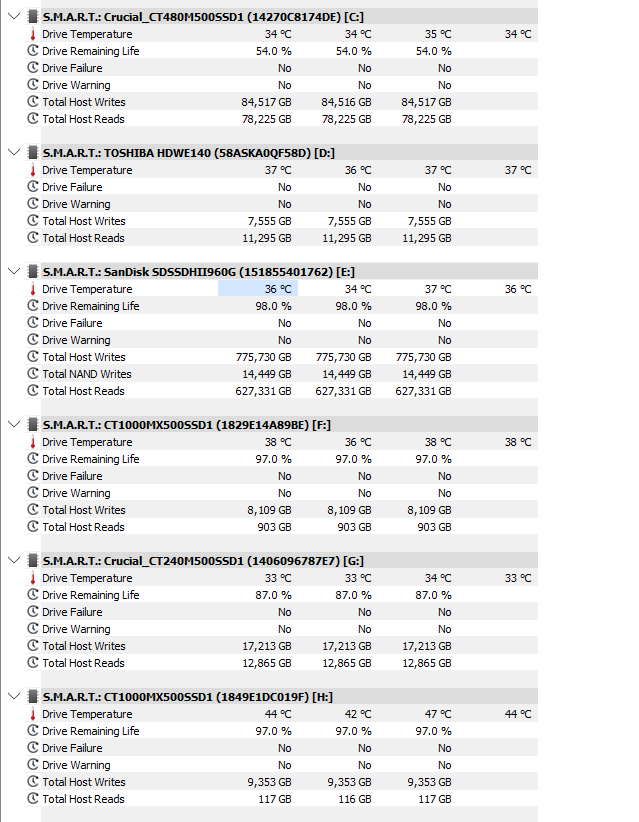

 with star wars lego i used the -dx12 command and it sorted the stuttering issues on that game. Thanks all!