• Some users have recently had their accounts hijacked. It seems that the now defunct EVGA forums might have compromised your password there and seems many are using the same PW here. We would suggest you UPDATE YOUR PASSWORD and TURN ON 2FA for your account here to further secure it. None of the compromised accounts had 2FA turned on.
    Once you have enabled 2FA, your account will be updated soon to show a badge, letting other members know that you use 2FA to protect your account. This should be beneficial for everyone that uses FSFT.

A few questions

v8_h8r

Gawd
Joined
Aug 3, 2004
Messages
735
There are a few questions I have searched for on the forums and can't seem to find the answers im lookin for. So here goes

1. When running your leak check do you run it disconnected from the electronics then install it after it passes? or run it installed? Running it with it attached seems kinda risky, but my radiator will be installed in the case and so will the resevoir. I want the lines ran a certain way in the case(geek/coolness factor) and I see no other way to do it other than having it installed.


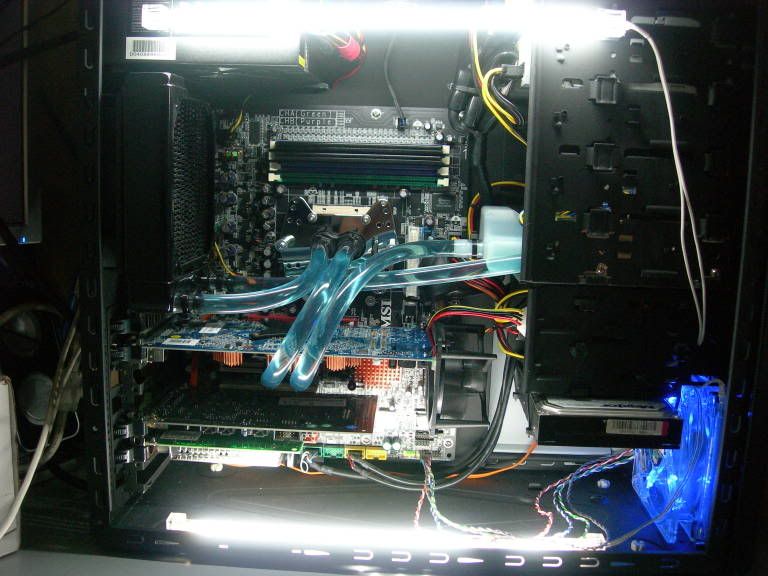
2. in the picture I will attach at the bottom of this post, what made the fluid in the hoses look that color blue? Dye? Colored Hoses? That color looks sweet and I want it to look the same in mine. EDIT: Guessing its Pentosin?


3. Im not real familiar with electrical terms for the pumps. Can I see some pics of pumps inside your cases and how they connect to a power source? (E.g 4pin molex or regular wall plug in) Also, show which power connector is which type of current AC or DC.


4. Will a single 120MM radiator be enough cooling power for a single 939 CPU and a single X series Video card? Reason Being I am ordering Thermaltake Armor case and I want to mount the Radiator on the rear of the case at the fan hole.


Now here is that pic with the hoses


Thanks for all your help


J
 
I had everything installed when I did a leak test because I could only plug my pump into the motherboard to power it on. The only place it could have leaked out of and hit anything electrical was the cpu waterblock, although if you are planning on cooling the gpu too that could be another place to leak out of. The water test imo isn't as big of a deal as other people make it seem. It was no big deal after I had done it the first time.

That is probably some type of dye, mine glows a purple from a blue LED light and some super coolant lubricity stuff that gives it the purple hue.

Most posts I have seen have said a single 120mm is not enough to cool a CPU and a GPU well, a dual 120mm is not too much more $ however, finding the room to fit it could be a pain. Good luck. I would recommend mounting your radiate on the outside of the case as thats what I did and it was easy.
 
More than likely yes it's pentosin (sp?) as to the AC/DC thing, a molex is DC a wall plug is AC.

About the leak test...there are two schools of thought, I follow the assemble everything, mount the blocks dry (no thermal paste) then route the hoses, pull everything out and fill, bleed and leak test -school of thought. I do it because I like to torque all the fittings to make sure that IF I have to work on my PC after it's built I won't be discovering a leak then plus I really don't want to clean all my parts if there is a bad leak. After my leak test is complete I want to have my shiz running in an hour's time. Not wait 2 days for any possible coolant to dry.

Other people test with their stuff installed. It all depends on your preferences.

A friend of mine just set up a Kandalf with the same basic setup (939 DC, 7900GT, single 120 rad) and he's getting really impressive temps.
 
Run the leak test with everything installed BUT with no power going to anything. Have the PSU outside the case, or at least where no liquid can contact it. Then have ONLY the pump connected and jump start the PSU. If anything leaks nothing will be damaged because no current is flowing through it. This way you dont have to risk having any leaks created when you reinstall all the gear into the case. You could very easily tweak something while installing it after leak testing outside of the case.

That case is Liquid_Cooled's and I dont believe he ever actually said what he used to achieve that color, but similar color can be obtained with pentosin quite easily.

A single 120mm radiator will cool that ok, but not much more.
 
A single GTstealth radiator with a 50cfm fan, or a BIX with a 70cfm fan will cool your setup.

It won't cool it superly well, but at least the GTS will be quieter than your HSF and GPUHSF fan's running. Don't expect any sort of overclocks over stock + 10%.

As for colour, I believe it's probably blue water dye, or pentosin blue (Audi car coolant). The coolant should be mixed at a ratio of 5% antifreeze (coolant) to 95% distilled water.

What I like to do is only use distilled water when I'm leak testing my setup, and leave room for 10ml of antifreeze. That way there's no conductivity through the water (leaks aren't a problem) and an antifreeze solution is 500% harder to bleed than straight water.

As for a pump, I'd recommend either going AC or DC. AC eheim pumps are expensive and large, but are huge workhorses. They need to be plugged in and turned on seperately from your computer (true, you can buy circuits and products that turn your pump on at the same time as your computer, but that adds cost). DC pumps, like the Laing D5 or the swiftech MCP655 (just a rebranded Laing D5 :p) will run off of a Molex if you buy them from any PC shop. Expect to pay 65-80$ for a good DC molex pump.
I recommend the Swiftech MCP655 pump, as it's a really powerful little guy. I just have the pump sucking water from my radiator and pushing it to the CPU inlet. It's lying on a foam pad screwed to the bottom of my case...


IMO... I'd upgrade your processor and Mobo before venturing into water cooling... You won't see much of a benefit (unless you push that processor really hard on a good WC setup).
 
If it helps any, I can tell you an easy way to leak test.. this is how I'll be doing mine this week when I recieve my waterblock to complete my loop.

Alright.. you don't have to have the mobo or anything in your case at all when you do the test if you fear any electrical/water damage. What to do before anything is setup all your watercooling stuff besides the main loop that will cool your processor/gpu. Mount your reservoir, radiator, pump, etc.. then run some of the lines between those. Next, install your mobo and graphics card. Then, just temporarily run your lines to those with the waterblocks so you know how long to make the lines. Then, take them all out after you pre-cut the lines, then put it all together again, minus the motherboard/gpu being in the case. So, now it will basically just look like your complete loop, but with no hardware inside.

Next could be a little tricky: getting power to you pump to run the leak test. I'm going to be using one of my spare external HDD enclosures minus the hard drive to power my pump. Just connect the molex connector, then flip the switch for power. It will activate the pump for however long you need it on to test your loop. If you don't have a spare hdd enclosure to use as a power source, you could do the pin-mod thing on the PSU to take the place of your motherboard and power switch to turn on the PSU. Basically what you do is use a wire or paper clip to make a connection between the green wire, and a ground wire on the 20/24 pin connector of the PSU. That turns on your power supply so you'll get power to turn on the pump. I wouldn't recommend using a good psu, just incase something goes wrong. I have a bunch of brand new PSU's that came in various cases I've purchased over the years.
 
Arcygenical said:
IMO... I'd upgrade your processor and Mobo before venturing into water cooling... You won't see much of a benefit (unless you push that processor really hard on a good WC setup).


well i ordered a 939 2.2ghz proc and a AN8 SLi. You mean more than that? Im on a budget and i was at a 754 1.8 so I think that it is a pretty significant upgrade.


Also I plan on running DI water instead of Distilled since I have a abundant amount at my disposal and It doesnt conduct electricity.
 
v8_h8r said:
well i ordered a 939 2.2ghz proc and a AN8 SLi. You mean more than that? Im on a budget and i was at a 754 1.8 so I think that it is a pretty significant upgrade.


Also I plan on running DI water instead of Distilled since I have a abundant amount at my disposal and It doesnt conduct electricity.

I'd go with distilled water if it was me, DI water can still contain impurities whereas distilled water is sans any impurities due to the distilling process. At $.99 a gallon distilled water is practically free anyways.
 
v8_h8r said:
2. in the picture I will attach at the bottom of this post, what made the fluid in the hoses look that color blue? Dye? Colored Hoses? That color looks sweet and I want it to look the same in mine. EDIT: Guessing its Pentosin?
me gusta la Pentosina....

DSCN6043.jpg


http://www.hardforum.com/showthread.php?t=1074867

[/shameless plug]
 
well i ordered a 939 2.2ghz proc and a AN8 SLi. You mean more than that? Im on a budget and i was at a 754 1.8 so I think that it is a pretty significant upgrade


Ahhh, I had no idea. That's an awesome pair.

At the post above, that's an awesome way to mount your HDD :p
 
w1retap said:
If it helps any, I can tell you an easy way to leak test.. this is how I'll be doing mine this week when I recieve my waterblock to complete my loop.

Alright.. you don't have to have the mobo or anything in your case at all when you do the test if you fear any electrical/water damage. What to do before anything is setup all your watercooling stuff besides the main loop that will cool your processor/gpu. Mount your reservoir, radiator, pump, etc.. then run some of the lines between those. Next, install your mobo and graphics card. Then, just temporarily run your lines to those with the waterblocks so you know how long to make the lines. Then, take them all out after you pre-cut the lines, then put it all together again, minus the motherboard/gpu being in the case. So, now it will basically just look like your complete loop, but with no hardware inside.

Next could be a little tricky: getting power to you pump to run the leak test. I'm going to be using one of my spare external HDD enclosures minus the hard drive to power my pump. Just connect the molex connector, then flip the switch for power. It will activate the pump for however long you need it on to test your loop. If you don't have a spare hdd enclosure to use as a power source, you could do the pin-mod thing on the PSU to take the place of your motherboard and power switch to turn on the PSU. Basically what you do is use a wire or paper clip to make a connection between the green wire, and a ground wire on the 20/24 pin connector of the PSU. That turns on your power supply so you'll get power to turn on the pump. I wouldn't recommend using a good psu, just incase something goes wrong. I have a bunch of brand new PSU's that came in various cases I've purchased over the years.


See the problem with leak testing like you say is this: When you reinstall everything back into the case you risk tweaking some of your fittings and/or connections. This could cause something to come loose and leak. If you leak test like I suggested, with all components that have waterblocks on them installed, then you dont have this problem. There is no risk of water damage because you wont have power applied to any components. If there is a leak just dry everything off and your good to go. This avoids the hassle of trying to reinstall and uninstall the water loop multiple times, and it is much safer.

As for the PSU, there is no danger in jumping the PSU.
 
Erasmus354 said:
See the problem with leak testing like you say is this: When you reinstall everything back into the case you risk tweaking some of your fittings and/or connections. This could cause something to come loose and leak. If you leak test like I suggested, with all components that have waterblocks on them installed, then you dont have this problem. There is no risk of water damage because you wont have power applied to any components. If there is a leak just dry everything off and your good to go. This avoids the hassle of trying to reinstall and uninstall the water loop multiple times, and it is much safer.

As for the PSU, there is no danger in jumping the PSU.

This is why I tweak all the fittings during the leak test. This way I know that if I need to yank the CPU or GPU blocks I won't end up with a nasty surprise.
 
madmat said:
This is why I tweak all the fittings during the leak test. This way I know that if I need to yank the CPU or GPU blocks I won't end up with a nasty surprise.


yeah I think I will go with the install leak test method. Don't want to have to take all the stuff off and on a few times. Only thing Im worried about is jumping the PSU, Im not sure about all that


J
 
Just wanted to thank everyone for the info and help. I am now officially in the watercooling club. I will post pics today sometime or this evening.


thanks,


J
 
Back
Top