• Some users have recently had their accounts hijacked. It seems that the now defunct EVGA forums might have compromised your password there and seems many are using the same PW here. We would suggest you UPDATE YOUR PASSWORD and TURN ON 2FA for your account here to further secure it. None of the compromised accounts had 2FA turned on.
    Once you have enabled 2FA, your account will be updated soon to show a badge, letting other members know that you use 2FA to protect your account. This should be beneficial for everyone that uses FSFT.

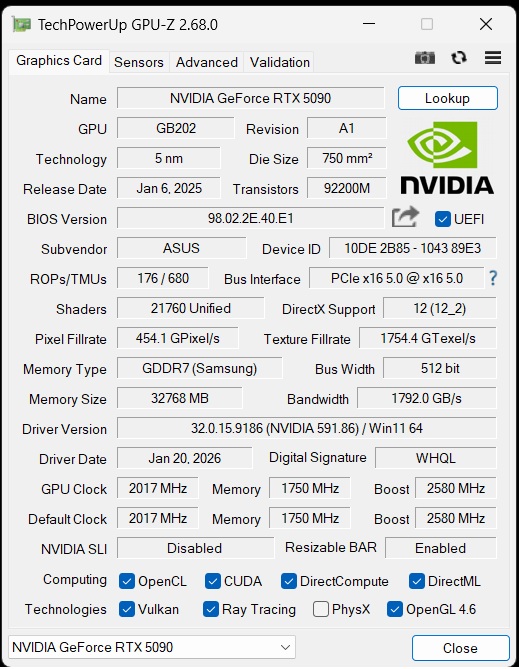
591.86

erek

Fully [H]
2FA
Joined
Dec 19, 2005
Messages
17,671
“Game Ready
This new Game Ready Driver provides the best gaming experience for the latest new games supporting DLSS 4 technology including ARC Raiders: Headwind Update and Arknights: Endfield. In addition, there is Game Ready support for Highguard which features DLSS Super Resolution.

Fixed Gaming Bugs
  • Total War: Three Kingdoms: Artifacts may be observed during gameplay when Screen Space Reflections is enabled [5745647]
Fixed General Bugs
  • Color banding observed with SDR content when Windows Automatic Color Management enabled [5754551]
  • ASUS G14 may freeze on startup when ASUS Ultimate Mode is enabled [5754849]”
https://www.techpowerup.com/345711/nvidia-releases-geforce-591-86-whql-game-ready-drivers
 
1769554687227.png

https://www.3dmark.com/compare/sw/3110618/sw/3201696
 
You have to enable it via Nvidia Profile Inspector to get it to show up in GPU-Z....
The reddit post seems to point to enabling PhysX on a per-game basis, so how does it get enabled in a global way such that GPU-Z recognizes it is present?
 
The reddit post seems to point to enabling PhysX on a per-game basis, so how does it get enabled in a global way such that GPU-Z recognizes it is present?
Use Nvidia Profile Inspector and enable hidden features. Search for the 0x number in the first code block. Change it as instructed.

For the second code block, search for the key terms "P2" and "physx" and change it as instructed. Then save changes.

You'll then have 32bit PhysX enabled for GPU-Z to see, same as me. This will have to be accomplished with every driver update/reinstall.
 

NVIDIA App Hotfix 11.0.6.386 Fixes Optimus MUX Switching Issues

by AleksandarK Today, 11:58 Discuss (1 Comment)
NVIDIA released a hotfix version 11.0.6.386 for its app that addresses a serious issue where users were unable to access advanced Optimus MUX switch options. These options were reportedly grayed out during random MUX switch scenarios. As a reminder, NVIDIA Optimus technology is designed to switch between integrated and dedicated graphics within the system to conserve power. This feature is not used on desktop systems but on laptop PCs that have an iGPU from an Intel or AMD processor and a dedicated NVIDIA GeForce GPU. During light workloads, such as basic image display, the iGPU is used, which saves laptop battery due to its low power consumption. However, when demanding graphics tasks are running, NVIDIA uses a MUX switch to activate its dedicated GPU for heavier workloads. In the previous NVIDIA app version, users reported that some advanced Optimus MUX switch options were "grayed out" during random MUX switch scenarios. The issue has now been isolated, and users can either update the NVIDIA app from the software itself or download it from the link below, which is a direct link to NVIDIA's .exe file.“
 
Back
Top