![[H]ard|Forum](/styles/hardforum/xenforo/logo_dark.png)

- Joined
- Dec 19, 2005
- Messages
- 17,421
6% slower
Intel's has announced their Arrow Lake "Plus" processors a few weeks ago, today we can finally publish our full reviews of both new processors. The Core Ultra 7 270K Plus is the high-end model in the new lineup. It offers 8 P-Cores and 16 E-Cores, for a total thread count of 24 (there is no Hyper-Threading). This is the same core configuration as the much more expensive Core Ultra 9 285K. The underlying Arrow Lake technology is the same though from an architectural perspective, but Intel has improved lots of small things, like memory compatibility and link speeds between the various dies on the CPU.
Test Setup
Our test setup remains pretty much identical to what we used in 2025, we updated to Windows 25H2, with the newest drivers, replaced Elden Ring with Battlefield 6 and continue using DDR5-6000 CL28 as baseline memory. While this puts Arrow Lake at a slight disadvantage, it's understandable given the high memory prices these days. I asked the community last year, but there was no consensus on whether Arrow Lake should be tested at its own sweet spot, such as 7200 MT/s, similar to how Zen 5 is being tested at its 6000 CL28 optimal setting. I did do an additional test run at 8800 MT/s with CUDIMM memory, because I wanted to get a feel for how much of a difference ultra-fast memory can make (i.e. can it catch X3D?). I also enabled the Cores 200S Boost, which is still available, it basically enables XMP DDR5-8000 with supporting memory.
Application Performance
Application performance of the Core Ultra 7 270K Plus is impressive, beating even the Core Ultra 9 285K, which is unexpected given the positioning and price, but no surprise if you look at the core counts. The 285K does still win a handful of tests, because it runs at a higher maximum boost frequency. With these numbers, the 270K Plus is beating all AMD CPUs, except for the 9950X ($515) and the 9950X3D ($675)—looks like AMD will have to rethink their pricing. Looking at individual applications, we definitely see cases where Arrow Lake is still underperforming, due to the underlying architecture, but none of those are dealbreakers. I think it's also worth highlighting cases where Arrow Lake can show its muscles and lives in a class of its own. While I know it has little real-life relevance today, I think it is still worth mentioning that Intel does offer an NPU in all Arrow Lake processors, which could eventually become useful to accelerate AI workloads on your PC, while AMD does not have such a capability on Ryzen AM5.
Gaming Performance
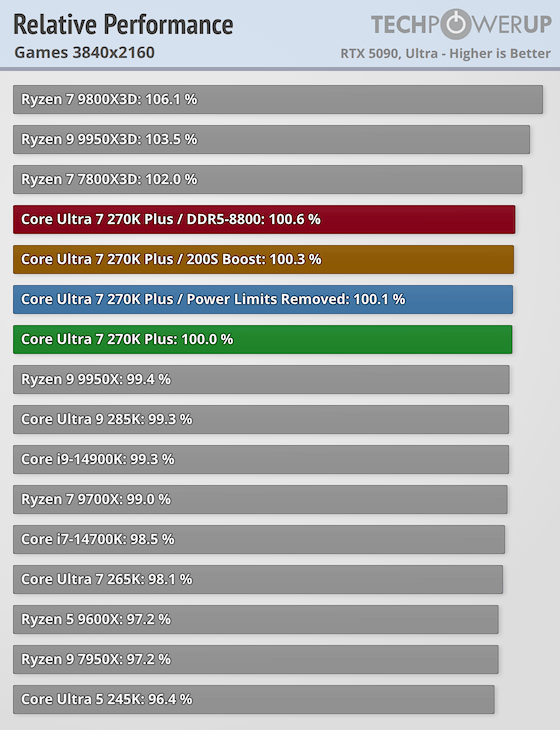
Gaming performance of the Core Ultra 7 270K Plus is much improved, too. It's now faster than the 14900K (by a tiny margin), and of course faster than all other Intel offerings from the past, including the 285K. These gains also help overcome AMD's Ryzen CPUs. The 270K Plus beats every single AMD processor at gaming, except for the Ryzen X3D models. Even when compared against X3D, the differences are relatively small, the 9800X3D is 15% faster on average, not huge, but definitely worth considering if you're using your PC only for gaming. But also consider that the 9800X3D costs $420, whereas the 270K Plus is only $300 and offers much better application performance at the same time.
Integrated Graphics
With the Core Ultra 200 Series, Intel has introduced a revamped iGPU, which is built on a more modern architecture. Arrow Lake Plus does not make any changes here, performance is roughly doubled compared to Raptor Lake. While that isn't enough for AAA gaming, light gaming won't be a problem at all. You also get accelerated video playback with wide codec support and Quick Sync for an exceptional media encoding experience. Any sort of productivity, Internet browsing, Office, Photoshop will run perfectly fine of course, too.
Power Consumption
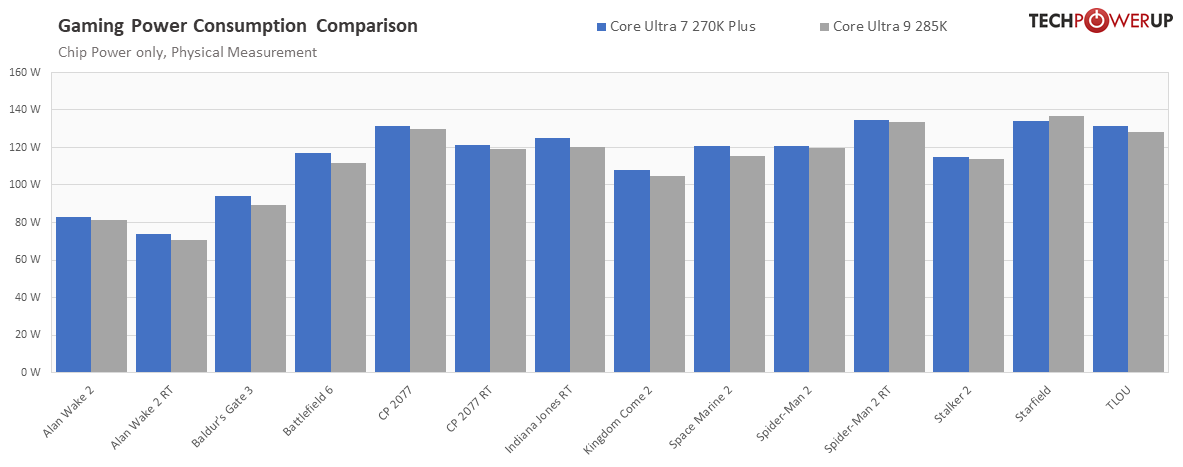
From a power consumption perspective, the 270K Plus is comparable to the 285K, which isn't unexpected given the identical core configuration. We measured 140 W on average in our 50 application tests, which is a bit more than AMD, but not nearly as high as the older 14th gen processors. With 110 W, gaming power consumption is a bit on the high side when compared to single CCD processors from AMD, and a bit lower than the dual CCD models, but the differences are small, nothing that's worth losing sleep over.
Cooling Requirements
In the past, Intel's high-end processors were difficult to cool—this is a total non-issue now. Thanks to improvements in energy efficiency the heat output is lower, and that heat isn't as concentrated anymore, because the P-Cores are spread out over a larger area. You can keep the 270K Plus cool at stock with a good air cooler. Intel's decision to increase the thermal limit to 105°C allows for more headroom, while still maintaining a full warranty for 24/7 use. AMD uses a 95°C thermal limit, which, paired with the thicker IHS makes their processors more difficult to cool, despite the slightly lower heat output. For serious overclocking, a high-end AIO cooler will help. However, you can manage the heat output by adjusting your power limit settings to match your cooling capabilities. This approach won't significantly impact performance but will help keep temperatures more manageable.
Overclocking
While we saw excellent overclocking from the 250K Plus, the 270K Plus didn't stand out just as much. Overclocking is easy thanks to the K suffix, which denotes a multiplier unlocked processor, but the OC potential was lower, because the 270K Plus is pretty much maxed out already. We were still able to reach 5.6 GHz on all cores, which is 100 MHz higher than the rated 5.5 GHz Max Boost on up to 2 cores—nice but not a game changer. The E-Cores overclocked better, reaching 5.1 GHz, 400 MHz more than their rated maximum. What you should definitely consider is that Intel locks overclocking behind their most expensive chipset option, so you must buy an expensive Z890 motherboard for all the OC goodies. AMD has much better OC support, even on cheaper motherboards—Intel should really rethink this artificial limitation.
Platform
The Arrow Lake platform has had a lot of time to mature, and Intel invested a lot of time into improving everything. It feels rock stable now, everything just works. During the original launch I noticed issues with memory compatibility, BIOS settings, etc. now I just plopped in my 8800 MT/s CUDIMM modules, selected XMP, and everything ran perfectly fine. With Arrow Lake you're also getting all the latest tech features like modern USB, Wi-Fi, Thunderbolt, etc.
Intel Binary Optimization
With Arrow Lake Plus, Intel is introducing a new Binary Optimization software that has impressive potential, especially for gaming. The promise is that by optimizing applications as they are loaded, Intel can introduce performance gains that were previously only possible by optimization on the developer side, which is time intensive and costly. Right now there are only few game profiles, but if Intel can scale this to cover a significant percentage of the market, they could have a winning tech on their hands that would make them independent of developers who can't justify these optimizations most of the time—similar to what's happening in GPU drivers, which simply replace inefficient shader code with optimized versions.
Pricing & Alternatives
The 270K Plus is priced pretty aggressively at $300, which is the same price as the Core Ultra 265K, which will probably come down a bit in pricing, possibly making it an interesting "new" option. AMD wants $305 for their Ryzen 7 9700X, which offers slightly lower gaming performance and much lower application performance—not easy to justify at that price point. AMD does offer a better upgrade path though, because eventually you can use the same setup and plop in an X3D CPU for additional gaming performance. The X3D CPUs are very expensive though, for relatively little gain when strictly looking at dollars spent and FPS gained—they are still the best choice for gamers who have the money to spend. No doubt that 9800X3D is awesome, but $420 vs $300 might make some gamers consider Intel, and spend the rest of the money on memory or SSD. Intel's Arrow Lake LGA1851 platform is basically the end of the line for this socket though, so there is no upgrade path and your next upgrade will require a new motherboard.“
Source: https://www.techpowerup.com/forums/threads/intel-core-ultra-7-270k-plus.347579/
“Value and Conclusion
- The Intel Core Ultra 7 270K Plus will sell for $300.
- Faster than Core Ultra 9 285K at lower pricing
- Gaming performance significantly improved, faster than any non-X3D Ryzen
- Affordable
- Overclocking unlocked
- Integrated GPU
- Good memory support, well over DDR5-8000
- LGA1851 is compatible with existing LGA1700 coolers
- Support for Thunderbolt 4 & 5, Wi-Fi 6E & 7
- NPU included
- Overclocking requires expensive Z890 motherboard
- No support for AVX-512
Intel's has announced their Arrow Lake "Plus" processors a few weeks ago, today we can finally publish our full reviews of both new processors. The Core Ultra 7 270K Plus is the high-end model in the new lineup. It offers 8 P-Cores and 16 E-Cores, for a total thread count of 24 (there is no Hyper-Threading). This is the same core configuration as the much more expensive Core Ultra 9 285K. The underlying Arrow Lake technology is the same though from an architectural perspective, but Intel has improved lots of small things, like memory compatibility and link speeds between the various dies on the CPU.
Test Setup
Our test setup remains pretty much identical to what we used in 2025, we updated to Windows 25H2, with the newest drivers, replaced Elden Ring with Battlefield 6 and continue using DDR5-6000 CL28 as baseline memory. While this puts Arrow Lake at a slight disadvantage, it's understandable given the high memory prices these days. I asked the community last year, but there was no consensus on whether Arrow Lake should be tested at its own sweet spot, such as 7200 MT/s, similar to how Zen 5 is being tested at its 6000 CL28 optimal setting. I did do an additional test run at 8800 MT/s with CUDIMM memory, because I wanted to get a feel for how much of a difference ultra-fast memory can make (i.e. can it catch X3D?). I also enabled the Cores 200S Boost, which is still available, it basically enables XMP DDR5-8000 with supporting memory.
Application Performance
Application performance of the Core Ultra 7 270K Plus is impressive, beating even the Core Ultra 9 285K, which is unexpected given the positioning and price, but no surprise if you look at the core counts. The 285K does still win a handful of tests, because it runs at a higher maximum boost frequency. With these numbers, the 270K Plus is beating all AMD CPUs, except for the 9950X ($515) and the 9950X3D ($675)—looks like AMD will have to rethink their pricing. Looking at individual applications, we definitely see cases where Arrow Lake is still underperforming, due to the underlying architecture, but none of those are dealbreakers. I think it's also worth highlighting cases where Arrow Lake can show its muscles and lives in a class of its own. While I know it has little real-life relevance today, I think it is still worth mentioning that Intel does offer an NPU in all Arrow Lake processors, which could eventually become useful to accelerate AI workloads on your PC, while AMD does not have such a capability on Ryzen AM5.
Gaming Performance
Gaming performance of the Core Ultra 7 270K Plus is much improved, too. It's now faster than the 14900K (by a tiny margin), and of course faster than all other Intel offerings from the past, including the 285K. These gains also help overcome AMD's Ryzen CPUs. The 270K Plus beats every single AMD processor at gaming, except for the Ryzen X3D models. Even when compared against X3D, the differences are relatively small, the 9800X3D is 15% faster on average, not huge, but definitely worth considering if you're using your PC only for gaming. But also consider that the 9800X3D costs $420, whereas the 270K Plus is only $300 and offers much better application performance at the same time.
Integrated Graphics
With the Core Ultra 200 Series, Intel has introduced a revamped iGPU, which is built on a more modern architecture. Arrow Lake Plus does not make any changes here, performance is roughly doubled compared to Raptor Lake. While that isn't enough for AAA gaming, light gaming won't be a problem at all. You also get accelerated video playback with wide codec support and Quick Sync for an exceptional media encoding experience. Any sort of productivity, Internet browsing, Office, Photoshop will run perfectly fine of course, too.
Power Consumption
From a power consumption perspective, the 270K Plus is comparable to the 285K, which isn't unexpected given the identical core configuration. We measured 140 W on average in our 50 application tests, which is a bit more than AMD, but not nearly as high as the older 14th gen processors. With 110 W, gaming power consumption is a bit on the high side when compared to single CCD processors from AMD, and a bit lower than the dual CCD models, but the differences are small, nothing that's worth losing sleep over.
Cooling Requirements
In the past, Intel's high-end processors were difficult to cool—this is a total non-issue now. Thanks to improvements in energy efficiency the heat output is lower, and that heat isn't as concentrated anymore, because the P-Cores are spread out over a larger area. You can keep the 270K Plus cool at stock with a good air cooler. Intel's decision to increase the thermal limit to 105°C allows for more headroom, while still maintaining a full warranty for 24/7 use. AMD uses a 95°C thermal limit, which, paired with the thicker IHS makes their processors more difficult to cool, despite the slightly lower heat output. For serious overclocking, a high-end AIO cooler will help. However, you can manage the heat output by adjusting your power limit settings to match your cooling capabilities. This approach won't significantly impact performance but will help keep temperatures more manageable.
Overclocking
While we saw excellent overclocking from the 250K Plus, the 270K Plus didn't stand out just as much. Overclocking is easy thanks to the K suffix, which denotes a multiplier unlocked processor, but the OC potential was lower, because the 270K Plus is pretty much maxed out already. We were still able to reach 5.6 GHz on all cores, which is 100 MHz higher than the rated 5.5 GHz Max Boost on up to 2 cores—nice but not a game changer. The E-Cores overclocked better, reaching 5.1 GHz, 400 MHz more than their rated maximum. What you should definitely consider is that Intel locks overclocking behind their most expensive chipset option, so you must buy an expensive Z890 motherboard for all the OC goodies. AMD has much better OC support, even on cheaper motherboards—Intel should really rethink this artificial limitation.
Platform
The Arrow Lake platform has had a lot of time to mature, and Intel invested a lot of time into improving everything. It feels rock stable now, everything just works. During the original launch I noticed issues with memory compatibility, BIOS settings, etc. now I just plopped in my 8800 MT/s CUDIMM modules, selected XMP, and everything ran perfectly fine. With Arrow Lake you're also getting all the latest tech features like modern USB, Wi-Fi, Thunderbolt, etc.
Intel Binary Optimization
With Arrow Lake Plus, Intel is introducing a new Binary Optimization software that has impressive potential, especially for gaming. The promise is that by optimizing applications as they are loaded, Intel can introduce performance gains that were previously only possible by optimization on the developer side, which is time intensive and costly. Right now there are only few game profiles, but if Intel can scale this to cover a significant percentage of the market, they could have a winning tech on their hands that would make them independent of developers who can't justify these optimizations most of the time—similar to what's happening in GPU drivers, which simply replace inefficient shader code with optimized versions.
Pricing & Alternatives
The 270K Plus is priced pretty aggressively at $300, which is the same price as the Core Ultra 265K, which will probably come down a bit in pricing, possibly making it an interesting "new" option. AMD wants $305 for their Ryzen 7 9700X, which offers slightly lower gaming performance and much lower application performance—not easy to justify at that price point. AMD does offer a better upgrade path though, because eventually you can use the same setup and plop in an X3D CPU for additional gaming performance. The X3D CPUs are very expensive though, for relatively little gain when strictly looking at dollars spent and FPS gained—they are still the best choice for gamers who have the money to spend. No doubt that 9800X3D is awesome, but $420 vs $300 might make some gamers consider Intel, and spend the rest of the money on memory or SSD. Intel's Arrow Lake LGA1851 platform is basically the end of the line for this socket though, so there is no upgrade path and your next upgrade will require a new motherboard.“
Source: https://www.techpowerup.com/forums/threads/intel-core-ultra-7-270k-plus.347579/