• Some users have recently had their accounts hijacked. It seems that the now defunct EVGA forums might have compromised your password there and seems many are using the same PW here. We would suggest you UPDATE YOUR PASSWORD and TURN ON 2FA for your account here to further secure it. None of the compromised accounts had 2FA turned on.
    Once you have enabled 2FA, your account will be updated soon to show a badge, letting other members know that you use 2FA to protect your account. This should be beneficial for everyone that uses FSFT.

CPU&GPU FAH Optimization through CPU Affinity

jfb9301

[H]ard DCOTM x4
2FA
Joined
Jan 11, 2005
Messages
1,734
So I decided to continue my posts as I investigate this to a new post rather than the Annual Challenge post.

The long and the short is, I am trying to find the best settings to run CPU folding (it's important too) without crippling my PPD on GPU folding.

The root of what I am trying to accomplish is from this thread: https://forum.foldingathome.org/viewtopic.php?t=42919

Now I know it's relatively simple to assign permanant affinities in Linux, under windows, things become tougher. You can use Task Manager or better yet download the Power Tool Process Expolorer. However, you can only set the affinity for the current running processes. With GPUs finishing WUs in 45 minutes, that would be a new process with the new WU, and also when that happens, the CPU core restarts (god only knows why, it's annoying), so you loose all of your settings, and is a PITA when you have 32 cores to assign. Right now I trying things out with Process Lasso (https://bitsum.com/tools/cpu-affinity-calculator/).

Currently I'm using CPU0-3 for Core 0x27 (GPU), and CPU4-31 for Core 0xa8 (CPU). I'll post as I go.
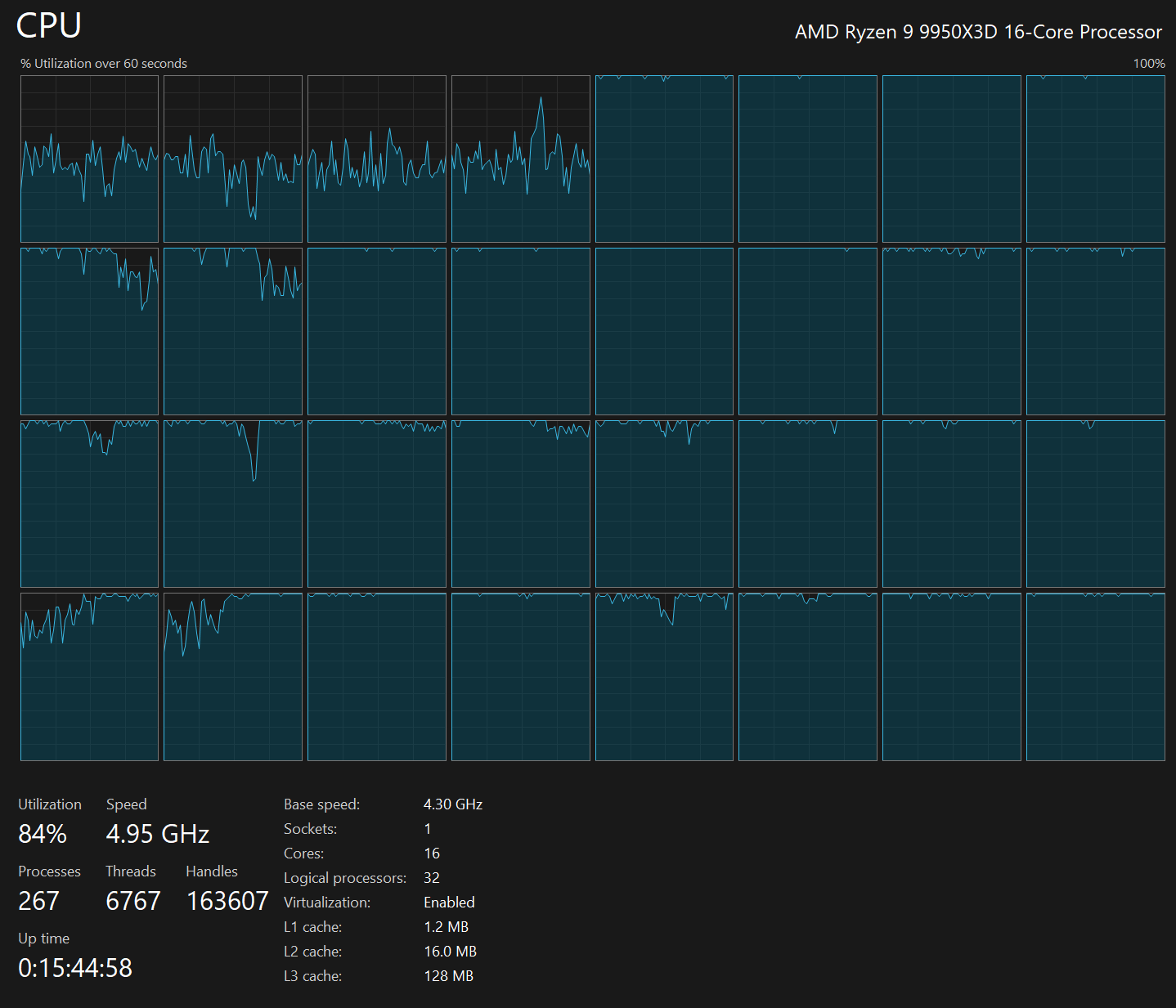
1768053561278.png
 
Last edited:
OK, I have been running with this overnight. I am thrilled with my results, and probably will not make a lot of changes.

What I am seeing is the points on the GPU are similar (possibly slightly lower) to when I was using my N-2 strategy.

To explain:

N-2, where N is the number of REAL CPU cores. So for my 9950X3D, I set my folding to 16-2 at 14 cores. The GPU gained far more PPD than the CPU lost. There were losses though. Somewhat following the thread on foldingathome.org, I added a step to my thinking reserving X CPU cores. I wanted to reserve 1 real core for the GPU at all times, and the general guidance was to reserve 1 CPU core for system tasks.
I wanted those cores to be real cores, and I also reserved their associated HT cores. Also now that I am counting HT cores so N is now 32 not 16.

In summary N-2 becomes N-2X. 32-2(2)=28.

9950X3D - CPU0-3 for Core 0x27 (GPU), and CPU4-31 for Core 0xa8 and oxa9(CPU)
10700K - CPU0-3 for Core 0x27 (GPU), and CPU4-15 for Core 0xa8 and oxa9(CPU)

I am seeing the significant gains of reserved REAL CPU cores for my GPU Folding
I am keeping most of my speed of my CPU folding.

My RTX5080 is now 21-25MPPD, around a 3MPPD gain over no reserved cores.
My 9950X3d is now 1.2-1.4MPPD, only giving up 100KPPD vs no reserved cores, but gaining as much as 500KPPD vs my original N-2 method.
AND it can be done in Windows using Process Lasso.

I know GPU is king, and many just run GPU for the massive PPD you can get. Sure I fold for points, but the cause has priority too, #everyWUmatters. So I do try to get those CPU WUs done too.

I'd love if someone else confirms these gains.
 
Last edited:
Process Lasso is pretty easy to set up.

I used default settings for the install, started it up.
I sorted by CPU usage, and 0x27 and 0xa8 floated to the top.

Right click the process, select affinity
At this point you can choose between Setting and Always.
Current is just for now, the settings are lost on a restart of the process or the computer.
Always is Always, the settings are still applied after a restart.
I did the first for some quick testing, but did Always after an couple WUs
The next submenu is something like select and a list of every core, go for select, and a page opens listing all your cores with check boxes.
Save
This process gets you through the WUs that were running, but far more rare 0xa9 cores probably were not running
Go to the menu at the top
File/Manually Edit Configuration
Look for
DefaultAffinitiesEx=fahcore_27exe,0,A-B,fahcore_a8,0,C-D
A-B and C-D are the cores you set to reserve, so mine was
DefaultAffinitiesEx=fahcore_27exe,0,0-3,fahcore_a8,0,4-31
edit this line to add cores as necessary, e.g.
DefaultAffinitiesEx=fahcore_27exe,0,0-3,fahcore_a8,0,4-31,,fahcore_a9,0,4-31
save and exit the editor.

Go back to your Folding Web Client and set CPU cores to whatever you elected to have (e.g. 28 for my 9950X3D)
Save, and enjoy GPU and CPU folding not crippled by each other.
 
Last edited:
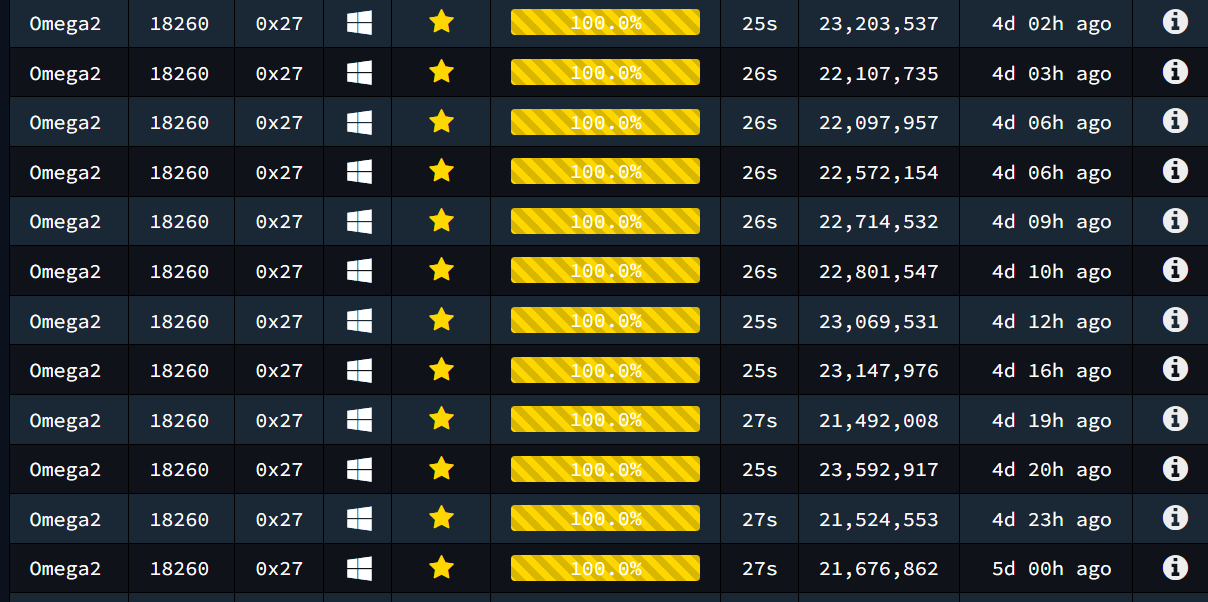
I went back through my logs, sorted by just my RTX5080 and then selected a single common project. Recently Project 18260 is very common, and for my rig they process really fast, so I have a lot of data.

From 4 days ago before I started playing with reserved cores:
1768147376373.png


And now the last 24 hours with reserved cores:
1768147431120.png


Some WU do better, but this is a good snapshot of what kind of gains can be made. They are only modest for this project and also 18261, but they are there. They get bigger with other projects.
 
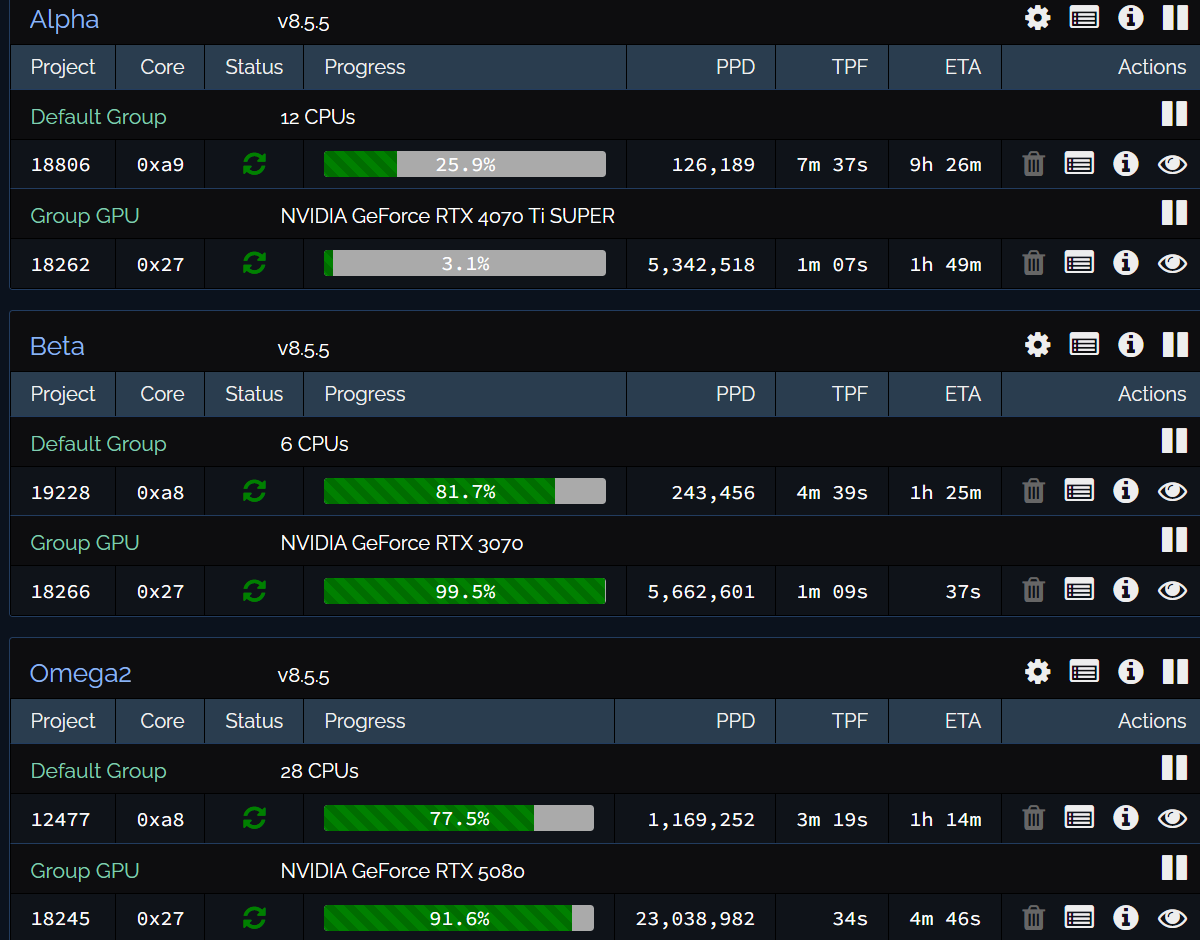
Tidbit I picked up from the FAH forums....

The CPU core gets interrupted because available cpus fluctuates.
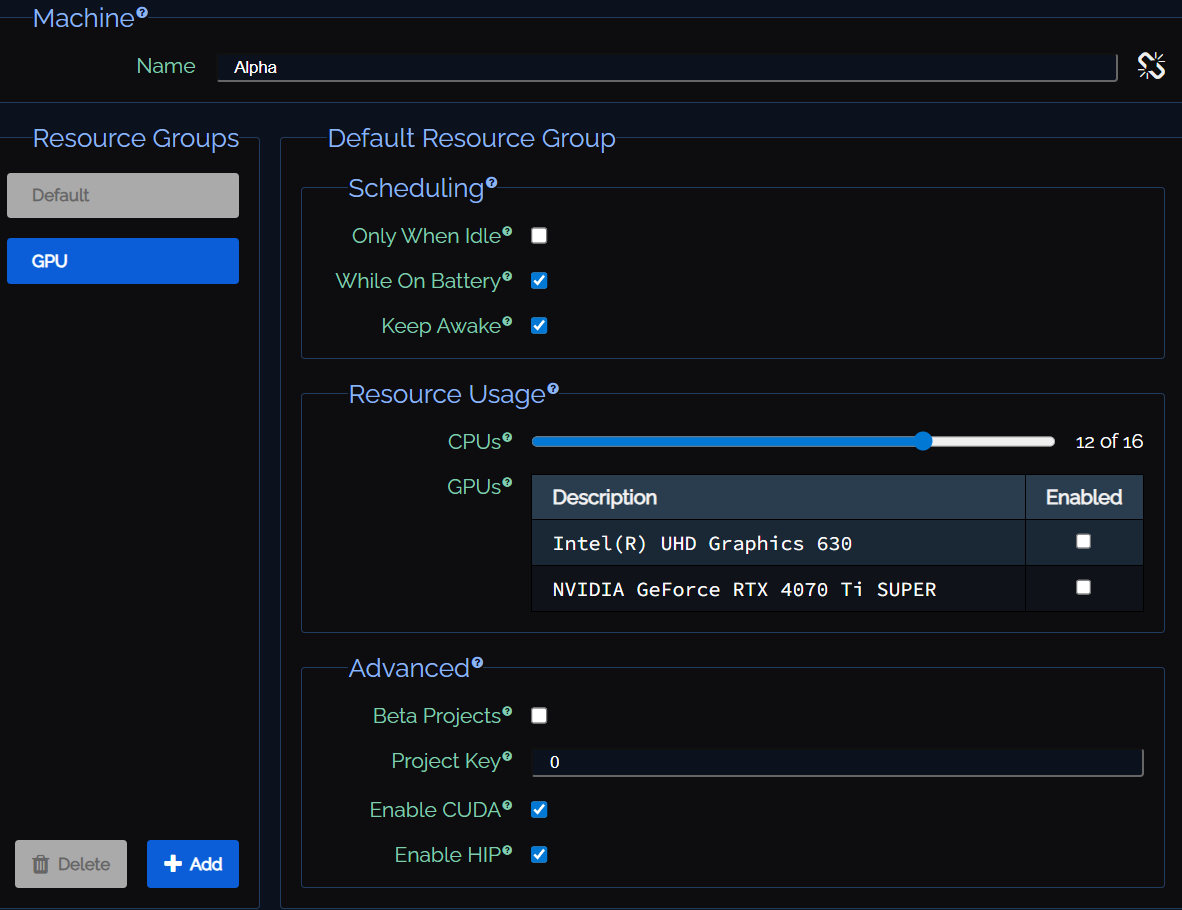
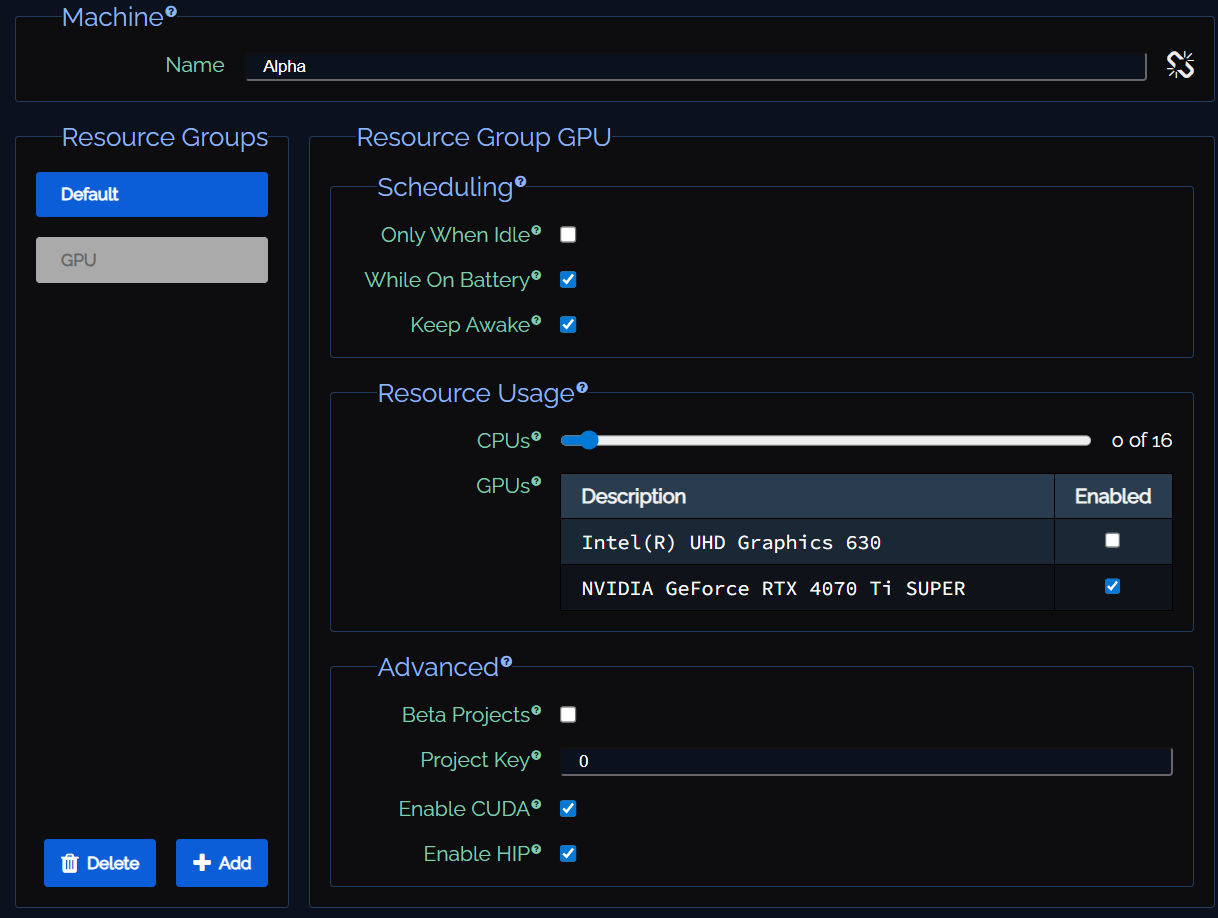
To avoid this, use resource groups in web control config.
(click padlock at lower right of config panel)

Set cpus to zero in a separate group for your gpus.
Only allocate cpus in one group, which has no gpus.

And now I can pause/finish/resume my CPUs independently of my GPUs, or I can still do the whole machine.
1768337403137.png

1768337444398.png

1768337474396.png


Not actually useful for the original topic, but still useful to all of us.
 
Oh and I am now testing GPU to Cores 0-31, and keeping CPU to cores 4-31. No effect on CPU, but minor gain on GPU due to having all cores available for sanity checks. shaves about 1 second per frame off a 18260.

I think this is the setup I go with.
 
I'm getting 91K PPD on project 19228. i5-10400 (stock speed, turbo boost disabled) with 6 (12) cores enabled on Ubuntu 24.04. Your i7-9700K with 6 (8) cores enabled is getting 243K PPD (2.5x) on project 19228. I would think performance would be similar between Comet Lake and Coffee Lake. Do you have turbo boost enabled? Any specific tweaks? I've tried enabling only 4-5 cores and that doesn't seem to make a difference.

I'm getting higher PPD on the non-1922x projects. All of the 1922x projects are slow. 19227, PPD is 89K. 19229, PPD is 63K.
 
Last edited:
I'm getting 91K PPD on project 19228. i5-10400 (stock speed, turbo boost disabled) with 6 (12) cores enabled on Ubuntu 24.04. Your i7-9700K with 6 (8) cores enabled is getting 243K PPD (2.5x) on project 19228. I would think performance would be similar between Comet Lake and Coffee Lake. Do you have turbo boost enabled? Any specific tweaks? I've tried enabling only 4-5 cores and that doesn't seem to make a difference.

I'm getting higher PPD on the non-1922x projects. All of the 1922x projects are slow. 19227, PPD is 89K. 19229, PPD is 63K.
Turbo clocks are on, XMP is on but limited to 2933Mhz, using a SATA SSD. Ubuntu 24.04.3 LTS. 6 Cores to CPU, but all cores are real cores on a 9700K, no HT support on that chip.

As soon as I get another B560M board I will move that rig to my other 10700K.

DRAM and PCIe bandwidth matters a lot for GPU folding and the z390 board in that rig only gets PCIe 3 at x8. By moving it over I should get DDR4 3200, and PCIe 3 x16. It should be me a couple hundred thousand PPD.

That 9700 is a beast, it out performs my 10700 on some WUs. But generally the 10700 is better, so having 2 10700 rigs will be better.

Turn on turbo and check your DDR speeds
 
Last edited:
It's a Dell Inspiron 3880 tower. I had to disable turbo boost to keep the CPU fan from running full speed. It only has a CPU fan with a shroud venting to the rear of the case. No GPU folding. It only has a 200W PSU with no PCIE connectors. Best GPU it will take is a GTX 1650 (75W).

I checked the RAM speeds, and they are running at 2666 to match the CPU. Both sticks are DDR4-3200, 1x8GB and 1x4GB.

RAID mode was enabled in the BIOS. I changed it to AHCI mode since I'm only running a single drive. PPD increased 5% for all projects.
 
Last edited:
In Intel, RAM speed is usually limited by the CPU, I don't know for non-K products, but I can set any ram speed I want. It just might not work, overclocking = MMV. This is why that z380 is only at 2933 with 3200 in it, the 9700 refuses to fold anything reliably over 2933. My 10700s are also limited to 2933, but are happy up to 3600, I just don't have an extra set of 3600 to stick in Beta when I upgrade the MB so 3200 will have to do. Other than that, I agree, you're probably done unless you do extreme old-school [H] '90s things like cut a blowhole, or cut an even bigger hole and put a tower heatsink sticking out of the case.

I just noticed 8 and 4? Dual channel or single channel. Dual channel, that might work great, but single channel can kill PPD. Dual channel is the way to go, but I bet you need matched in size sticks to get them to work, and a matched pair to get them to run at high clock rates.
 
I just noticed 8 and 4? Dual channel or single channel. Dual channel, that might work great, but single channel can kill PPD. Dual channel is the way to go, but I bet you need matched in size sticks to get them to work, and a matched pair to get them to run at high clock rates.
I was thinking the RAM (12gb) might be a bottleneck. It came from Dell this way (via ebay). It's in Flex Mode, first 8gb is dual channel and the last 4gb is single channel. I may pull out the 4gb stick to see if running single channel is better. I have another 8gb stick in another Dell Inspiron, but it's 2400 speed.

What Is RAM Flex Mode and How Does It Work?
 
Last edited:
I was thinking the RAM (12gb) might be a bottleneck. It came from Dell this way (via ebay). It's in Flex Mode, first 8gb is dual channel and the last 4gb is single channel. I may pull out the 4gb stick to see if running single channel is better. I have another 8gb stick in another Dell Inspiron, but it's 2400 speed.

What Is RAM Flex Mode and How Does It Work?
That all sounds very not optimal
 
16G of dual 2400 is probably the best you can do.... my god that's a terrible setup. I am betting those WUs that are so slow are occupying enough ram that you are single channeling the active memory folding and killing your PPD.
 
16G of dual 2400 is probably the best you can do.... my god that's a terrible setup. I am betting those WUs that are so slow are occupying enough ram that you are single channeling the active memory folding and killing your PPD.
16Gb of dual 2400 (2x8) is slower than 12Gb of flex dual 3200 (8+4). Ubuntu is using 2.5Gb, most likely on the first 8Gb.

PPD for all projects increased by 5-20% after the RAID to AHCI disk mode change. Project 19228 increased from 91K to 110K.
 
Last edited:
So today my windows install on my laptop took a crap. Good thing it is dual boot. I was feeling kind of down, and in a few days I'll have to reinstall.

In the mean time, just to feel better, I figured I would share some pr0n.........

Sunday I rebuilt Omega2 into a Corsair 5400 triple chamber mid tower with the best RGB and AIO Corsair sells. Don't ask how much it cost, it's too much. It's not the best use of space, it's not the quietest, it's not the coolest, but D4MN it looks good. With moving the CPU cooling off to it's own chamber the GPU does not heat the CPU and the CPU does not heat the GPU. Both are running MUCH cooler. CPU from 90C to 70C, GPU 85C to 65C. While I was never thermal throttling, I was limiting my boost clocks. So I gained a couple hundred MHz on both my CPU and GPU.

On to the pr0n

PXL_20260119_230056887.jpg


PXL_20260119_230115454.jpg


And that is under FULL folding load....
 
Last edited:
The new mainboard so I can put my second 10700K into beta finally made it to........

Yeah literally less than 10 miles from me just across the river, but there is a foot of snow and it's Sunday. Maybe just maybe I get it tomorrow, but if I am to install it, I would have to take down Beta during the competition.... it's a dilemma that's for sure
 
There are not enough symbols on my $%^ing keyboard for all the curse works I just used.

Seems under Ubuntu 25.10 Gnome helplully REMOVED any possible normal way to run commands on startup and/or login. For FZXCKs SAKE it's my computer if I want to run a startup command that needs sudo, let me do it, it's my computer.

in any case setting affinity Works... but I have to run the script each and every restart of the computer. init.d nope, usr/local/bin nope, startup applications removed. There is an autostart feature, but not useful if you need sudo.

I spent 2 hours bashing my head against Ubuntu. I want those hours back.
 
Last edited:
<Security freaks and Linux enthusiasts look away now>
<you have been warned>

OK after another hour of tinkering with Ubuntu, and accepting that any option other than granting the user SU by default (yep, password free) and then logging the user on (also without a password). I got it working, if it is not persistent, I will have to make some changes to the script.

fah_affinity.sh

#!/bin/bash
sudo taskset -acp 3-15 $(pgrep FahCore_a)

fah_affinity.desktop

[Desktop Entry]
Type=Application
Exec=sh -c "sleep 60; /home/<USER>/fah_affinity.sh"
Hidden=false
Name=Startup Script
Comment=Sets CPU affinity for FAH workunits
Terminal=true

edit fah_affinity.sh to correct processor affinities
sudo taskset -acp <A>-<B> $(pgrep FahCore_a)
where <A> is the first CPU core to be used
where <B> is the last CPU core to be used
copy fah_affinity.sh to /home/<USER>
where <USER> is the user that will be granted SU privilage
CHMOD +x fah_affinity.sh
edit fah_affinity.desktop to correct <USER> path
copy fah_affinity.desktop to /.config/autostart

To grant a user root privileges without a password in Ubuntu 25.10, edit the /etc/sudoers file using:

sudo visudo and add <USER> ALL=(ALL) NOPASSWD: ALL to the end of the file.

reboot

done

All that frigging nonsense to run ONE line of code on the terminal. I hate you Gnome.
 
After some research, taskset is NOT preserved when the core restarts.

So it looks like fah_affinity may need to look something like this:

#!/bin/bash
COUNT=1
sleep 60
# Loop until the condition ([ $COUNT -gt 5 ]) is true
until [ "$COUNT" -gt 2 ]; do
sudo taskset -acp 4-15 $(pgrep FahCore_a)
sleep 300
# Do not Increment the counter
#((COUNT++))
done

This should wait 1 minute and then run the taskset command every 5 minutes until.... well forever, because the counter never counts.
 
Last edited:
OK, progress made. Knowing that it would exit after run, and new processes did not inherit affinity, when I was using normal service methods of running the script. It would run, not find the process, exit, and sometime after that the client would start folding.

The script with the sleeps and until count (not counting) works. I then moved it back to /usr/local/bin and registered it as a service. I also removed the .config/autostart/fah_affinity.desktop file. Crossed my fingers and rebooted.

Success.

So now I undid the changes I made with visudo, and I can probably disable the auto login.

I hate how something simple can become a complete PITA in linux. Now to figure out remote desktop/remmina... I had it working until the first reboot. (For reference, I gave up trying to remote into Beta)
 
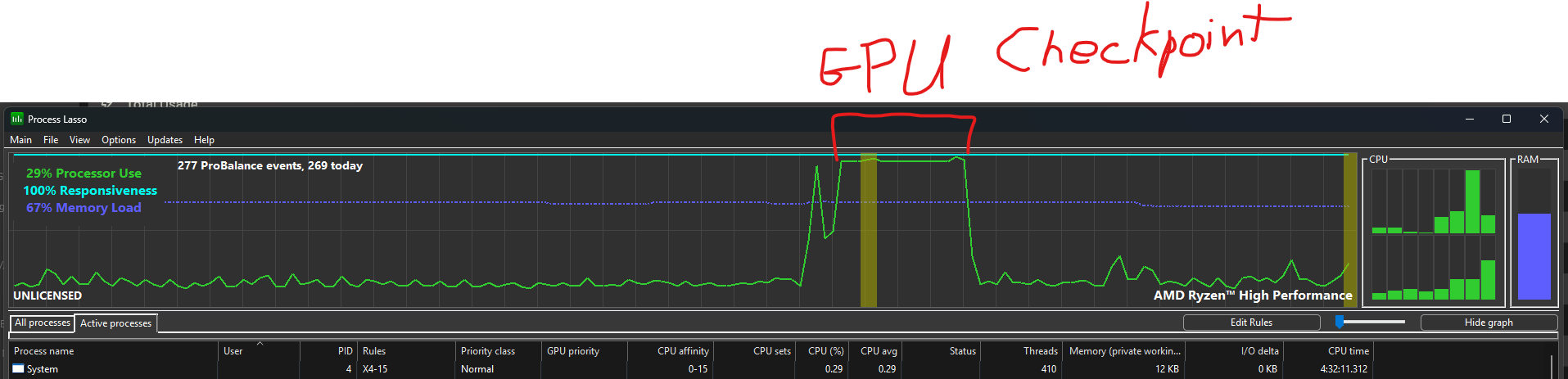
I tried Process Lasso for F@H and folding with the CPU (Win11). I have a 5800X and an RX 9700. What I found was my PPD dropped when folding with CPU and GPU. I tried the affinity thing as you detailed above, but that caused a further drop in PPD. I started watching Process Lasso and saw that when GPU hits a checkpoint, it uses all available CPU power for a few seconds. That few seconds dented my PPD pretty good when CPU was actively folding and elongating that checkpoint process. So, I can choose between greater variety of WU and suffer a sizable PPD hit, or fold on GPU only. The screenshot with "GPU checkpoint" was when I had cores 0-3 reserved for core_27. I'm not sure if a higher core count CPU would gain more PPD (diminishing return I think) by processing that quicker. I think I would need a 16 core CPU with 8 physical cores for GPU and 8 for folding.
 

Attachments

  • Process Lasso with 5800X &n RX 9700 GPU checkpoint.png
    Process Lasso with 5800X &n RX 9700 GPU checkpoint.png
    56.6 KB · Views: 0
  • Process Lasso with 5800X &n RX 9700 GPU checkpoint all cores available #2.png
    Process Lasso with 5800X &n RX 9700 GPU checkpoint all cores available #2.png
    88.4 KB · Views: 0
  • Process Lasso with 5800X &n RX 9700 GPU checkpoint all only cores 0-3 available #1.png
    Process Lasso with 5800X &n RX 9700 GPU checkpoint all only cores 0-3 available #1.png
    108.3 KB · Views: 0
  • Process Lasso with 5800X &n RX 9700 GPU checkpoint all only cores 0-3 available #2.png
    Process Lasso with 5800X &n RX 9700 GPU checkpoint all only cores 0-3 available #2.png
    209.5 KB · Views: 0
Last edited:
WU 12137 is a whole different beast, it barely asks anything from the CPU, just a very brief spike. I think this is a newer WU since I don't recall seeing PPD this low over the past several months.
 

Attachments

  • Process Lasso with 5800X &n RX 9700 GPU checkpoint all cores available WU 12137.png
    Process Lasso with 5800X &n RX 9700 GPU checkpoint all cores available WU 12137.png
    542.3 KB · Views: 0
Last edited:
Proj12137.png


Definitely not a good work unit. That's on a Radeon 6750xt. Slowest one I've come across so far and it's running on a rather old core as well.

As to your previous post, it depends on the work unit. A few of the work units each up CPU badly for checkpoints. It's annoying as shit because it practically brings the machine to a halt until it's done writing the checkpoint. I think they need to look into those to see what they can do. A few others hit the CPU hard for checkpoints but it's normally only for a split second rather than 5-8 seconds on a Ryzen 5800x that's not folding on CPU.
 
This core affinity thing might be more of a nvida specific thing. I did come across it on a nvidia specific part of the FAH forums. I do see a 5 second spike in CPU every 5% of the WU as it performs a sanity check. if you look back 5 posts or so, you can see a single core jump to 100% between 20 and 15 seconds (history time). That WU must only use just 1 core for the sanity check, others use the whole CPU, but I do not see the penalty in PPD that you mention.
 
here is another sanity check. Different WU, all cores jump to 100%, but very brief, and doesn't affect CPU PPD. Still very typical of an nvidia WU.

Screenshot From 2026-01-29 06-57-04.png
 
here is another sanity check. Different WU, all cores jump to 100%, but very brief, and doesn't affect CPU PPD. Still very typical of an nvidia WU.

View attachment 782283
Right, it hardly affects CPU PPD, but it noticeably drops GPU PPD when they don't get full CPU attention for that checkpoint. Good to know that it isn't any different with Nvidia. I noticed loss of PPD when folding on CPU and GPU previously, but it was not as quantifiable as it is with the RX 9700 and Process Lasso highlighting WU behavior.
 
I cannot imagine that using the 7.4.9 client makes much difference. As I said it could be the nvidia vs radeon. Are you setting the 0x27 to just a single cpu or are you letting 0x27 run on all cpus and just limiting 0xa8 to limited cores? All I am setting is cpu only. GPU is allowed to use everything it wants. I am definitly seeing the GPU taking only a minor hit (<5%) and getting CPU with a hit based on how many cores I gave up. For a 8c/16h core it's about 25%, and for my 16c/32h it's around half that. I can fold both, and have definitely seen overall gain in PPD, but then I have always folded both GPU and CPU, and just accepted the hit.
 
This core affinity thing might be more of a nvida specific thing. I did come across it on a nvidia specific part of the FAH forums. I do see a 5 second spike in CPU every 5% of the WU as it performs a sanity check. if you look back 5 posts or so, you can see a single core jump to 100% between 20 and 15 seconds (history time). That WU must only use just 1 core for the sanity check, others use the whole CPU, but I do not see the penalty in PPD that you mention.
Maybe with CUDA the checkpoint process is handled differently and you don't see the PPD loss like with an RX 9700. I posted that I was "giving her all she's got Captain" and it was after I had started CPU folding that I noticed the PPD drop. I saw 3 mil PPD and thought that was strange so I lowered OC settings on GPU and it didn't improve things from what I had seen regularly before. I halted CPU folding and PPD went back up to more or less what had been normal for the past few weeks. Then I tried the Process Lasso thing you posted about and realized that when CPU is folding it adds a couple more seconds per checkpoint which drags PPD down for GPU. Obviously in the grand scheme of things that is not a huge deal, but when time is points, it seems to affect an RX 9700 tangibly.
 
I cannot imagine that using the 7.4.9 client makes much difference. As I said it could be the nvidia vs radeon. Are you setting the 0x27 to just a single cpu or are you letting 0x27 run on all cpus and just limiting 0xa8 to limited cores? All I am setting is cpu only. GPU is allowed to use everything it wants. I am definitly seeing the GPU taking only a minor hit (<5%) and getting CPU with a hit based on how many cores I gave up. For a 8c/16h core it's about 25%, and for my 16c/32h it's around half that. I can fold both, and have definitely seen overall gain in PPD, but then I have always folded both GPU and CPU, and just accepted the hit.
I was experimenting last night for a bit and core 27 at least wants all it can get for CPU processing. I set folding to 8 cores on CPU so I have headroom for GPU since the old advice was one physical core reserved per GPU. However, every time I reduced the number of CPU cores for CPU folding (8 to 4 to 2 logical), PPD would go up because that GPU checkpoint time was reduced and the CPU PPD was not enough to offset the GPU loss using 4 CPU physical cores (8 logical) for folding and the other 4 physical cores for GPU and everything else.
 
On a minor upside my B560M showed up. I took down Beta, and installed it with my spare 10700K. Another New-old stock Chinese board, another win. That massive Cryorig cooler is an interference fit with the RAM and the GPU, but not worrysome. Everything booted fine, started up Ubuntu 24.04.3 LTS. The RAM now runs 3200 vice 2933, and the GPU has 16 lanes of PCIe 3, so both bottlenecks fixed. Using what I learned from Gamma, I created and installed my service script. Fixed all my RDP/Remmina issues. I then fired it off, and everything works as intended. Now what to do with a 9700K and a mainboard that will only run ram at 2933? Keep in spares most likely. That 9700K with 8 real cores but no HT is a beast, but hardly worth the effort to bring it's 250-275 KPPD online.
 
<Security freaks and Linux enthusiasts look away now>
<you have been warned>

OK after another hour of tinkering with Ubuntu, and accepting that any option other than granting the user SU by default (yep, password free) and then logging the user on (also without a password). I got it working, if it is not persistent, I will have to make some changes to the script.

fah_affinity.sh

#!/bin/bash
sudo taskset -acp 3-15 $(pgrep FahCore_a)

fah_affinity.desktop

[Desktop Entry]
Type=Application
Exec=sh -c "sleep 60; /home/<USER>/fah_affinity.sh"
Hidden=false
Name=Startup Script
Comment=Sets CPU affinity for FAH workunits
Terminal=true

edit fah_affinity.sh to correct processor affinities
sudo taskset -acp <A>-<B> $(pgrep FahCore_a)
where <A> is the first CPU core to be used
where <B> is the last CPU core to be used
copy fah_affinity.sh to /home/<USER>
where <USER> is the user that will be granted SU privilage
CHMOD +x fah_affinity.sh
edit fah_affinity.desktop to correct <USER> path
copy fah_affinity.desktop to /.config/autostart

To grant a user root privileges without a password in Ubuntu 25.10, edit the /etc/sudoers file using:

sudo visudo and add <USER> ALL=(ALL) NOPASSWD: ALL to the end of the file.

reboot

done

All that frigging nonsense to run ONE line of code on the terminal. I hate you Gnome.

You probably want to look into making a systemd service that starts after the fah-client service.

Using systemd will fix your issues with su.
 
Back
Top