• Some users have recently had their accounts hijacked. It seems that the now defunct EVGA forums might have compromised your password there and seems many are using the same PW here. We would suggest you UPDATE YOUR PASSWORD and TURN ON 2FA for your account here to further secure it. None of the compromised accounts had 2FA turned on.
    Once you have enabled 2FA, your account will be updated soon to show a badge, letting other members know that you use 2FA to protect your account. This should be beneficial for everyone that uses FSFT.

What Mouse and Keyboard Are You Using Right Now?

I’m guessing they’re LGBTQ+ switches. 🏳️‍🌈 They’re all the colors of the rainbow, tactile while smooth, clicky while silent. Also halo and panda and kangaroo. They also have north and south facing led cutouts so you can always be blinded by the LEDs, as well as being half box so your caps are both wobbly and stable at the same time. I believe they are also bundled with some foam so you can dial in the right amount of ping as well as thocc.
Who cares about typing comfort or usefulness when you've got all that ;).
 
View attachment 811086


Can't be any worse than the Browns on my LOL Logitech. This will be my first optical keyboard. I tried out the Razers at Walmart they feel really cheap.

I use this keyboard for work. I like it. It's fully linear, no dampening, higher actuation and less force required than traditional keyboards. I bought it right when it came out and used it for a couple years as my main keyboard until Corsair came out with their hall effect magnetic version.
 
I use this keyboard for work. I like it. It's fully linear, no dampening, higher actuation and less force required than traditional keyboards. I bought it right when it came out and used it for a couple years as my main keyboard until Corsair came out with their hall effect magnetic version.
I just plugged it in like a hour ago it took me about a hour to figure out how to disable or overwrite the default startup profile. I wonder if that is the reason why they sold it on ebay? I had to update icue to get the software to work otherwise it wouldn't even detect the keyboard.
 
Last edited:
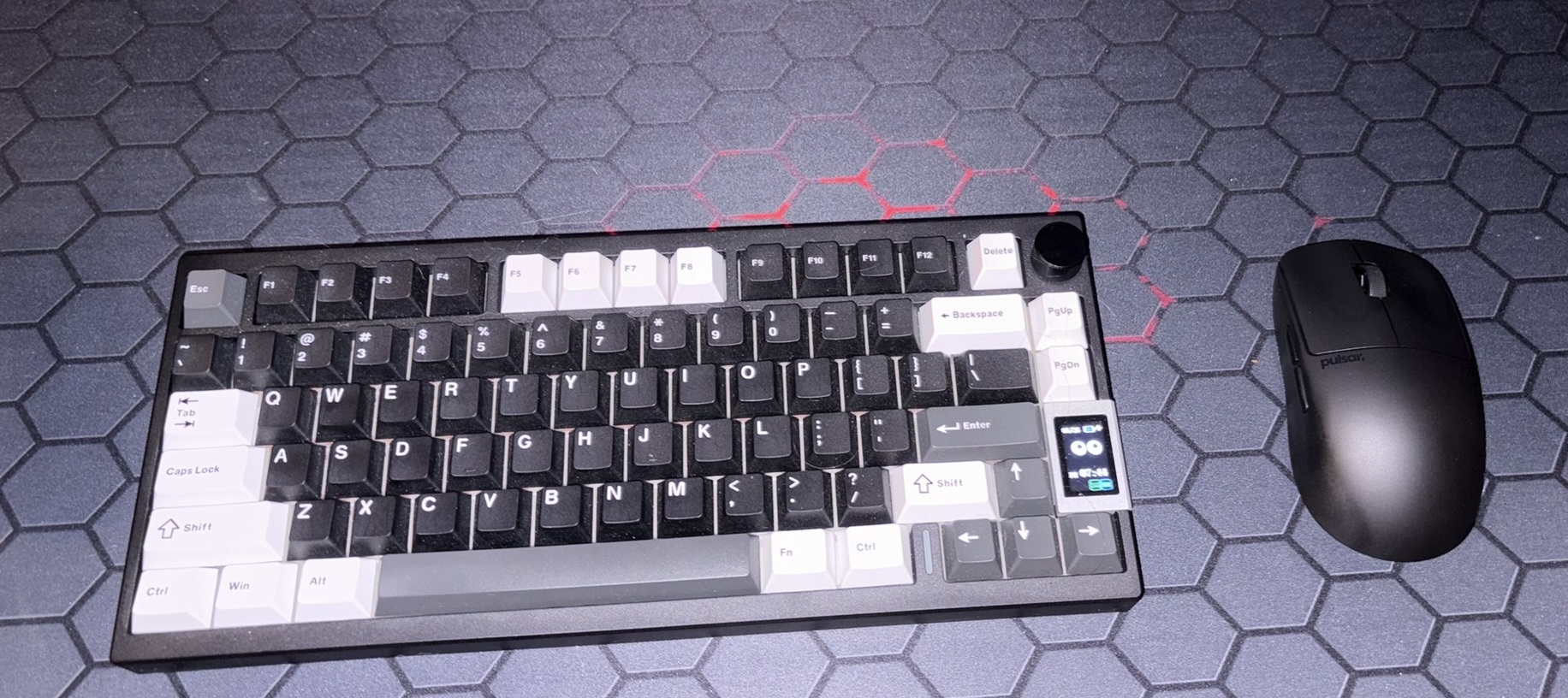
Yunzii AL80, Pulsar X2 crazy light. The Keyboard is heavy AF! about 3lbs. All Aluminum case! Mouse is exactly like it sounds! Crazy light! but doesn't feel cheap or flimsy!
 

Attachments

  • IMG_4036.JPEG
    IMG_4036.JPEG
    544 KB · Views: 0
So I posted a while back that I had gone to the Nuphy Air75 V3 primarily due to its volume knob + tri-mode connectivity + battery life.

I ended up liking it so much that I also bought their Node75, which is essentially just a less expensive version of the Air75. It carries over the RGB backlighting, is lighter, and substitutes a "touch strip" for the volume knob...which I actually ended up liking better. The dotted area above the PrtSc/Ins/Del keys is touch sensitive and lets you map various functions to it. I used the strip as a volume slider, and found it really intuitive to just slide a finger from left to right (or vice versa) to control the system volume.

Nuphy_Node75.png


I had been curious to try their Hall Effect keyboard, so thanks to a well-timed summer sale coupon I also added the Air75 HE to the stable:

Air75HE-1.png

Air75HE-2.png


This thing is really nice. Keychron doesn't seem to make a TMR board with low profile switches yet, and I'm meh on most boards from Logitech and Corsair, so looks like I'm a Nuphy guy for the foreseeable future. Still love my S1s, though.
 
So I posted a while back that I had gone to the Nuphy Air75 V3 primarily due to its volume knob + tri-mode connectivity + battery life.

I ended up liking it so much that I also bought their Node75, which is essentially just a less expensive version of the Air75. It carries over the RGB backlighting, is lighter, and substitutes a "touch strip" for the volume knob...which I actually ended up liking better. The dotted area above the PrtSc/Ins/Del keys is touch sensitive and lets you map various functions to it. I used the strip as a volume slider, and found it really intuitive to just slide a finger from left to right (or vice versa) to control the system volume.

View attachment 812203

I had been curious to try their Hall Effect keyboard, so thanks to a well-timed summer sale coupon I also added the Air75 HE to the stable:

View attachment 812205
View attachment 812206

This thing is really nice. Keychron doesn't seem to make a TMR board with low profile switches yet, and I'm meh on most boards from Logitech and Corsair, so looks like I'm a Nuphy guy for the foreseeable future. Still love my S1s, though.
I've been using my Air75v2 as my daily driver for, I dunno, a couple of years now, it feels like. What's TMR?
 
I've been using my Air75v2 as my daily driver for, I dunno, a couple of years now, it feels like. What's TMR?
Just a different (supposedly, superior) technology for the electrical/magnetic switching. In a nutshell:

https://www.keychron.com/blogs/news/tmr-vs-hall-effect-what-s-the-difference-in-magnetic-keyboards

Keep in mind that link is from Keychron's page, who only sell TMR boards though, so the pros and cons are likely to be overemphasized just like with any other list like that.
Personally, I take all of this marketing speak from most of these companies with a huge grain of salt after living through decades now of all of the gaming peripheral manufacturers acting like every new development is some killer feature that will be transformative to your experience. Not saying there aren't benefits to the technology, but don't let anyone tell you it's something you need. It's a "nice to have" once you've tried most other things. I could swap back in a stock Dell membrane keyboard and work & game just fine if I had to. Did it that way for years. I just like nice keyboards (because it's something you interact with so much as one of the primary interfaces) and enjoy trying new things from time to time.
 
Well, that's a bummer.

I bought my rather pricy aluminum case for my WASD Keyboards Code V3 with Cherry MX Green switches, because I was expecting to be able to find replacement boards whenever I needed them, so I was thinking it was a long term investment.

Well..

WASD Keybaords seems to be defunct. Their website has been down for a year now. I'm saddened. Their keyboards are some of the best I've ever used.
 
Yeah, it's a shame. Seems like they quietly just sort of went away. Great keyboards (I have a Code with MX Clears myself) but I would think that it would be a challenging business model with so much competition out there. I'm not really sure what made them stand out other than build quality, though (and catering their marketing towards programmers, I guess?) so I'm not too upset knowing that there are plenty of others who (for me) can fill that void.

You probably already stumbled across this, but for anyone else interested: https://discourse.codinghorror.com/t/what-happened-to-wasd-keyboards/10143/4
 
dang.. now I have to do an engineering equivalency evaluation for new keyboards on one of my systems at work. I used WASD Code keyboards for our entire nuclear security system. :bigtears:
 
Gentlemen it is with great pleasure I inform you I replaced the dodgy right click micro-switch on my Logitech G500 laser mouse. such soldering... much skills? whatever... old microswitch was a real pain to desolder but I got there and didn't break anything all in all pleased with the results.

edit.. dang it I think I need to order a new ribbon cable for the side buttons as forward and center side button work but back side button is currently not working... oh well a new cable is ~$11.. I did notice the ribbon cable connector was looking a bit ~iffy when I was working on this yesterday..


1783536773837.jpeg
1783536798338.jpeg


1783536156966.png

1783536962542.png
 
Last edited:
Gentlemen it is with great please I inform you I replaced the dodgy right click micro-switch on my Logitech G500 laser mouse. such soldering... much skills? whatever... old microswitch was a real pain to desolder but I got there and didn't break anything all in all pleased with the results.

edit.. dang it I think I need to order a new ribbon cable for the side buttons as forward and center side button work but back side button is currently not working... oh well a new cable is ~$11.. I did notice the ribbon cable connector was looking a bit ~iffy when I was working on this yesterday..


View attachment 814057View attachment 814058

Oh man. I loved my G500. I miss that mouse so much. I wish I had bought like 10 of them at a discount when they were being discontinued.

I see yours held up much better than mine had by 2019 when I had to retire it due to a bad cable. I could have re-cabled it, but the top of the mouse was so worn at that point that I deemed it not worth rescuing. It was the right call at the time, but it took me some years to find a replacement I really liked, and I still wish I could have a G500 in good shape. It fit my large hands (well,at least my mouse hand) perfectly, tracked really well, and looked fantastic while doing it.

My MX518 relaunched version mice are a close second though, especially after cracking them open and adding some tungsten putty to give them a little bit more weight and stability. At least I bought enough of those to last me for the rest of my life when they were at EOL sale prices of ~$20.
 
Last edited:
I am using my Logitech G110/G13/G600 setup. I've got at least 1 backup for each so I guess this will probably be my forever setup, lol. I refurbished my G600's with Red Kailh GM 4 switches before I recently found a long forgotten G600 NIB in the closet so I am definitely good there. As long as the LGS software keeps working properly I'll stay put I guess.
 
I've actually been using my Ergodox some lately, and been reminded of things I turned out not to like about it, that I hadn't heard about before I bought it. Oh well.

I'm partway through 3d printing a Manuform Dactyl case, and trying to figure out where I stored all my switches to build a keyboard out of it; we'll see how that goes.
1785344620595.png

1785344642402.png
 
Back
Top