• Some users have recently had their accounts hijacked. It seems that the now defunct EVGA forums might have compromised your password there and seems many are using the same PW here. We would suggest you UPDATE YOUR PASSWORD and TURN ON 2FA for your account here to further secure it. None of the compromised accounts had 2FA turned on.
    Once you have enabled 2FA, your account will be updated soon to show a badge, letting other members know that you use 2FA to protect your account. This should be beneficial for everyone that uses FSFT.

50 series hotspot monitoring... unlocked!

arestavo

2[H]4U
Joined
Mar 25, 2013
Messages
2,492
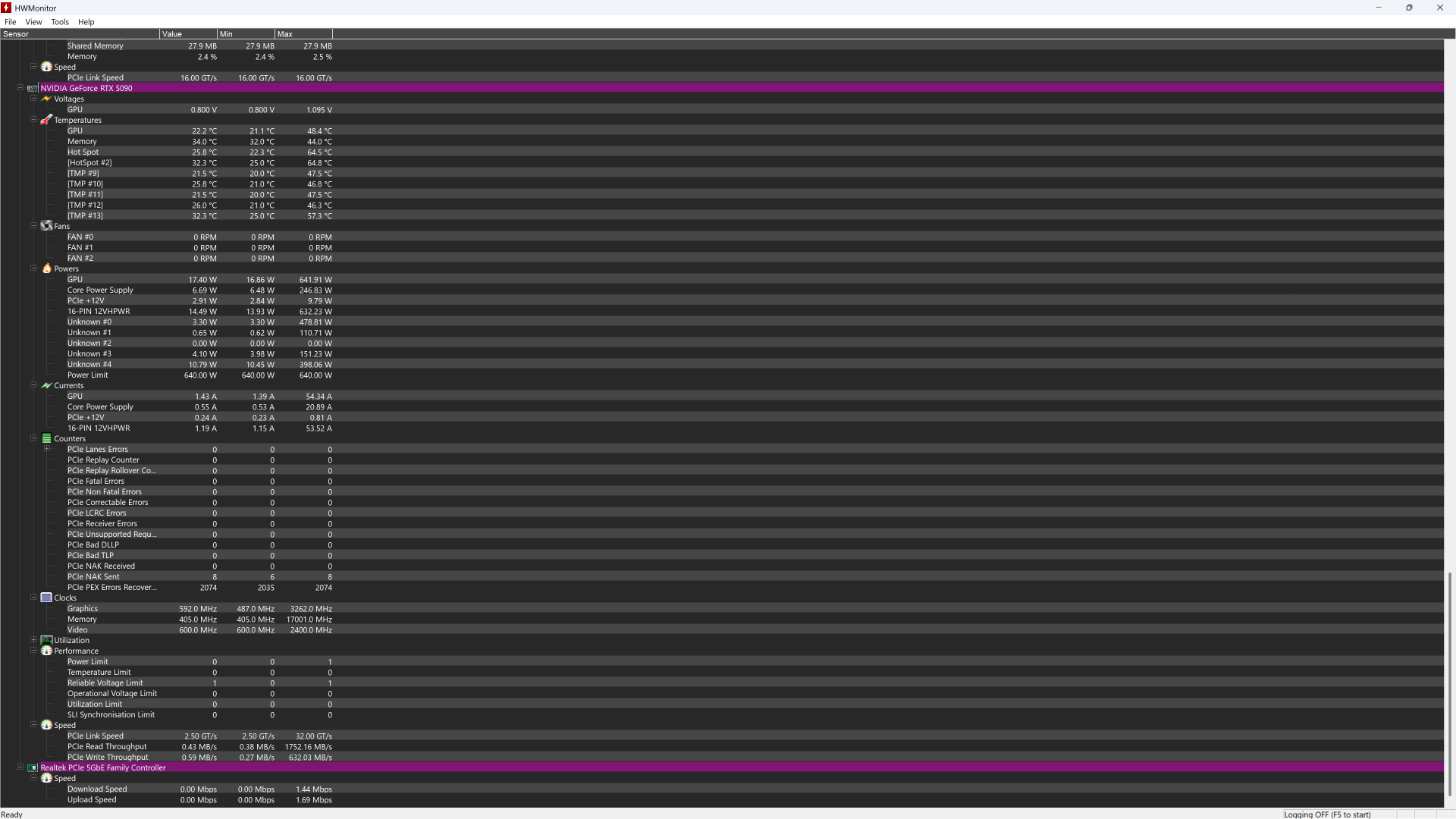
HWMonitor 1.65 has unlocked hotspot monitoring for the 50 series! I've read that HWiFO 64 has it in an alpha or beta build, and I'll be using that once it hits full release.

The downside is that I've found out that my PNY 5090 is hitting just about 100C for the hotspot / hotspot 2 when limited to 500W (attempting to keep electrical bill manageable during the summer heat). I'm assuming that it's thermal pump out since it's a 5090 with its very large die area. In a few days I'm going to replace the thermal paste with a Thermal Grizzly Kryosheet (44x37 sized for the 5090) to ensure no more thermal pump out. Yes, I'll be using the Kapton tape that comes with the Kryosheet.

I'll try to remember to get a snip of the max temps before and after.
 
10 minutes of Furmark. 85% power limit, default fan curve Zotac Core OC 5090

image.png
 
Found HWiFO64 version 8.51 which has a single hotspot, unlike the two that HWMonitor has. This was after 10 minutes of OCCT heavy GPU testing, 75.6F ambient, fully stock power/fans/clocks. Hopefully the Kryosheet will fix that hotspot.
 

Attachments

  • 5090 stock TIM ambient 75.6.png
    5090 stock TIM ambient 75.6.png
    222.8 KB · Views: 0
Thanks for the heads up on the hw monitor. Just checked my FE card and it was max of 84C but I run 1440P vsynched at 120Hz so it rarely goes over 330 watts. Just a shortened run of 3Dmark to see how hot it would get at max power since it's my first look at hotspot temp.
Hotspot.png
 

Attachments

  • Hotspot.png
    Hotspot.png
    2.2 MB · Views: 0
FW 190 used the BMW 801 twin row 14 cylinder radial 42 liters displacement with variants from 1500-2000 HP. Armament was ferocious and varied as well. That one was photographed at Airshow of the Cascades in Madras Oregon.
 
Massive success with this Thermal Grizzly Kryosheet. This was after 11 minutes of OCCT heavy (extreme) GPU testing, 74.7F ambient, fully stock power/fans/clocks. The fans are spinning 500RPM less, and the hotspot maxed out at 82.8C.

OCCT did update, though, to 17.0.11... so it's not 100% apples to apples.

I'm very happy with these results. EDIT: I noticed that the memory junction temp is up a bit - that's likely from better heat transfer and slower fan speeds. The cold plate is the same piece of metal for the VRAM as it is for the GPU die. EDIT2: That seems to be the case, since manually setting the same fan speed as the stock paste job was using (as close as I can get it) nets a 76C (72C stock) memory junction temp, a 77.7C (100C stock) hotspot, and a 68.9C (77.6C stock) GPU temp with a 10 minute OCCT run. However the fans are noticeably loud just as they were with the stock paste job, whereas now when letting it do its own thing they aren't noticeable at all. Just the way that I like it.
 

Attachments

  • 5090 Kryosheet ambient 74.7 OCCT heavy GPU 11 mins.png
    5090 Kryosheet ambient 74.7 OCCT heavy GPU 11 mins.png
    214.4 KB · Views: 0
Last edited:
... Watch out 12VHPWR temp fuse.
I'm running a Thermal Grizzly WireView Pro II, which caught one of my pins pulling more than 10.5A. A new adapter fixed it, and the WireView will scream at me if there's a problem in the future (including input or output temperature issues). Shout out to German engineering for a fix to a problem that should never have been one in the first place.
 
Yea I was eyeing that too but the price is a steep and I don't really need it for my use case. This GPU is super efficient and runs everything I care about at under 350W so I think I 'll be good.
 
HWinfo now has its own on-screen display functionality. However, it also supports passing its info to Rivatuner. So, you can view it while you are gaming.


About 2.5 weeks ago, I dismantled a Zotac 5080 Solid Core, and replaced the paste with Thermal Grizzly Phase-sheet. And replaced the thermal pads with Thermal Grizzly putty.

I also removed the pads from the backplate.

I did this because the stock pads were causing a pretty severe bend in the PCB.

I dunno what the hotspot temp was, before. As this functionality was not available at that time. But, regular temps are down about 4 degrees, fan speed is quite a bit lower with noticeably less noise. And my +200 mhz OC on the core, is more consistent.

Hotspot averages about 7 degrees higher than the regular temp sensor. With momentary spikes to about 10 degrees higher.
And that is a fantastic hotspot behavior.
 
HWinfo now has its own on-screen display functionality. However, it also supports passing its info to Rivatuner. So, you can view it while you are gaming.


About 2.5 weeks ago, I dismantled a Zotac 5080 Solid Core, and replaced the paste with Thermal Grizzly Phase-sheet. And replaced the thermal pads with Thermal Grizzly putty.

I also removed the pads from the backplate.

I did this because the stock pads were causing a pretty severe bend in the PCB.

I dunno what the hotspot temp was, before. As this functionality was not available at that time. But, regular temps are down about 4 degrees, fan speed is quite a bit lower with noticeably less noise. And my +200 mhz OC on the core, is more consistent.

Hotspot averages about 7 degrees higher than the regular temp sensor. With momentary spikes to about 10 degrees higher.
And that is a fantastic hotspot behavior.
Just be glad you don't have a gigabyte card. Took me like 3+ hours to get 80% of the explosion of thermal putty everywhere off so I could put a block on it. Ended up saying the hell with it that's good enough because I felt like I was going to snap something off the PCB trying to clean that junk off. Ended up with a golf ball+ size ball of putty and every surface around my workstation covered in that shit.
 
Just be glad you don't have a gigabyte card. Took me like 3+ hours to get 80% of the explosion of thermal putty everywhere off so I could put a block on it. Ended up saying the hell with it that's good enough because I felt like I was going to snap something off the PCB trying to clean that junk off. Ended up with a golf ball+ size ball of putty and every surface around my workstation covered in that shit.
I saw pictures of Gigabyte's horror... They instantly reminded me of the Spooky Ghost™ from South Park. In related hot spot news, I found that manually setting 50% fan speed keeps my 5090 silent and the all of the temps absolutely beautiful (VRAM, hot spot, normal GPU temp). The Kryosheet was a great investment.
 

Attachments

  • south-park-there-was-a-ghost.gif
    south-park-there-was-a-ghost.gif
    638.6 KB · Views: 0
Just be glad you don't have a gigabyte card. Took me like 3+ hours to get 80% of the explosion of thermal putty everywhere off so I could put a block on it. Ended up saying the hell with it that's good enough because I felt like I was going to snap something off the PCB trying to clean that junk off. Ended up with a golf ball+ size ball of putty and every surface around my workstation covered in that shit.
I prefer putty to pads. It generally performs better, won't physically stress components or the PCB. And allows a lower Z-height for the GPU die. I also use putty on my SSD heatsinks. As pads can often bend your drive.

Gigabyte simply F'ed up by using runny putty.
 
So I used that Linux based Hotspot application.

For my HP card, the delta from the hottest core on the card to the hotspot, is about 10C. So if the card was at 78C (which it gets to doing long Stable Diffusion workloads with relatively low fan settings), the hot spot will be about 88C. The memory temp is usually pretty low. That's with the fans running relatively low, too. That's at about 570W limit. If I turn down to 470W, I don't even get up to 80C on the hotspot.

Honestly pleasantly surprised. This HP OEM 5090 seems to be pretty well pasted and quite good. Pretty happy with it. I don't think I need to touch it. 88C on the hotspot is still probably quite fine, and =<80 is definitely fine.
 
HWMonitor 1.65 has unlocked hotspot monitoring for the 50 series! I've read that HWiFO 64 has it in an alpha or beta build, and I'll be using that once it hits full release.

The downside is that I've found out that my PNY 5090 is hitting just about 100C for the hotspot / hotspot 2 when limited to 500W (attempting to keep electrical bill manageable during the summer heat). I'm assuming that it's thermal pump out since it's a 5090 with its very large die area. In a few days I'm going to replace the thermal paste with a Thermal Grizzly Kryosheet (44x37 sized for the 5090) to ensure no more thermal pump out. Yes, I'll be using the Kapton tape that comes with the Kryosheet.

I'll try to remember to get a snip of the max temps before and after.
Nope... use thermal.grizzly PTM phase change material. Much better than carbon sheet thermally and never pumps out again.

Edit.. see that you already used the sheet. For gpus the sheet isnt best even if youre seeing 70s. I have an Asrock 7900xtx liquid with enhanced bios. My card can peak 580 watts easy. My hotspot temperature using ptm on my custom h2o loop is 64c. Kryosheet is about 10 to 15c hotter.

Before I applied ptm my Hotspot was 110c due to pump out
 
Last edited:
Nope... use thermal.grizzly PTM phase change material. Much better than carbon sheet thermally and never pumps out again.

Edit.. see that you already used the sheet. For gpus the sheet isnt best even if youre seeing 70s. I have an Asrock 7900xtx liquid with enhanced bios. My card can peak 580 watts easy. My hotspot temperature using ptm on my custom h2o loop is 64c. Kryosheet is about 10 to 15c hotter.

Before I applied ptm my Hotspot was 110c due to pump out
Interesting, so PTM doesn't have minimal pump out levels that I've read about from personal accounts and from reviews pointing out that it will eventually require replacement at some point?

I'm more interested in never having to mess with it ever again. Never, ever again. I'm getting older and less inclined to fudge with ship. Kinda crazy that your watercooled hotspot temp was about the same as my aircooled with the Kryosheet.
 
I also have better results with PTM and tried both. The life span of PTM from the datasheet validation. The material is silicone-free, which eliminates common issues like pump-out, bleed-out, and dry-out, while offering superior long-term reliability validated through rigorous testing such as 150°C baking for 1000 hours and 1000 temperature cycling cycles. Mines been on the 7900XTX water block for 2 years now and it's only gotten better with age.
 
...The material is silicone-free, which eliminates common issues like pump-out, bleed-out, and dry-out, while offering superior long-term reliability validated through rigorous testing such as 150°C baking for 1000 hours and 1000 temperature cycling cycles...
I mean, I'd love to take your word for it except for what Thermal Grizzly has in their own datasheet for their Phasesheet PTM (and from what I've seen Thermal Grizzly has a reputation for being honest):

"PhaseSheet PTM is a thermal pad that has been optimized for applications where maintenance cycles are subject to a high interval duration. It is more durable than traditional thermal conductive pastes, but not as durable as KryoSheet, for example, which is virtually maintenance-free...

Compared to traditional thermal paste, PhaseSheet PTM retains a very low viscosity in its liquid state and contracts again when it changes to a solid, so that the so-called "pump-out" effect is only very slight." (emphasis mine)
 
I mean, I'd love to take your word for it except for what Thermal Grizzly has in their own datasheet for their Phasesheet PTM (and from what I've seen Thermal Grizzly has a reputation for being honest):

"PhaseSheet PTM is a thermal pad that has been optimized for applications where maintenance cycles are subject to a high interval duration. It is more durable than traditional thermal conductive pastes, but not as durable as KryoSheet, for example, which is virtually maintenance-free...

Compared to traditional thermal paste, PhaseSheet PTM retains a very low viscosity in its liquid state and contracts again when it changes to a solid, so that the so-called "pump-out" effect is only very slight." (emphasis mine)
The pump out effect is the solid turning into liquid int the first 10 or so thermal cycles. A slight pump occurs first then the whole thing stabilizes basically for good. There isnt actually pump out loss as in silicone.

Im actually bummed because I didn't replace memory thermal pads when I applied ptm. Bummer, I gotta redo it all at some point as my vram hits 85c if the AC isnt running while my gpu hits 45 package and 60 to 64 under full max load Hotspot.

But Arestavo I do use the kryosheet on my cpu and it also runs very cool. 7800x3d.

On my next cpu I will use ptm.
 
For what it's worth to those seeking better hotspot temps, from what I can find PTM does have both a shelf life (that varies per product from months to a couple of years) as well as a limited in-use longevity of 5 - 7 years (possibly less with more cycles, which I would most definitely have as a gamer who is retired).

So it comes down to a few factors that have already been brought up, such as how long you plan on using the GPU/CPU, cost (PTM is cheaper), and mounting pressure/flatness. The latter seems to have a decent variance even from folks here talking about their own experiences: so if your cold plate and/or CPU IHS isn't very flat, then PTM would likely provide better results due to it acting more like a paste than a sheet of graphene can.

It's great that we can now compare notes with the 50 series getting a hotspot reading!
 
so if your cold plate and/or CPU IHS isn't very flat, then PTM would likely provide better results due to it acting more like a paste than a sheet of graphene can.
This is pretty important. Those graphene sheets (KryoSheet) are very thin, and don't compress much, so a good mating surface is very important. I had much better performance from PhaseSheet on my cpu/cooler combo because the surfaces weren't ideal, even before break in was complete.
 
I've got some JoyJom brand PTM in 3 laptops (Asus gaming Laptop with an RTX 2070 mobile and two of the same Dell laptop with extra thick chassis for big cooling, 45 watt10th gen Intel, and some kind of Nvidia Quadro) and on a 4070 TI Super (Along with CX H1300 13.5w thermal putty to replace the pads). At this point.....about 3 years for all of them. Temps are just as good now, as they were in the first couple weeks.

Nowadays, I use Thermal Grizzly Phasesheet. As the price has come down a bit. and JoyJom went up a bit. I've used Phasesheet for several CPU installations. My own 9800X3D is nearly two years for its Phasesheet. And as I said in a post above, I recently put Phasesheet on a 5080. Along with Thermal Grizzly Putty Advance.
 
Back
Top