• Some users have recently had their accounts hijacked. It seems that the now defunct EVGA forums might have compromised your password there and seems many are using the same PW here. We would suggest you UPDATE YOUR PASSWORD and TURN ON 2FA for your account here to further secure it. None of the compromised accounts had 2FA turned on.
    Once you have enabled 2FA, your account will be updated soon to show a badge, letting other members know that you use 2FA to protect your account. This should be beneficial for everyone that uses FSFT.

Linux gaming thread, what games are you currently playing?

So I finally updated to the Nvidia 595.58.03 open drivers today on the KDE Neon system and decided to give the new and still under development Vulkan Descriptor Heap fixes a go. So far the only non native Vulkan title I've tested CP2077 is as it has a handy inbuilt benchmark and I have results from a previous run at the same settings, and the results are simply amazing, with the GPU sitting at an almost constant 95 - 99% utilization now.

Hardware used is identical to specs in sig. Resolution is 1200p, all graphics settings are maxed out and full path based RT is enabled along with DLSS4 Performance, FG, and Ray Reconstruction. running Proton-CachyOS Latest with PROTON_ENABLE_WAYLAND=1 and PROTON_VKD3D_HEAP=1 added to Steam launch options for the game. Results as follows.

Pre descriptor heap fix and 580 drivers:

View attachment 799867

Post descriptor heap fix and 595 drivers:

View attachment 799868

Comparing Min, Max and Avg figures, results as follows:

Min: +24.33 fps
Max: +19.18 fps
AVG: +13.74 fps.

The notable increases in min fps results indicate the CPU bottleneck is finally being vastly reduced, which is also backed up by the notable increase in GPU utilization.

26% improvement in the 1% lows is a great result.
Hopefully it holds for all titles. :)
 
26% improvement in the 1% lows is a great result.
Hopefully it holds for all titles. :)
Here's the results from Marvel Rivals, a UE5 based game. UE5 titles are usually the ones that have issues. These results are staggering in relation to min FPS. 1200p, all settings maxed out, DLSS4 and FG enabled, Lumen RT enabled.

PC specs in sig. Nvidia 595 drivers, without PROTON_VKD3D_HEAP=1 applied under Steam launch options:

Marvel Rivals i9 4800.png

Once again, PC specs in sig. Nvidia 595 drivers, with PROTON_VKD3D_HEAP=1 applied under Steam launch options:

Marvel Rivals descriptor heap fix i9 4800.png

Max fps: +5 fps (probably within the margin of error).
1% low: +66 fps - That's huge, almost a 60% improvement.
 
Here's the results from Marvel Rivals, a UE5 based game. UE5 titles are usually the ones that have issues. These results are staggering in relation to min FPS. 1200p, all settings maxed out, DLSS4 and FG enabled, Lumen RT enabled.

PC specs in sig. Nvidia 595 drivers, without PROTON_VKD3D_HEAP=1 applied under Steam launch options:

View attachment 799918

Once again, PC specs in sig. Nvidia 595 drivers, with PROTON_VKD3D_HEAP=1 applied under Steam launch options:

View attachment 799919

Max fps: +5 fps (probably within the margin of error).
1% low: +66 fps - That's huge, almost a 60% improvement.
That is huge. Nvidia is finally going to feel as smooth as AMD hardware. That difference in frame time swing is insane.

I'm sure there will still be the BUT BUT BUT my "Average" FPS in windows is 2fps higher crowd.

I know you very unlikely have windows data. But I wonder how those 1% lows compare. That is where AMD really wins it, its not just a higher Max fps or average even, its that most Linux games are just smooth with nice consistent frame rates.

I'm happy to be it seems wrong about the heap extensions. I wasn't convinced they were not going to be a big win, just a bit of a bump. Clearly they are doing what we hoped. If the dips some people complain of are gone that is huge.
 
That is huge. Nvidia is finally going to feel as smooth as AMD hardware. That difference in frame time swing is insane.

I'm sure there will still be the BUT BUT BUT my "Average" FPS in windows is 2fps higher crowd.

I know you very unlikely have windows data. But I wonder how those 1% lows compare. That is where AMD really wins it, its not just a higher Max fps or average even, its that most Linux games are just smooth with nice consistent frame rates.

I'm happy to be it seems wrong about the heap extensions. I wasn't convinced they were not going to be a big win, just a bit of a bump. Clearly they are doing what we hoped. If the dips some people complain of are gone that is huge.
Totally agreed regarding the 1% lows and consistent frame rates, and like yourself I really wasn't expecting to see huge gains, but the gains I'm seeing have blown my expectations out of the water. I do have a Windows m.2 SSD that I used to use for testing, but it's been so long since I used it that I put it in a safe place and have totally lost it - One problem with things getting smaller is the fact they get lost easier, I hope I haven't inadvertently thrown the damn thing out with a pile of papers...
 
Totally agreed regarding the 1% lows and consistent frame rates, and like yourself I really wasn't expecting to see huge gains, but the gains I'm seeing have blown my expectations out of the water. I do have a Windows m.2 SSD that I used to use for testing, but it's been so long since I used it that I put it in a safe place and have totally lost it - One problem with things getting smaller is the fact they get lost easier, I hope I haven't inadvertently thrown the damn thing out with a pile of papers...
lol Were is my windows drive... :)
Ya I wouldn't be installing or hunting for a windows drive to compare either. No doubt within a few days people will start reporting comparisons. I still expect windows is going to get a bit higher "average" FPS. Linux is going to have a nice tight frame time if your data holds for everyone. I will take 160fps average with 110 lows over 170fps with 75 lows all the time. Windows for AMD and from what I have seen NV seems to have a crazy swing from max to min fps. Lots of spikes.

I wonder if a CPU scheduler like LAVD would give you an even smoother result? I know it helps a bit depending on the game on Ryzen. I wonder if it makes much or any difference with Intel. As I understand what was happening before with the loading and unloading of descriptors it could put pressure on the CPU. Wonder if with the new extensions even Intel gets a bit more of a smoothness bump.
 
I wonder if a CPU scheduler like LAVD would give you an even smoother result? I know it helps a bit depending on the game on Ryzen. I wonder if it makes much or any difference with Intel. As I understand what was happening before with the loading and unloading of descriptors it could put pressure on the CPU. Wonder if with the new extensions even Intel gets a bit more of a smoothness bump.
Unfortunately this is on my KDE Neon system, swapping to scx_lavd isn't as straight forward as it is under CachyOS.
 
  • Like
Reactions: ChadD
like this
Curious to see what games I have that may benefit from this. Went ahead and made sure to get onto the 595.58.03 driver myself on Kubuntu 24.04 LTS. I believe I run both PoE1 and PoE2 in Vulkan typically. Curious if the 1% lows in those games gets a huge boost or not. I don't game as often or with as many games as I once did so it's hard for me to have in mind easily which games will be affected. Also I don't know that I'm too heavily CPU bound in anything, having a 7800X3D+4070 and running everything in mild resolutions (1080p). So, it probably won't make a difference for me much BUT, if I can harmlessly get some marginally better frame-time performance / efficiency, why not

Nice to see such a big uplift though. Don't know that I've run into too many problems with it anyway, but the frame-time consistency gains from such a 1% low improvement seems like it could feel like night and day on some games
 
Curious to see what games I have that may benefit from this. Went ahead and made sure to get onto the 595.58.03 driver myself on Kubuntu 24.04 LTS. I believe I run both PoE1 and PoE2 in Vulkan typically. Curious if the 1% lows in those games gets a huge boost or not. I don't game as often or with as many games as I once did so it's hard for me to have in mind easily which games will be affected. Nice to see such a big uplift though. Don't know that I've run into too many problems with it anyway, but the frame-time consistency gains from such a 1% low improvement seems like it could feel like night and day on some games
In all honesty, I never really noticed a problem with frame consistency of 1% lows before the descriptor heap updates, but I definitely won't knock back such a huge boost for nothing. (y)
 
I don't play Rivals, but a 78 -> 144 improvement in 1% low fps to me seems like it would feel buttery smooth by comparison, especially in that type of game
I actually don't play it that often myself, but it was an UT5 based game with an inbuilt benchmarking tool so I gave it a shot. It actually played great in the past, agreed it should fly now.
 
  • Like
Reactions: xx0xx
like this
Did a benchmark of GTAV EE with raytracing and DLSS enabled but no FG. GTAV doesn't provide a nice GUI, instead you have tables provided in a .txt file. Settings as follows:

=== SYSTEM ===
595.58Graphics Card Vendor Id 0x10de with Device ID 0x2783

=== SETTINGS ===
Display: 1920x1200 (Windowed) @ 60Hz VSync OFF
Tessellation: 2
LodScale: 0.000000
PedLodBias: 0.200000
VehicleLodBias: 0.150000
ShadowQuality: 2
ReflectionQuality: 2
SSAOType: 2
AnisotropicFiltering: 4
ResScalingType: 4
FrameGenType: 0
SamplingMode: 0
TextureQuality: 2
ParticleQuality: 3
WaterQuality: 2
GrassQuality: 2
ShaderQuality: 2
Shadow_SoftShadows: 2
UltraShadows_Enabled: false
Shadow_ParticleShadows: true
Shadow_Distance: 1.000000
Shadow_LongShadows: false
Shadow_SplitZStart: 0.930000
Shadow_SplitZEnd: 0.890000
Shadow_aircraftExpWeight: 0.990000
Shadow_DisableScreenSizeCheck: false
Reflection_MipBlur: true
AAType: 2
TAA_Quality: 1
TAA_SharpenIntensity: 1.000000
fsrQuality: 2
fsrSharpen: 0.200000
fsr3Quality: 2
fsr3Sharpen: 0.800000
fsr3FrameGenMode: 1
dlssQuality: 2
dlssSharpen: 0.800000
dlssFrameGenMode: 0
Lighting_FogVolumes: true
Shader_SSA: true
CityDensity: 0.900000
PedVarietyMultiplier: 0.900000
VehicleVarietyMultiplier: 0.900000
VehicleHeadlightDistanceMultiplier: 1.000000
PostFX: 2
DoF: 1
HdStreamingInFlight: true
MaxLodScale: 0.000000
MotionBlurStrength: 1.000000
VehicleDamageCacheSize: 80
VehicleDamageTextureSize: 128
PedOverlayTextureSize: 512
PedOverlayCloseUpTextureSize: 1024
HDTextureSwapsPerFrame: 100
LensFlare_HalfRes: false
LensArtefacts_HalfRes: false
Raytracing_Enabled: true
Raytracing_StaticBvhEnabled: true
Raytracing_StaticBvhRadius: 256.000000
Raytracing_StaticBvhAngularThreshold: 0.750000
Raytracing_DynamicBvhEnabled: true
Raytracing_DynamicBvhRadius: 64.000000
Raytracing_DynamicBvhAngularThreshold: 1.500000
Raytracing_HDVehicleBvhRadius: 32.000000
Raytracing_VehicleBvhRadius: 256.000000
Raytracing_TreeBvhEnabled: true
Raytracing_TreeBvhRadius: 256.000000
Raytracing_TreeBvhAngularThreshold: 1.000000
Raytracing_TreeBvhAnimRadius: 64.000000
Raytracing_TreeBvhAnimScThreshold: 0.030000
Raytracing_TreeBvhAxisScThreshold: 0.200000
Raytracing_GrassBvhEnabled: false
Raytracing_GrassBvhRadius: 96.000000
Raytracing_GrassBvhAngularThreshold: 3.000000
Raytracing_GrassBvhDensity: 1.750000
DeferredReflectionsEnabled: true
DeferredCubeReflectionsEnabled: true
DeferredWaterReflectionsEnabled: true
DeferredMirrorReflectionsEnabled: true
DeferredCubeReflectionsComputeEnabled: true
DeferredWaterReflectionsComputeEnabled: true
DeferredMirrorReflectionsComputeEnabled: true
RTShadows_Enabled: true
RTShadows_Quality: 1
RTAmbientOcclusion_Enabled: true
RTAmbientOcclusion_Quality: 1
RTReflection_Enabled: true
RTReflection_Quality: 1
RTIndirectDiffuse_Enabled: true
RTIndirectDiffuse_Quality: 1
RTCharacterShadow_Enabled: false
RTApplyAOToFillLights: true
RTIndirectDiffuse_SecondBounce_Enabled: false
RTReflection_FullRes_Enabled: true
PlayerHeadlightShadowsQuality: 1
NetPlayerHeadlightsCastShadows: false
AllVehicleHeadlightShadowsQuality: 0

Results @ 1200p, system in sig, Nvidia-open 595.58.03 drivers, proton-cachyOS latest, PROTON_VKD3D_HEAP=1 disabled:

Frames Per Second (Higher is better) Min, Max, Avg
Pass 0, 7.272748, 173.118195, 132.080872
Pass 1, 12.140726, 250.162613, 161.354965
Pass 2, 6.004779, 227.019897, 150.616028
Pass 3, 7.352660, 206.058105, 149.840485
Pass 4, 10.658913, 311.672119, 143.182999

Results @ 1200p, system in sig, Nvidia-open 595.58.03 drivers, proton-cachyOS latest, PROTON_VKD3D_HEAP=1 enabled:

Frames Per Second (Higher is better) Min, Max, Avg
Pass 0, 6.679495, 179.111969, 139.032303 = +3.4029% Max, +5.128% Avg difference.
Pass 1, 13.455003, 265.111328, 171.852097 = +5.802% Max, +6.301% Avg difference.
Pass 2, 8.138312, 244.702194, 162.866547 = +7.497% Max, +7.815% Avg difference.
Pass 3, 6.589069, 217.414932, 156.485001 = +5.363% Max, +4.338% Avg difference.
Pass 4, 10.015413, 309.310242, 147.423279 = -0.760% Max, +2.918% Avg difference.

I left out min FPS as I'm not too sure just where the bench got those results from, I never saw fps dip that low, but the results don't lie. The differences are more subtle in this game, but they are there - TBH, even with ray tracing enabled, it's hard to get this game to push the GPU even close to 95 - 99%, with CPU utilization also remaining very low. Playing the game it's more than playable and butter smooth.
 
hrm, running into some weird temporary graphical glitches on 595.58.03. sometimes when gaming or doing other intensive graphical things, my 2nd monitor gets a weird "fake burn in" ghost of things that were on the screen previously (almost like they're trapped in the VRAM or frame buffer or something? they appear very faintly over top of everything else on the screen and with "vertical bars" too).

after exiting the game or waiting a while, this seems to fade back to normal. checked cables, not a problem. tried changing refresh rates, etc, and it persists. seems to be something persisting in the GPU itself that makes it to the display and it only has happened under 595, and not consistently. i'm curious if it only happens on games where i've attempted to use the HEAP variable. i'll keep an eye on it as i play various games and all and see how it goes. it's temporary and just weird/annoying more than anything.

i don't really need to solve it unless anyone has seen this exact thing before and has a fix. if it gets too bothersome i'll just revert to an earlier release. i don't really *need* the improvements from the heap changes at this point anyway
 
hrm, running into some weird temporary graphical glitches on 595.58.03. sometimes when gaming or doing other intensive graphical things, my 2nd monitor gets a weird "fake burn in" ghost of things that were on the screen previously (almost like they're trapped in the VRAM or frame buffer or something? they appear very faintly over top of everything else on the screen and with "vertical bars" too).

after exiting the game or waiting a while, this seems to fade back to normal. checked cables, not a problem. tried changing refresh rates, etc, and it persists. seems to be something persisting in the GPU itself that makes it to the display and it only has happened under 595, and not consistently. i'm curious if it only happens on games where i've attempted to use the HEAP variable. i'll keep an eye on it as i play various games and all and see how it goes. it's temporary and just weird/annoying more than anything.

i don't really need to solve it unless anyone has seen this exact thing before and has a fix. if it gets too bothersome i'll just revert to an earlier release. i don't really *need* the improvements from the heap changes at this point anyway
I'm running dual 1200p displays here with the 595.58.03 drivers and I haven't experienced anything like that here under KDE Neon 6.6.4. Even my CachyOS system runs the 595's with dual 1080p monitors under KDE Plasma 6.6.4, and it also doesn't exhibit the issue you're describing.

What distro are you running and how did you install the drivers?
 
Kubuntu 24.04.4 LTS (using Cinnamon 6.0.4 though, yeah it's a frankenstein's monster of a system), installed using the Software & Updates Additional Drivers UI, selected the nvidia-driver-595 (proprietary). Running on dual (almost identical) monitors, both 1080p, both 144hz. System fully updated post-driver-install (for this version at least, I'm not planning to leap to 26.04 anytime soon)

Main reason I did not choose the open version is because of potential CUDA/etc use which I've heard can be iffy with the open kernel driver, whether or not that's true I have no idea.

It definitely was strange and I've only seen it occur twice and not with any consistency or "trigger" that I know of and it doesn't last forever. I'm mad at myself for not screencapping it (or taking a photo if not visible in a screencap), because it's difficult to explain how it looks without showing it. But imagine an extremely faint full-color "burn in" with very low opacity, laid on top of everything else on the screen, but also with vertical bars through it.
 
Kubuntu 24.04.4 LTS (using Cinnamon 6.0.4 though, yeah it's a frankenstein's monster of a system), installed using the Software & Updates Additional Drivers UI, selected the nvidia-driver-595 (proprietary). Running on dual (almost identical) monitors, both 1080p, both 144hz. System fully updated post-driver-install (for this version at least, I'm not planning to leap to 26.04 anytime soon)

Main reason I did not choose the open version is because of potential CUDA/etc use which I've heard can be iffy with the open kernel driver, whether or not that's true I have no idea.

It definitely was strange and I've only seen it occur twice and not with any consistency or "trigger" that I know of and it doesn't last forever. I'm mad at myself for not screencapping it (or taking a photo if not visible in a screencap), because it's difficult to explain how it looks without showing it. But imagine an extremely faint full-color "burn in" with very low opacity, laid on top of everything else on the screen, but also with vertical bars through it.

Not meaning to throw shade on your OS configuration, but considering Kubuntu as well as Cinnamon, I think your issue may be more of a DE/outdated Wayland issue than a specific Nvidia driver issue. The open modules are identical to the proprietary modules, the only difference is the shim that allows the userland Nvidia driver to hook into the kernel.

EDIT: Are you using Wayland or are you running X11?
 
X11 (yeah I know), and yeah, I get it. I'm aware I'll run into stuff because of my particular choices. Just never a problem I've encountered until now, was fine on the previous driver version.

It happened again while not doing anything intensive, just while web browsing. All of a sudden what was on my screen started showing those vertical bars, and when I switched to something else, a ghost of what was on my screen when it happened remained around, and it has faded over the last 30 seconds.

It's not capture-able in a screenshot (screenshot looks absolutely normal), and faint enough that a camera would have a tough time picking it up.

Might just revert or something. At some point I am going to swap distros (want to get away from Canonical period, though I'm not tribal or fanboyish about arch v debian etc so not sure where I'll land). On other machines I use MX Linux + XFCE. On my test rig I'm just now testing out Cachy + MATE. That said, I have a thing for more antiquated/lightweight DEs, and may still run X11 in the future, who knows. I do so with the understanding I may run into more issues. Overall, my mentioning of this problem was less of a complaint and more an observation of a different post-driver-update
 
ah, i was able to capture an example with my phone

if i moved the window around the "ghost" flickerd quite a bit and inverted too

example_artifacts.jpg
 
Last edited:
Okay, there were certain things I could do to get it to consistently repeat itself.

- If I opened certain "auto-updating" interfaces (like a terminal or a browser terminal that is constantly refreshing) it would happen
- If I adjusted the redshift temperature up and down, I could get the ghosting to appear and disappear (or change in visibility)
- If I set the affected monitor to 60hz, on 595 it had a weird flicker to it that is not present under 580. (this was just for testing, I run at 144hz)

I just reinstalled 580 drivers and tried again. I have not been able to reproduce any of the issues at all under 580 using all the same tricks.
 
X11 (yeah I know), and yeah, I get it. I'm aware I'll run into stuff because of my particular choices. Just never a problem I've encountered until now, was fine on the previous driver version.
This isn't helping your situation. Beyond Xwayland, X11 development has basically stopped and problems are going to become more and more common as time advances.

ah, i was able to capture an example with my phone

if i moved the window around the "ghost" flickerd quite a bit and inverted too

View attachment 800209
That looks like a monitor issue? Have you tried connecting the monitor to another device to see if the problem persists across differing sources?
 
Monitor is fine now that I'm on 580. Issue has completely solved. I did think it might have been a monitor issue if it hadn't started right after I did the upgrade. Because I agree it doesn't look like a driver issue, but turns out it was. I've done the steps that pretty consistently triggered it many many times now and zero problems on 580

If the issue continued under a non-595 release, checking the monitor on other devices was going to be one of the steps I tried (to rule out it being a coincidentally-timed but unrelated problem) or similarly, swapping the cables on my monitors and seeing if the issue swaps places, using a spare monitor and see if it shows there, etc.

And yes I'm aware the world is moving on with Wayland for better or worse and maybe someday I'll move over (though for the record I'm not interested in discussing X11 vs Wayland etc in any detail)- I'll just leave it at the fact that I'm well aware

EDIT: Just confirming hours later, the issue has not returned since reverting to earlier driver release. So definitely some combo of my particular configuration + 595 makes things not happy. Games ran fine as did nearly everything else, but just really weird second-monitor problems on 595 (tried with and without composition pipeline settings, with and without gsync, etc, so no idea of the source of the problem, might even just be 595 not liking Cinnamon's compositor + multi-monitor or something)

EDIT 2: After reading a bunch through the 595 release feedback & discussion area of the nvidia dev forums, others have mentioned similar flickering types of problems to what I saw when I set my second display to 60hz, for instance, among a number of other bugs/issues, so I expect it to either eventually get ironed out (OR that i would have to change my setup to go 595). Either way I get great performance on 580 anyway and 595 was just for fun to try the heap stuff. No big deal. I'll stick where I am for now
 
Last edited:
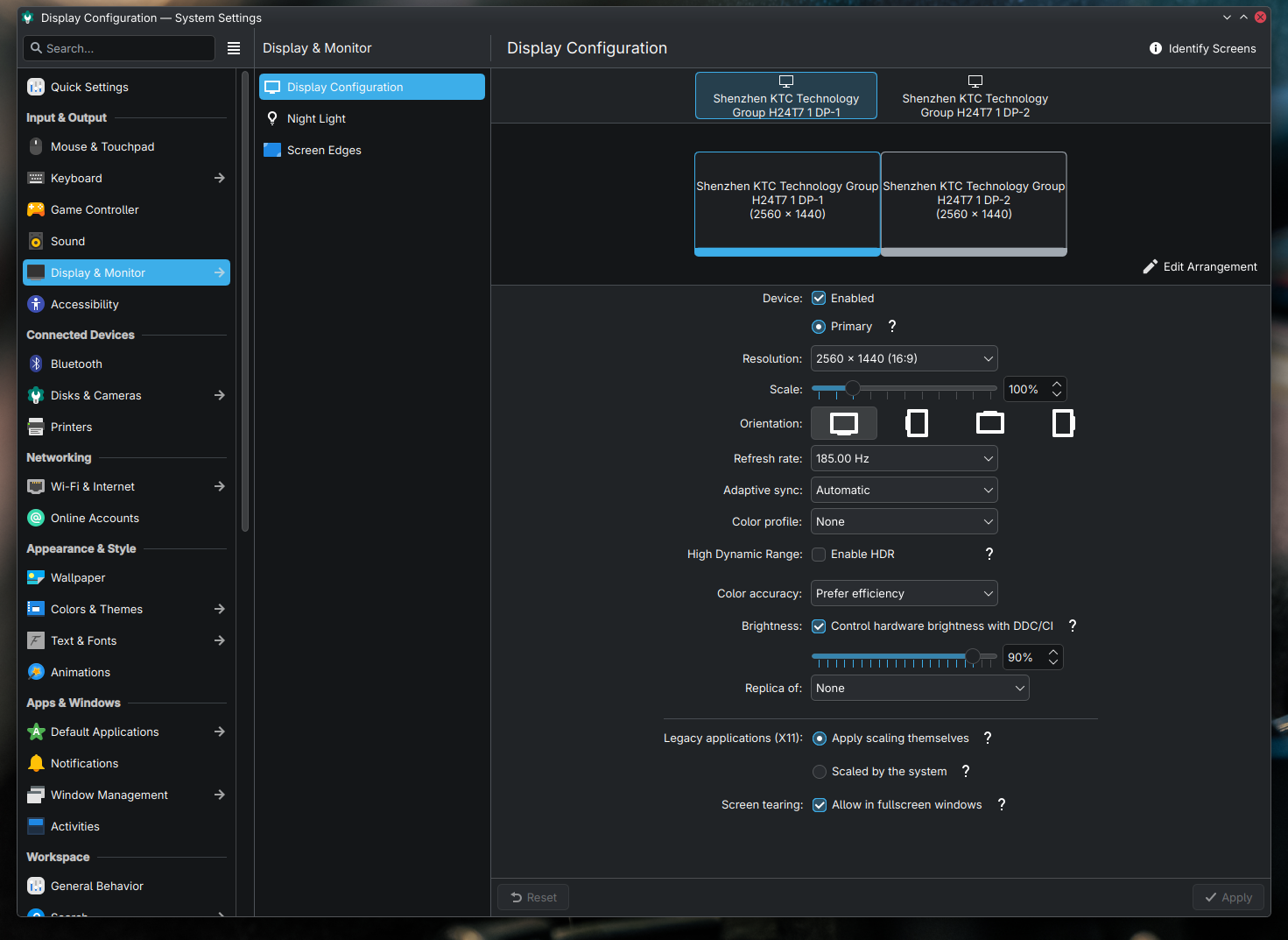
So I finally upgraded to 2 x 24" 1440p 185Hz VRR monitors. Damn, I should have done this sooner, I by far actually prefer these screens to my 4k 27" display. 1440p is the perfect resolution.

My stupid Samsung phone seems to have the narrowest depth of field, so I can't get both screens perfectly in focus, but damn they're clear.

Dual 1440p monitors.jpg


Adaptive sync VRR.png
 
If I hadn't needed a number of other things I would have gotten a second 27" 1440p Acer monitor to pair with my main one. It would replace a messed up 32" 1440p monitor a friend of my son gave me a while back.

The one I have isn't the best but it's good for the price. There's another Acer 27" 1440P monitor on Amazon with a bit lower specs for $135 right now. I don't know exactly how good it is but I usually have good luck with Acers and for that price it should be very good for someone looking at getting into 1440p.

I don't think there's any way I could do 24" 1440p and there's no way I could have done 27" 4k. I like 27" 1440p as it's a bit higher pixel density than 24" 1080p but not so much that I need to mess with scaling or anything even with my bad eyesight.
 
I don't think there's any way I could do 24" 1440p and there's no way I could have done 27" 4k. I like 27" 1440p as it's a bit higher pixel density than 24" 1080p but not so much that I need to mess with scaling or anything even with my bad eyesight.
The reason I can't do 27" is because of my eyesight, with both screens side by side my focal point is so limited that I can't see the furthest top corner of each screen clearly. At 24" I can focus on the top point of each screen easily, and 100% scaling on the 1440p display is close to 125% scaling on the 27" 4k display - I can actually see graphical elements and text on these displays quite easily, and because of the increased PPI image quality is amazing.

I've had many Acer monitors over the years, and they all still work fine 15 years later.
 
I was thinking of a single UWS monitor, but I don't know how well Linux handles letterboxing in the instance I wanna run a game in 16:9?
Center of the screen. If you use an ultrawide hack, most can fix the 16:9 HUD to the middle.
 
I was thinking of a single UWS monitor, but I don't know how well Linux handles letterboxing in the instance I wanna run a game in 16:9?
It depends on the game and how Wine/Proton handles it—some work well, others don't.
But this also happens in Windows, although much less frequently, but still.
UW monitor here.
 
It depends on the game and how Wine/Proton handles it—some work well, others don't.
But this also happens in Windows, although much less frequently, but still.
UW monitor here.
OK, this is the reason I avoided a UWS monitor. TBH, I'm quite happy with 2 x 1440p displays, 185Hz and VRR is bloody amazing.
 
OK, this is the reason I avoided a UWS monitor. TBH, I'm quite happy with 2 x 1440p displays, 185Hz and VRR is bloody amazing.
I'm not a fan of ultrawide monitors either. Dual monitors tend to have fewer problems and better utility in my opinion and for my use cases. A single, big monitor does not fit how I use my system.
 
I'm not a fan of ultrawide monitors either. Dual monitors tend to have fewer problems and better utility in my opinion and for my use cases. A single, big monitor does not fit how I use my system.
This 100%, but each to their own.
 
Excuse my ignorance, what's an ultrawide hack?
Executable or DLL hacks that get around many developers' lack of foresight or blatant ignorance regarding 21:9 & higher ratios.

I don't have a need for multiple monitors, which is why a super ultrawide is my definitive preference.
 
I'm not a fan of ultrawide monitors either. Dual monitors tend to have fewer problems and better utility in my opinion and for my use cases. A single, big monitor does not fit how I use my system.
All except the bezels running through the center........

I do have an appreciation for dual, or triple, monitors though. I like triple to keep the bezels out of the middle.
Getting used to games that don't work fully across 5120x1440 is pretty easy. At least for me. The ones that do though, it's immersive. Playing Fatekeeper starting out on the side of a mountain. Killer view.

Most of the time I play a game windowed at 2650x1440 and have a movie going in the rest.
 
It's not a big deal to me if the game isn't centered—that rarely happens, but UW looks great in most games; I really like it when I see more space on the right and left.
 
All except the bezels running through the center........

I do have an appreciation for dual, or triple, monitors though. I like triple to keep the bezels out of the middle.
Getting used to games that don't work fully across 5120x1440 is pretty easy. At least for me. The ones that do though, it's immersive. Playing Fatekeeper starting out on the side of a mountain. Killer view.

Most of the time I play a game windowed at 2650x1440 and have a movie going in the rest.
I don't span games across monitors so it's not an issue for me. I have my primary monitor which is whatever I'm doing at the moment and then I have the secondary monitor to the side with everything I like to keep up at all times along with a music player or movie or maybe another browser if I'm following a guide or something related to what I have fullscreen on the main monitor.

To each their own. I like my setup and have been using it for years. I'm also typically broke so I also don't have to worry about having a high powered video card to push UW resolutions when gaming or worry about running into the occasional oddness when running windowed mode. Luckily it's much more rare for that to happen nowadays but it still happens most likely with older games. As I said, to each their own and whatever works for each person. It's good that we all have our own options.
 
Even new games fail with (S)UW when the devs/pubs are lazy or jerks or both. :mad:

It's why I have to go hunting for workarounds & hacks.
 
It's not a big deal to me if the game isn't centered—that rarely happens, but UW looks great in most games; I really like it when I see more space on the right and left.
As an ex Nvidia Surround user for many years, I can understand this; but the possibility of games not running letterboxed in the center of the monitor in 16:9 mode puts me off UWS monitors. I haven't used NVS for many years now, and I have to say I'm more than happy playing games on one 1440p screen, and I find two separate monitors suit my daily workflow better when I'm not gaming.
 
As an ex Nvidia Surround user for many years, I can understand this; but the possibility of games not running letterboxed in the center of the monitor in 16:9 mode puts me off UWS monitors. I haven't used NVS for many years now, and I have to say I'm more than happy playing games on one 1440p screen, and I find two separate monitors suit my daily workflow better when I'm not gaming.
All games usually default to 16:9 letterboxed, so not sure where you're getting this idea of it not happening.
 
All games usually default to 16:9 letterboxed, so not sure where you're getting this idea of it not happening.
Well partially in response to comments you made when I asked the question, although I now realize you were specifically referring to game HUD's, which I never questioned so I'm not sure why you focused on in game HUD's? And basically in response to comments such as this:

It depends on the game and how Wine/Proton handles it—some work well, others don't.
But this also happens in Windows, although much less frequently, but still.
UW monitor here.
Bearing in mind that I'm referring specifically to gaming under Linux and not gaming under Windows.
 
Back
Top