• Some users have recently had their accounts hijacked. It seems that the now defunct EVGA forums might have compromised your password there and seems many are using the same PW here. We would suggest you UPDATE YOUR PASSWORD and TURN ON 2FA for your account here to further secure it. None of the compromised accounts had 2FA turned on.
    Once you have enabled 2FA, your account will be updated soon to show a badge, letting other members know that you use 2FA to protect your account. This should be beneficial for everyone that uses FSFT.

OpenZFS NAS (BSD, Illumos, Linux, OSX, Solaris, Windows + Storage Spaces) with napp-it web-gui

Like Windows ACL, previous Versions just works only on Windows or Solaris/Illumos without any setting, it may work in SAMBA with some if and when. If you google you find some howtos but a lot of no success reports with suggestions in smb.conf like

vfs objects = shadow_copy2
shadow:snapdir = .zfs/snapshot
shadow:format = -%Y-%m-%d-%H%M
shadow:snapprefix = ^zfs-auto-snap_\(frequent\|hourly\|daily\|weekly\|monthly\)
shadow:delimiter = -20
shadow:localtime = no

ex
https://www.reddit.com/r/linuxadmin/comments/1iusvhk/samba_share_on_zfs_to_mimic_shadow_copies/

It can only work if shares are per ZFS filesystem. In SAMBA you can share any directory. This cannot work as a ZFS snapdir is per ZFS filesystem. In Solaris or Illumos a share is always a ZFS property.
 
Thanks for the reference! Seems it's a hit or miss thing. When the time comes (probably next year) I'll test more to see it myself. Also it's gonna be ksmbd so even more unknowns@_@
 
I rediscovered Windows (Server Essentials) as a premium storage platform with best of all ACL and audit support, previous versions, Active Directory, virtualdisks/raid over SMB and working SMB Direct with up to 10Gbyte/s over lan, The OpenZFS on Windows filesystem driver is still beta but already good for serious tests.
 
Proxmox 9.1 is there with OpenZFS 2.3.4 and zfs rewrite to rebalance pools after expansion or to move files in a hybrid pool between hd and nvme.
I have added a zfs rewrite menu to newest napp-it cs for zfs rewrite and the option to adjust small blocksize prior and after rewrite

1763732376245.png
 
Last edited:
OpenZFS for Windows 2.3.1 rc14

Still a release candidate/beta but already quite good with in most cases uncritical remaining issues.
Test it and report issues back to have a stable asap.


Download OpenZFS driver
Releases · openzfsonwindows/openzfs

Issues
openzfsonwindows/openzfs

rc14
  • Handle devices that are failed, ejected or removed, a bit better.
  • Fix rename, in particularly on SMB
  • Add basic sharesmb support
  • Fix "zpool clear" BSOD
  • Fix crypto file:// usage
  • zfs_tray add mount/unmount, password prompt.
 
napp-it licence update
napp-it se (Solaris Edition) and napp-it cs (client server edition, multi-os/ multi hosts, up from v.26) can be used for commercial,
edu and noncommercial use cases for free to manage the local storageserver..

For noncommercial homeuse, napp-it cs can be used to manage a group of 3 servers for free.
 
OmniOS r151056k (2026-01-14)
Weekly release for w/c 12th of January 2026.

https://omnios.org/releasenotes.html
This update requires a reboot

Security Fixes

Curl updated to version 8.18.0.
The bhyve mouse driver could de-reference a NULL pointer in some circumstances.

Other Changes

SMB Active Directory joins now fall back to seting the machine password via LDAP if kerberos fails. Many AD sites block kerberos for this.
NVMe devices used as a system boot device would previously end up with a single I/O queue, limiting performance.
NVMe devices could incorrectly return an error on queue saturation that is interpreted by ZFS as a device failure.

The IP Filter fragment cache table could become corrupt, resulting in a kernel panic.
 
OpenZFS on OSX 2.3.1 released
https://openzfsonosx.org/

improvements around Raid-Z expansion, vdev rebalance and Fast Dedup

OpenZFS on OSX 2.4 release candidate
improvements around performance and management
Check known issues prior use and report new issues

- faster encryption
- default quotas
- special vdev with Slog functionality (perfect for hybrid pools)
- less fragmentation

OpenZFS on Windows 2.3.1 release candidate 14
https://openzfsonwindows.org/
Check known issues prior use and report new issues

Windows behaves different on mounts, volumes and locking with much more hardware and software options.
This is why the Windows port is more complicated than the Linux or OSX port and requires more testings with different hard and software

I hope for the same state on Windows than on OSX asap.
 
OpenZFS on Windows v 2.4.1 pre release available
https://github.com/openzfsonwindows/openzfs/releases/tag/zfswin-2.4.1rc1
Main improvement of 2.4 are around hybrid pools
- special vdev is used as slog for sync writes
- special vdev can hold zvol data
- special vdev can hold metadata of a filesystem (small block size 0)
- special vdev can hold small files of a filesystem (small block size < filesize)
- special vdev can hold all files of a filesystem recsize <= small block size)
- you can move files between hd and flash with zfs rewrite

- improved encryption performance
- reduced fragmentation

Please report issues (new ones or remaining issues from 2.3)
https://github.com/openzfsonwindows/openzfs/issues
 
_Gea napp-it JOBS has stopped working after upgrading to OmniOS r151056.

Worked just fine in r151054.

Also, this seems to happen with napp-it every time a new OMNIOS version is released. Is there something I can do to prevent this from happening again when a new ONMIOS is released?

(Only noticed today, that for the past month and a half, none of my snapshot & system maintenance tasks has been running!)

Thanks for all your hard work on napp-it.
 
There are not many dependencies between OmniOS and napp-it but there are some. This is why you need to update napp-it too in some cases.

btw
I will check, but I am abroad atm.
 
_Gea napp-it JOBS has stopped working after upgrading to OmniOS r151056.

Worked just fine in r151054.

Also, this seems to happen with napp-it every time a new OMNIOS version is released. Is there something I can do to prevent this from happening again when a new ONMIOS is released?

(Only noticed today, that for the past month and a half, none of my snapshot & system maintenance tasks has been running!)

Thanks for all your hard work on napp-it.

151056 has a newer OpenSSL, you need to update SSL (rerun Cpan)
https://www.napp-it.org/downloads/tls.html

I also fixed a problem with size detection (div/0 for size=0) when size could not be detected properly in newest napp-it
hope that fixes your problem
 
Windows + OpenZFS 2.41 + napp-it cs
OpenZFS on Windows-2.4.1rc5 Pre-release

This is a huge step forward especially for hybrid pools (hd+nvme special vdev)


Releases · openzfsonwindows/openzfs
openzfsonwindows/openzfs

Hope, this is the new release candidate as 2.4.1 is perfect for hybrid pools (hd+nvme)

** rc4
  • Rewrite the Delete file/dir framework
  • Fix Events notifcation for Explorer progress [1]
  • Fix BSOD in delete print
  • Fix zdb
[1] I have noticed that sometimes Explorer does not update Progress when deleting with recycle.bin. It says "calculating"
the whole time, and gets removed when deletion completes - appearing as if frozen.

** rc5

Fix boot crash - ULONG tunables accessed 64bit
 
new zfs-windows-2.4.1rc6-1 Pre-release

** rc6

  • Fix write crash due to signed enum
This release we feel some confidence in.
2.4.1 rc6-1 supports fast blake3 hashing for Fast Dedup
 
Last edited:

Considerations when Migrating from Storage Spaces (Windows Software RAID) to ZFS Software RAID​


The highlight of Storage Spaces is the flexible use of Hybrid Pools (HDD+Flash) via Auto Tiering of "hot" data between the two, as well as the assignment of Spaces to either HDD or Flash. ZFS does not use this "last access" hot-tiering concept. Instead, ZFS utilizes a different tiering approach based on the physical data type (metadata), file size, or specific settings (small block size vs. recordsize) per ZFS dataset (filesystem or Zvol). Moving data isn't scheduled by time as in Storage Spaces, but occurs via a "ZFS rewrite" with adjusted settings. Both concepts have pros and cons. I find the ZFS approach superior because it aims to keep small, slow-access data on Flash and large, non-critical data on HDD from the start. This eliminates background re-copying (which costs time and creates load) and provides a "zero config" operation that is much simpler.
A ZFS Hybrid Pool consists of two RAID arrays (vdevs): one on HDD and one on Flash. If you want RAID redundancy, both must have similar reliability. The Flash array (special vdev) should typically be between 10% and 50% of the HDD capacity, depending on how much data you want on fast Flash.
A typical pool allowing for the failure of any single drive:
  • 2 x 20TB HDD Mirror
  • 2 x 2TB Flash Special VDEV Mirror
  • (Total Pool Capacity: 22 TB)
Only with a very high count of HDDs (e.g., 32 x HDD in multiple vdevs) you should consider a 3-way mirror for the special vdev to ensure both tiers have matching reliability. Currently, special vdevs only support mirroring; however, RAID-Z support is planned for a future version. Both vdev types can be expanded by adding further vdevs.
Another highlight of Storage Spaces is the flexible use of a pool containing different-sized drives, where redundancy is defined per Space rather than per Pool. Small Spaces then utilize the smaller drives. Classic RAID, like ZFS, cannot do this currently. However, "AnyRaid" (RAID Expansion/dRAID improvements) is on the horizon. It distributes RAID across "tiles," allowing it to work with mismatched drive sizes—expected in OpenZFS 2.5 or 2.6. This is essentially an evolution of the Synology SHR concept.
Another highlight of Storage Spaces is dedup + compress (depending on the Windows version). Windows Dedup works efficiently "offline" (post-processing). ZFS Fast Dedup is real-time deduplication and therefore requires more resources (RAM). Even with modern Fast Dedup, it should only be activated if you expect a significant deduplication ratio. However, you can now prune (shrink) and limit the size of dedup tables, as well as leverage special vdevs and ARC. Classic ZFS Dedup should never be used due to its numerous drawbacks. For ZFS Fast Dedup, you should use the fast BLAKE3 hash algorithm (available since Windows OpenZFS 2.4.1 rc6-1).
Windows protects Atomic Writes (which must never be partially executed) during a crash on NTFS only when combined with hardware RAID + BBU/Flash protection. ReFS volumes are as secure as ZFS in this regard thanks to Copy-on-Write (CoW), though they lack ZFS's broader feature set.
A further highlight of Storage Spaces is fast, flexible virtual disks (.vhdx) that can also reside on SMB. This feature stems from Hyper-V VM management. It allows for "RAID over LAN" and replaces iSCSI (local disks from remote storage) with zero configuration effort. With SMB Direct/RDMA, it is exceptionally fast. This also works for ZFS.
NTFS ACL permissions (a revelation if you are coming from SAMBA and Linux) work with NTFS, ReFS, and ZFS.
Miscellaneous
  • L2ARC: This is a fast ZFS read cache on Flash. It has become largely obsolete with Hybrid Pools, as the latter accelerates both reads and writes.
  • SLOG: (Protection for the RAM write cache) is no longer required in a Hybrid Pool starting with OpenZFS 2.4, as the log now lands on the special vdev.
  • Power Loss Protection (PLP): Essential for Flash in a single SLOG setup. With a mirrored SLOG or special vdev, the risk of data loss after a power failure is low.
The napp-it cs web-gui supports Storage Spaces and ZFS management when running on Windows (runs on Free-BSD, Linux, OSX, Illumos and Windows).
 
OpenZFS on Windows 2.4.1 rc7 is no longer a Pre Release but Latest. While still not the final release edition, the devs are confident enough to suggest this edition if you want to try OpenZFS on Windows. Especially in combination with hd + nvme hybrid pools you should use OpenZFS 2.4. Especially the blake3 fix (propably not a Windows but a OpenZFS issue is welcome, you want it for Fast(est) Dedup)

https://github.com/openzfsonwindows/openzfs/releases
https://github.com/openzfsonwindows/openzfs/issues

** rc7

  • Fix blake3 BSOD
  • Internal: automatically populate symstore for builds
  • Internal: fix github CI for minimal build, disable spdxcheck
The multi-OS, multi-server web-gui napp-it cs supports the new features
 

Considerations for a high performance workgroup for 4/8k av editing and 25G SMB Direct
http://napp-it.org/doc/downloads/windows-rdma.pdf

1.0 High performance SMB workgroup
1.1 Performance considerations
1.2 SMB server considerations
1.3 SMB client considerations
1.4 Nic and driver considerations
1.5 RDMA configuration
2.0 Storageserver configuration
2.1 Desktop Client configuration
2.2 Storage configuration
2.3 Storage Spaces
2.4 OpenZFS
3.0 Switch options
4.0 Configuration options
5.0 Management with napp-it cs web-gui
 
This and the ACL permission horror with SAMBA solutions makes Windows Server the best SMB server at the moment,
together with the nearly ready OpenZFS on Windows
 
zfs-windows-2.4.1rc8 Latest

** rc8

Fix thread priority BSOD on large multicore systems in KiAddThreadToPrcbQueue()
Correct potential arm64 disk IO race in completion.
Speedup dirlisting, avoid memory fragmentation
OpenZVOL driver unload fix
Fix double free of MDL in write path (CrystalDiskMark)

The remaining bugs are more and more very special and depend on rare environments
like Win10 and many cores cores. For many systems OpenZFS on Windows works well.
 
napp-it cs, first steps

Unlike many other web-gui tools, the napp-it cs frontend and backend can run on any OS (Free-BSD, Illumos, Linux, OSX and Windows) where you only need a Apache webserver and Perl. Main platform is Illumos (OmniOS), Linux (Proxmox) and Windows (Windows 11 or Windows Server). One frontend setup can manage multiple hosts (locally and remote) with a select option for localhost and remote hosts. Any menu option affects then the selected host.

Napp-it cs is Copy and Run. This means that installation = download csweb-gui app folder and deinstallation=delete csweb-gui app folder, Update and downgrade (last 5 versions) can be done online (menu About > Update.

Napp-it cs can manage any service and server. You can extend napp-it cs by private menus (update save). Default menus are intended to manage storage, either Storage Spaces on Windows or ZFS (any OS including Windows)

https://napp-it.org/doc/downloads/napp-it_cs_first_steps.pdf
 
New release candidate 10 for OpenZFS on Windows 2.4.1

https://github.com/openzfsonwindows/openzfs/releases
https://github.com/openzfsonwindows/openzfs/issues

** rc10
  • Add FileCompressionInformation to enable query of on-disk compressed size
  • Do some performance fixes to make things faster
  • Hardlink deletion would hide all other hardlinks
  • Fix deadlock in write path
  • Prioritise HarddiskXPartitionY paths over hack path
  • Add import --fix-gpt to correct NumPartitions=9 to NumPartitions=128.
  • Fix up condvar and mutex
  • Use User credentials, enabling zfs allow to work. Mix Unix and Windows permissions and hope for the best
  • OpenZVOL unload bug fixes
  • Fix spl_panic() call print and stack
So with Unix created GPT partitions, they use gpt.NumPartitions=9, this Windows does not accept, and Windows
computes gpt.checksum "as if" gpt.Numpartitions==128. So checksum mismatches, and partition table is ignored.
This is why OpenZFS uses path encoding of #partition_offset#partition_length#/path/to/device, saved into vdev->vdev_physpath.
This continues to work.
We added a new zpool import --fix-gpt which will rewrite gpt.NumPartitions=128, and recompute gpt.checksum. Since libefi already reads in the full GPT partition, we need not change anything else, and write it back out. This is left as a user option, as there could be partition usage I am unaware of. Who know if some legacy archs can only use fewer partitions? Or store microcode in the backhalf.
If GPT is written with gpt.NumPartitions=128, Windows will recognise the partitions, and create //?/HarddiskXPartitionY device objects, so we can import those directly, no need for special path. Success. We prioritise //?/HarddiskXPartitionY over #partition_offset#partition_length#/path/to/device - but it will try both.
Let's check for regression in this release.

Evaluate and report issues
 
napp-it cs and Object Storage

A file server or NAS primarily offers hierarchical local storage using file systems like ext4, NTFS, or ZFS. These are used to store the operating system and local data. Access to this data is efficient, whether locally or via multi-user NFS/SMB file sharing—even simultaneously—by locking individual files or database records. When a file is modified, only the corresponding data block is rewritten. Local storage can be designed with redundancy to survive the failure of one or more drives, either via RAID or through multiple data copies, such as with Storage Spaces.

S3 Object Flat Storage was developed as a web service for "Big Data," cloud storage, and backups. On an S3 server or cluster, entire files are stored under a unique ID. Access is handled via HTTPS GET, PUT, or DELETE and a REST API. Since there is no hierarchical file system to search or organize, access to 100 petabytes of data is nearly as fast as access to 10 terabytes. S3 storage can be organized as a cluster, where every additional node increases capacity and throughput. S3 distributes data copies across multiple servers within the cluster, ensuring that the failure of individual nodes does not lead to data loss (High Availability). There is no "Single Point of Failure" (such as a central metadata server), which increases stability in large clusters. S3 is the protocol that keeps the internet alive. The disadvantage of S3 is that file modifications (e.g., in a 10GB file) require the entire file to be re-uploaded rather than just changing the affected data block; therefore, it does not replace a local file system.

The market leader for large corporations is Amazon S3. For smaller companies or in-house on-premise solutions, MinIO S3 has become the standard. MinIO is open-source but has transitioned to the AGPLv3 license, which is legally problematic for many companies when integrating it into their own systems (due to the "copyleft" requirement for modifications).

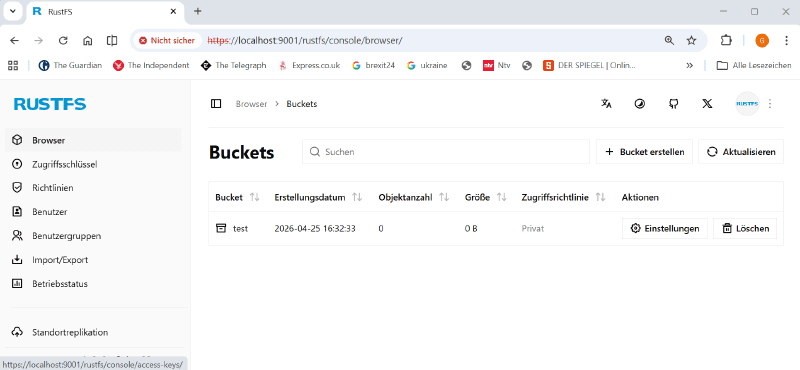
Previously, MinIO was integrated into napp-it. I am currently preparing the switch to RustFS, a MinIO-compatible S3 server. It is no longer developed in Go; instead, it consistently relies on Rust under a liberal Apache license to leverage well-known advantages in performance and security. It is significantly more resource-efficient and faster with small files. RustFS is currently in version 1.0 beta, with a stable release announced for summer 2026.

1777386846263.png
 
Where the journey is headed..

ZFS
is the best storage you can have locally on your machine, both in terms of data security and features like hybrid pools, RAID functions, encryption, and much more. It is a mature technology, and very little—like "AnyRaid"—is missing to make it a "perfectly happy" solution.

However, even with ZFS, you can lose data. Lightning strikes, theft, hardware failure, or sabotage—and it's all gone. That is why, even with ZFS, you need Disaster Backup, traditionally implemented as a 3-2-1 backup (3 copies on 2 different media, with 1 copy stored offsite). You can still do this today using external (USB) ZFS pools or one or two additional NAS systems with ZFS replication.

But there is a much more modern approach. I see 1S3 as the successor to the 3-2-1 principle: one copy of the data locally and one copy remotely on an S3 single server or, ideally, an S3 cluster. An S3 server or cluster can be rented relatively cheaply from a hoster or built yourself—privately with friends or family, or on-premise in an office, business, or school. Local data is synchronized from a ZFS snapshot to the S3 server over the internet. Deduplication and encryption are possible across platforms using tools like rclone, restic, or kopia. If you have an S3 cluster, it replicates the data automatically within the cluster, providing high availability for your backups.

One or more ZFS servers combined with one or more S3 installations as a cluster, centrally managed with a multi-OS / multi-server napp-it cs—that is the goal.
 
ZFS backup & restore

Currently ZFS replication and rsync with a ZFS snap as source are the classic methods for ZFS backup/restore.
The main alternative beside a local replication to preserve ACL is more and more S3 object storage with S3 based backup tools like restic because

- access performance is quite the same with a 10 TB and a 10 PB storage.
- any file is a link, accessible via authenticated https url

- S3 server can be installed in a basic single node/ single disk mode for a normal backup/restore
- S3 server can run as a cluster in x node/ y disk mode. Up from x=4, such a cluster offers high availability
(a node can fail, basically in a very simplified view something like a raid over nodes
with 4 nodes like Raid-Z1, 5 nodes like Z2 and 6 nodes like Z3)
with a load balancer, S3 remains accessible for clients under original ip when any node fails
without a load balancer, you can access another node with its ip
- S3 servers can include Site Replication, basically like a async mirror setup of two S3 servers

S3 object storage is available from Amazon AWS. As the S3 api is well documented, S3 api based storage is the standard for Cloud based backup/restore, not only from Amazon but from many Cloud or ISP providers at low costs. Many of them used the S3 compatible MinIO in the past as well as many NAS systems.

MinIO as an OpenSource S3 server is no longer an option, so we need an alternative. Most promising is RustFS, intended to be a 1:1 direct replacement of MinIO. Current state of RustFS is a 1.0.0 beta for first tests, A stable is anounced in summer 2026 (not finally confirmed). RustFS is based on Rust so it can be built on nearly any OS. Prebuild binaries are available for Linux, OSX and Windows at Releases · rustfs/rustfs (click on release for downloads).

On other systems you must build yourself. This can be tricky due to some dependencies. On problems ask AI (I used Claude) for help. To build RustFS on OmniOS, see (with a documented shell script to build) Topicbox
 
Privat menus in napp-it cs

Napp-it cs menus can be extended by your own menus.

Each private menu is update/downgrade save and a simple folder under ./csweb-gui/_my/menues with a script action.pl within.

If you want to use AI to create or review private menus e.g. Claude
- make a zip from the csweb-gui folder (csweb-gui.zip)
- upload that zip to claude

ask claude to insert and update two file in the root folder of the zip
- changelog.txt with current modifications and
- guideline.txt with the following initially

-- always create a zip file with all files within for download
-- update changelog with modifications and a list of modified files
-- local OS commands are executes via &exe("command") over server.pl, always check commands against server.pl
-- server.pl parses commands, e.g. ps axww gives a tasklist also on Windows
-- -fi [edf] filename can do a test (exist, file, directory)

you can add your own rules

Then ask Claude to
--- insert a new menu ex testmenu under ./csweb-gui/_my/menues/101/Private_menus
similar to the examples there

--- the new menu should ask the user for a certain information ex a task or filename
--- prozess this when answered
 
  • Like
Reactions: uOpt
like this
Hello,

I have a napp-it Pro setup with two OmniOS systems:

- NAS-G → 192.168.16.19
- GL-BCK → previously 192.168.16.11, now changed to 192.168.16.21

Replication jobs previously worked correctly using netcat transport (nc, port 51115).

After the IP change of GL-BCK from .11 to .21, replication jobs fail with:

this host 192.168.16.21 is not a member

Current status:
- SSH connectivity works between systems
- Appliance Group on GL-BCK shows:
- localhost
- NAS-G 192.168.16.19 alive/ok
- Existing snapshots and replication chains are intact
- There is also another existing remote backup replication setup which is currently working correctly
- GL-BCK is running napp-it Pro
- NAS-G (production) is running the free edition

Because of that, I want to avoid:
- breaking existing remote replication jobs
- recreating snapshot chains
- deleting/recreating replication jobs unnecessarily

Question:
What is the correct and safest way to update the appliance group/member IP from .11 to .21 for existing replication jobs in napp-it Pro 21.06a12 without affecting the other working remote backup replication setup?

Thank you.

I attached a screenshot of the exact replication error.
1779104037515.png
 
Last edited:
  • Like
Reactions: uOpt
like this
either remove/readd member or
edit groupfile name in /var/web-gui/_log/group/

For jobs
delete/recreate job with same jobid and source/destination or
edit jobfile in /var/web-gui/_log/jobs/
 
either remove/readd member or
edit groupfile name in /var/web-gui/_log/group/

For jobs
delete/recreate job with same jobid and source/destination or
edit jobfile in /var/web-gui/_log/jobs/
Thank you, that solved the “not a member” problem.

What fixed it was:
  • removing the old appliance group member entry
  • re-adding NAS-G (192.168.16.19) to the appliance group using the current napp-it admin password
After that, the replication job started correctly again.

However, replication now fails during zfs receive with:

cannot receive: failed
next destination snap SSD1/SkupnaRaba@1582920601_repli_zfs_Backup_nr_1286 from NAS-G was not created

There is enough free space on SSD1.
Target currently has snapshots nr_1284 and nr_1285, but nr_1286 is not created.

Any suggestion what to check next?
 
In menu Jobs:
- click on "replicate" in the line of the job for details
- click on "date" in the line of the job for more details of last run
 
In menu Jobs:
- click on "replicate" in the line of the job for details
- click on "date" in the line of the job for more details of last run
Thank you, the issue is solved now.

The appliance membership problem was fixed by removing and re-adding the member after the IP change.

The remaining replication problem was my mistake — I had accidentally changed the SkupnaRaba job from the original nc port 51115 to port 22 during troubleshooting/testing.

After restoring the original port 51115, replication started working correctly again.

Thanks for the help, and sorry for the stress caused by my mistake.
 
Back
Top