![[H]ard|Forum](/styles/hardforum/xenforo/logo_dark.png)
- Joined
- May 11, 2016
- Messages
- 2,204
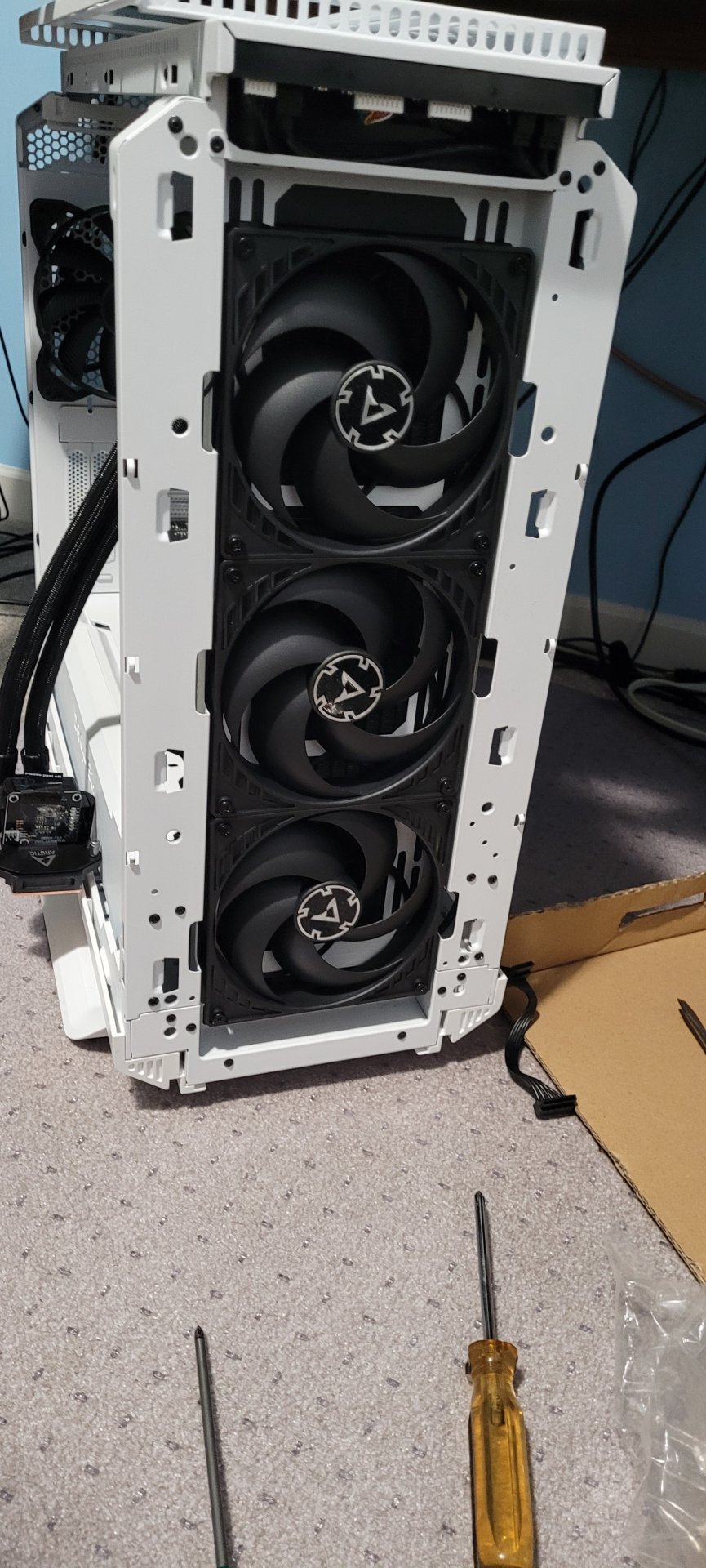
In case anyone else wonders, since I haven't seen anyone else report doing it (only reports of a LF2 420mm), a Liquid Freezer 420mm AIO can fit in a Silent Base 802 PC case, and probably in any standard orientation: top, front with tubes up, front with tubes down.
Putting the radiator at the top requires removing the top fan shelf (so there's enough space), and fastening the radiator to the top vent using thin zip ties.
Installing the radiator at the front with the tubes up, which is what I've done, required temporarily removing the top fan tray and unplugging some of the mobo cables, and removing the GPU, so that the radiator had room to be slid into place. It also requires removing all the shrouds add-in drive brackets, and the front-most PSU bay shroud so that there will be space for the radiator to sit.
The shrouds that need to be removed, and then with them removed:


I also tested installing the rad at the front with the tubes down, to see if there would be enough reach in the tubes if I inverted the Silent Base 802 case (it definitely won't reach without inverting the case). This requires removing also the 2nd front-most PSU bay shroud, for the tubes to come up through. After getting it in place, and putting back the PSU bay drive bracket that I have loaded with a couple of backup drives, it seemed to me that there would be enough reach. But I didn't do it because inverting the case and redoing all the cabling would be more work than I wanted. I didn't think to take a picture of the radiator in place while I had it tubes down (but here's a photo of the same thing with a Liquid Freezer II 420mm in an inverted Silent Base 802 case), but the gap to the left of the drive bracket in the PSU bay in this photo is where the tubes were coming up through:

How it looks after installation (and before re-installing the front bracket that goes over the intake fans):

Having finished the job and starting the system up, the first thing to notice is the LF3's crazy-loud (the comments mention how to tame it) pump whine. This is a common mention regarding these coolers. It's also mentioned that the whine disappears if setting the pump speed to around 40%. I did that, and while it's basically not noticeable, as someone very sensitive to, and particular about sound, I can still detect the faintest sound of it. And after turning it down to around 40%, it doesn't really get any quieter on lower settings.
A relevant pos and thread (and some additional relevant info):

Getting on to temps and Cinebench testing, while the 420mm AIO has given me several lower C temps than my Noctua NH-D15, It's also giving me lower Cinebench scores.
I'm doing 10-minute, multi-core runs. With the Noctua NH-D15, right before I installed the LF3 420mm AIO, I got scores of 18,35X and 18,33X in my first and second runs. With the LF3 420mm, the scores dropped to 18,213 (pump at 40%), then 17,921 (pump at 40%), then 17,322 (pump at 38%), then 17,776 (pump at 80%).
The LF3 420mm runs were also done with an added 140mm exhaust fan, as I repurposed one of my previous case intake fans as an exhaust fan, after installing the AIO with its own 3x 140mm intake fans.
1st and 2nd Cinebench run scores with the LF3 420mm:
 3rd LF3 run:
 4th LF3 run:

During the testing, the LF3 typically rode at 77 - 78C, and would only blip up to 80C or 81C momentarily once or twice, usually near the start of the test. By comparison, the Noctua NH-D15 was riding around 82C today (though, ambient temp is a lot cooler now than during the summer days, where it would ride higher), while bliping up to as high as 85C.
Pros to the Liquid Freezer III 420 AIO over the Noctua NH-D15:
- load fan noise seems to be quieter (maybe just coz there are more fans, letting them run lower RPM)
- cooler temps
Cons to the Liquid Freezer III 420 AIO over the Noctua NH-D15:
- a trace of pump whir at any pump speed
- lower Cinebench scores (so maybe fewer in-game FPS)
I find the lower scores despite there being lower temperatures puzzling. Also, the CPU clock speeds didn't boost any higher with the LF3 than they did with the Noctua. At the peak boost clock I've seen from both is 5.0XX Ghz.
All things considered, I think I'll be better off using the Noctua NH-D15 and installing a couple more case fans: one more intake and one more exhaust, so I'll have a total of 3 intake and 2 exhaust, plus the two fans on the Noctua cooler's tower. Then I might have marginally better performance and perhaps comparable fan noise, while not having any bit of the pump whir.
Putting the radiator at the top requires removing the top fan shelf (so there's enough space), and fastening the radiator to the top vent using thin zip ties.
Installing the radiator at the front with the tubes up, which is what I've done, required temporarily removing the top fan tray and unplugging some of the mobo cables, and removing the GPU, so that the radiator had room to be slid into place. It also requires removing all the shrouds add-in drive brackets, and the front-most PSU bay shroud so that there will be space for the radiator to sit.
The shrouds that need to be removed, and then with them removed:
I also tested installing the rad at the front with the tubes down, to see if there would be enough reach in the tubes if I inverted the Silent Base 802 case (it definitely won't reach without inverting the case). This requires removing also the 2nd front-most PSU bay shroud, for the tubes to come up through. After getting it in place, and putting back the PSU bay drive bracket that I have loaded with a couple of backup drives, it seemed to me that there would be enough reach. But I didn't do it because inverting the case and redoing all the cabling would be more work than I wanted. I didn't think to take a picture of the radiator in place while I had it tubes down (but here's a photo of the same thing with a Liquid Freezer II 420mm in an inverted Silent Base 802 case), but the gap to the left of the drive bracket in the PSU bay in this photo is where the tubes were coming up through:
How it looks after installation (and before re-installing the front bracket that goes over the intake fans):
Having finished the job and starting the system up, the first thing to notice is the LF3's crazy-loud (the comments mention how to tame it) pump whine. This is a common mention regarding these coolers. It's also mentioned that the whine disappears if setting the pump speed to around 40%. I did that, and while it's basically not noticeable, as someone very sensitive to, and particular about sound, I can still detect the faintest sound of it. And after turning it down to around 40%, it doesn't really get any quieter on lower settings.
A relevant pos and thread (and some additional relevant info):
Getting on to temps and Cinebench testing, while the 420mm AIO has given me several lower C temps than my Noctua NH-D15, It's also giving me lower Cinebench scores.
I'm doing 10-minute, multi-core runs. With the Noctua NH-D15, right before I installed the LF3 420mm AIO, I got scores of 18,35X and 18,33X in my first and second runs. With the LF3 420mm, the scores dropped to 18,213 (pump at 40%), then 17,921 (pump at 40%), then 17,322 (pump at 38%), then 17,776 (pump at 80%).
The LF3 420mm runs were also done with an added 140mm exhaust fan, as I repurposed one of my previous case intake fans as an exhaust fan, after installing the AIO with its own 3x 140mm intake fans.
1st and 2nd Cinebench run scores with the LF3 420mm:
During the testing, the LF3 typically rode at 77 - 78C, and would only blip up to 80C or 81C momentarily once or twice, usually near the start of the test. By comparison, the Noctua NH-D15 was riding around 82C today (though, ambient temp is a lot cooler now than during the summer days, where it would ride higher), while bliping up to as high as 85C.
Pros to the Liquid Freezer III 420 AIO over the Noctua NH-D15:
- load fan noise seems to be quieter (maybe just coz there are more fans, letting them run lower RPM)
- cooler temps
Cons to the Liquid Freezer III 420 AIO over the Noctua NH-D15:
- a trace of pump whir at any pump speed
- lower Cinebench scores (so maybe fewer in-game FPS)
I find the lower scores despite there being lower temperatures puzzling. Also, the CPU clock speeds didn't boost any higher with the LF3 than they did with the Noctua. At the peak boost clock I've seen from both is 5.0XX Ghz.
All things considered, I think I'll be better off using the Noctua NH-D15 and installing a couple more case fans: one more intake and one more exhaust, so I'll have a total of 3 intake and 2 exhaust, plus the two fans on the Noctua cooler's tower. Then I might have marginally better performance and perhaps comparable fan noise, while not having any bit of the pump whir.
Last edited:


