• Some users have recently had their accounts hijacked. It seems that the now defunct EVGA forums might have compromised your password there and seems many are using the same PW here. We would suggest you UPDATE YOUR PASSWORD and TURN ON 2FA for your account here to further secure it. None of the compromised accounts had 2FA turned on.
    Once you have enabled 2FA, your account will be updated soon to show a badge, letting other members know that you use 2FA to protect your account. This should be beneficial for everyone that uses FSFT.

How To - Netgear MS510TXM fan replacement

Randall Stephens

2[H]4U
2FA
Joined
Mar 3, 2017
Messages
2,347
The Netgear MS510TXM utilizes AVC DA04015B12MP041 fans which are pretty bad even new, and ridiculously horrible when worn. The switch expects a locked rotor signal which few consumer fans have, so a suitable replacement usually requires a bit of research and hoping that the new replacements are an improvement. Since new the noise was barely tolerable, and now being worn, I opted to go with two 12V noctua A4x20 pwm fans as replacements. Unlike some Netgear switches, this switch accepts the standard fan screws the noctuas ship with, so mounting was a breeze. The switch has two fan headers than don’t take consumer fans, so I utilized some jumper wires to make the connections. Pay attention to the fact that netgear has reordered the pinout compared to our standard fans. You can use the stock fans to help you here. Note the white and gray wires that are grounded to the chassis by a PCB mounting screw. These wires correspond to the locked rotor pins on the headers and trick the switch into thinking the fans are spinning. Picture taken during testing, it’ll be cleaned up before I switch over. Hope this helps somebody. IMG_2176.jpegIMG_3767.jpegIMG_3766.jpeg
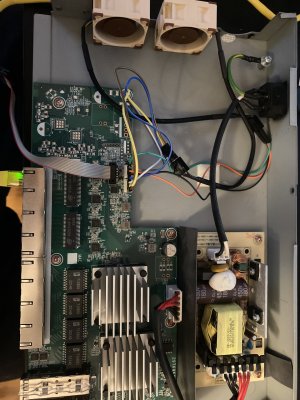
 
Last edited:
Thanks for posting this. Saved me a bunch of time on fan selection, pin out, and messing around with the rotor lock signal. I made some jumpers and installed the same NF-A4x20 PWM fans in my MS510TXUP.

20260103_175826.jpg


20260103_180807.jpg


Results: Much quieter operation but temperatures have gone up ~5C due to slower Noctua fans. Stock fans were at constant 25% duty cycle. Noctua fans modulate from 25-33% duty cycle depending on temperature. I wish i could push up the fan curve to reduce the temperature (Noctua fans would still be much quieter) but that does not appear to be an option in the web management tool.
 
Last edited:
Thanks for posting this. Saved me a bunch of time on fan selection, pin out, and messing around with the rotor lock signal. I made some jumpers and installed the same NF-A4x20 PWM fans in my MS510TXUP.

View attachment 776888


View attachment 776889

Results: Much quieter operation but temperatures have gone up ~5C due to slower Noctua fans. Stock fans were at constant 25% duty cycle. Noctua fans modulate from 25-33% duty cycle depending on temperature. I wish i could push up the fan curve to reduce the temperature (Noctua fans would still be much quieter) but that does not appear to be an option in the web management tool.
You should be able to pull the pwm pin and have it run at the full duty cycle. Not sure if it would throw a fan error but might be worth a shot if those 5C concern you.
 
I am not concerned about the ~5c, just reporting my results. I wanted to maintain the PWM function vs have max cooling.
 
Thank you Randall Stephens for posting how you did it, so far other people I found on the internet doing this replacement ended up having the switch reporting a faulty error on the fan LED (orange), as well as spamming the logs about it.

Before I proceed for mine, I want to make sure I got the wiring right, as it's not totally clear from your picture.

Here's what I understood :
  • Noctua Black (Ground) → Original Black
  • Noctua Yellow (+12 V) → Original Yellow
  • Noctua Green (RPM) → Not connected
    • Original White → Ground screw
  • Noctua Blue (PWM +5V) → Original Blue
Is this how you do it to trick this switch?
So that way the Fan LED stays green, and no report in the logs?
 
Thank you Randall Stephens for posting how you did it, so far other people I found on the internet doing this replacement ended up having the switch reporting a faulty error on the fan LED (orange), as well as spamming the logs about it.

Before I proceed for mine, I want to make sure I got the wiring right, as it's not totally clear from your picture.

Here's what I understood :
  • Noctua Black (Ground) → Original Black
  • Noctua Yellow (+12 V) → Original Yellow
  • Noctua Green (RPM) → Not connected
    • Original White → Ground screw
  • Noctua Blue (PWM +5V) → Original Blue
Is this how you do it to trick this switch?
So that way the Fan LED stays green, and no report in the logs?
Looks correct. You’re just grounding the rpm wire which is what you need. All the other wire just hook inline.
 
Last edited:
Back
Top