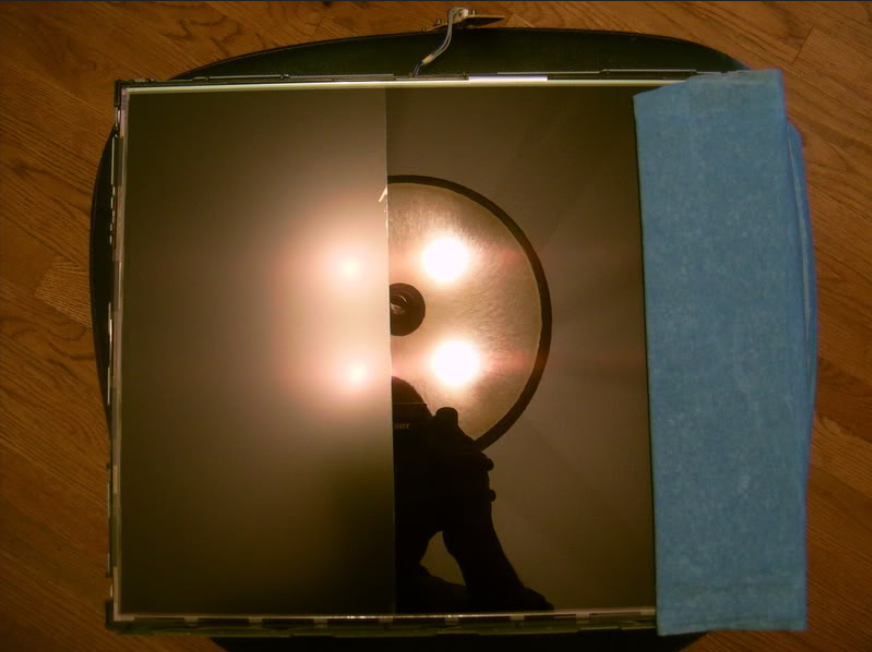
• Some users have recently had their accounts hijacked. It seems that the now defunct EVGA forums might have compromised your password there and seems many are using the same PW here. We would suggest you UPDATE YOUR PASSWORD and TURN ON 2FA for your account here to further secure it. None of the compromised accounts had 2FA turned on.
    Once you have enabled 2FA, your account will be updated soon to show a badge, letting other members know that you use 2FA to protect your account. This should be beneficial for everyone that uses FSFT.

LG 39GX950B 39" 5120 x 2160 OLED 165hz Ultrawide

Seems nice, but I hope the curve is 1000R because the display is big enough for that to make sense.
 
Are they abandoning the 45"? I feel like 39" is going to be too small for immersive gaming coming from a 48" C1 and a 45" 5k2k. I want to see more screen and less of the wall behind the screen. #firstworldproblems
 
Are they abandoning the 45"? I feel like 39" is going to be too small for immersive gaming coming from a 48" C1 and a 45" 5k2k. I want to see more screen and less of the wall behind the screen. #firstworldproblems
The 39" has been on the roadmap for a while. The 45" was likely just easier to manufacture. Most likely they will make both for some time.

IMO 39" is spot on for 5120x2160.
 
Seems nice, but I hope the curve is 1000R because the display is big enough for that to make sense.

I would seriously consider the 39WU just for the native 21:9 which is a pain in the arse to get working on some games on the Samsung 57" (even though I love it for productivity).
 
Are they abandoning the 45"? I feel like 39" is going to be too small for immersive gaming coming from a 48" C1 and a 45" 5k2k. I want to see more screen and less of the wall behind the screen. #firstworldproblems
I'm with you, anything under 32" right now for me would be too small for me
 
I'm in for one of these. I loved my old 38" WQHD (3840 x 1600) IPS monitor so this is a nice upgrade all the way around.
 
I would seriously consider the 39WU just for the native 21:9 which is a pain in the arse to get working on some games on the Samsung 57" (even though I love it for productivity).
What is the problem on getting that to work on the Neo G9 57?
 
What is the problem on getting that to work on the Neo G9 57?
Doesn't support it out of the box, needs to be added via Scaled Resolution Editor, which means you need to use GPU scaling which then means that on Nvidia 40 series 240 Hz is not an option. 50 series should be ok with this.
 
Doesn't support it out of the box, needs to be added via Scaled Resolution Editor, which means you need to use GPU scaling which then means that on Nvidia 40 series 240 Hz is not an option. 50 series should be ok with this.
Blade runner never mentioned 240 hz though but perhaps this is a problem in all resolutions? Seems like it might be a GPU limitation rather than a monitor limitation though if it is possible with another GPU.
 
Blade runner never mentioned 240 hz though but perhaps this is a problem in all resolutions? Seems like it might be a GPU limitation rather than a monitor limitation though if it is possible with another GPU.
I am running a 9070XT...from recollection 240hz works fine, but like Kasakka explained some games refuse to display properly at 21:9 or outright will not recognise 5120x2160 even when added as a custom resolution via the SRE app. Cyberpunk and Clair Obscur are two significant examples which come to mind.
 
1500R curve makes a lot more sense to me over 800R and 39 inch is a pretty nice size for the resolution. Kinda sucks that it's not 240Hz but 165Hz can at least be driven without any DSC on UHBR20 so meh. I'm willing to give the glossy version a shot.
 
Who's going to sell a monitor with the glossy version? I read that LG has no such plans. Who knows if and when some other company will decide to do it - glossy monitors are rare. LG also makes a glossy version of their 32" 6K panel, but I think only the Chinese monitor maker Kuycon uses it.
 
Who's going to sell a monitor with the glossy version? I read that LG has no such plans. Who knows if and when some other company will decide to do it - glossy monitors are rare. LG also makes a glossy version of their 32" 6K panel, but I think only the Chinese monitor maker Kuycon uses it.

TFTC has already confirmed in his video that there will be a glossy version of this. Probably Asus will sell one under the Trueblack glossy name.

EDIT: Sorry not TFTC, it was MonitorsUnboxed. Go to 5:10 in the video BladeRunner posted. He says LG told him the panel will be made in both glossy and matte finishes.
 
Last edited:
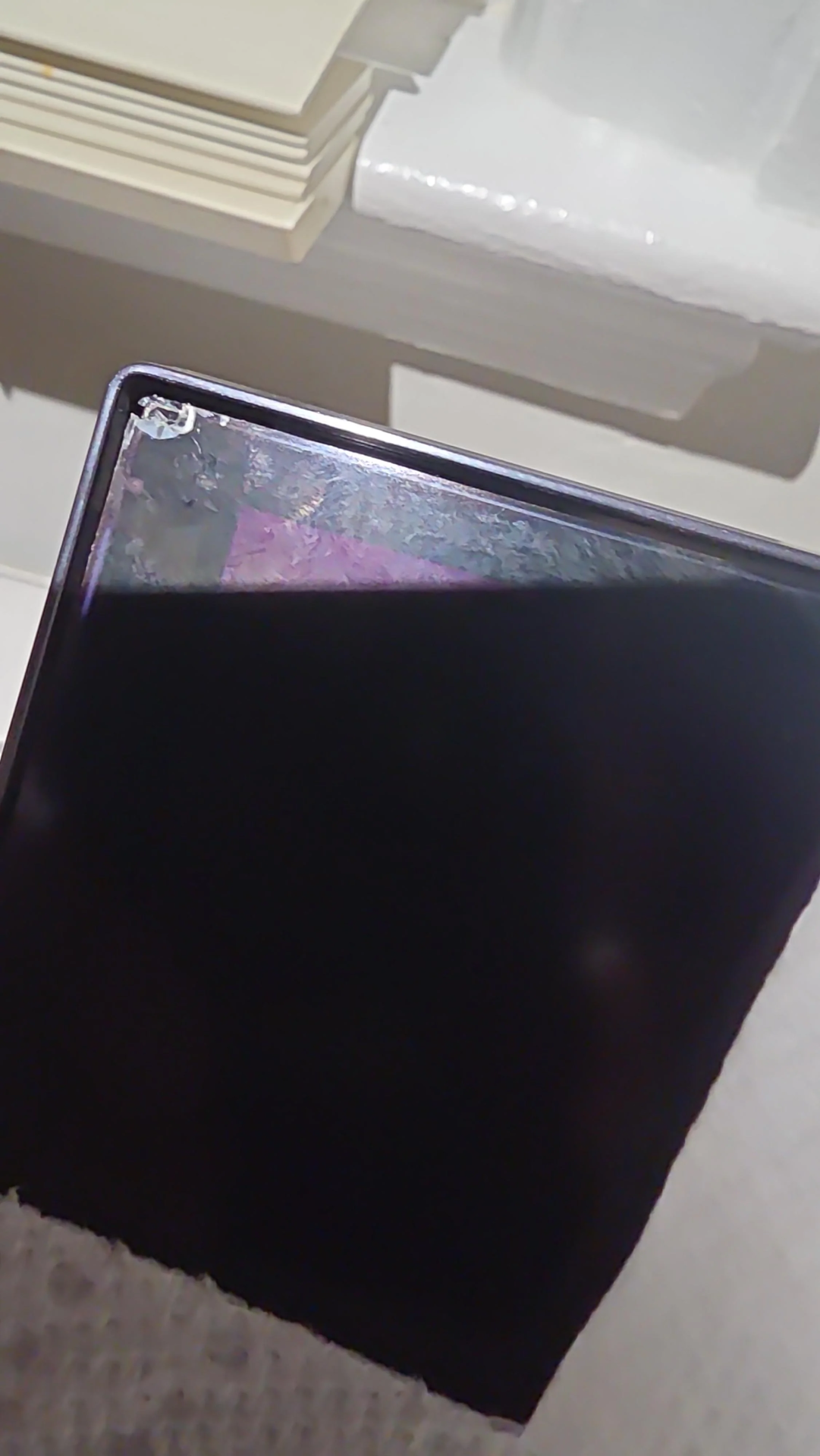
Someone on reddit attempted the wet paper towel method to remove the matte coating. It did not go well.

matte_removal.png
 
TFTC has already confirmed in his video that there will be a glossy version of this. Probably Asus will sell one under the Trueblack glossy name.

EDIT: Sorry not TFTC, it was MonitorsUnboxed. Go to 5:10 in the video BladeRunner posted. He says LG told him the panel will be made in both glossy and matte finishes.

Thanks, but the video says LG will use the matte panel in their monitor. They will also make a glossy version of the panel, but there's no mention of who will offer it in a monitor. I hope ASUS does it. Like I said, LG makes a glossy version of their 32" 6K panel, but no one offers that in a monitor other than Kuycon - LG and others use the matte version.
 
Thanks, but the video says LG will use the matte panel in their monitor. They will also make a glossy version of the panel, but there's no mention of who will offer it in a monitor. I hope ASUS does it. Like I said, LG makes a glossy version of their 32" 6K panel, but no one offers that in a monitor other than Kuycon - LG and others use the matte version.

Asus has already found a lot of success using glossy versions of LG's panels so I am 100% sure they be the ones to use it even if the video does not explicitly state it.
 
  • Like
Reactions: elvn
like this
Asus has already found a lot of success using glossy versions of LG's panels so I am 100% sure they be the ones to use it even if the video does not explicitly state it.

I hope you're right. Glossy panels are so much better (under the right room light conditions).
 
  • Like
Reactions: elvn
like this
Someone on reddit attempted the wet paper towel method to remove the matte coating. It did not go well.

View attachment 780387

I've never done it, but I followed along a long time ago when Vega did it. Not something I'd do until a screen was out of warranty at the very least, if ever.

Though I haven't done that myself, from what I've read, it's more successful if you don't just use water and normal paper towels:


Not my quote, and unverified, but thought I'd pass it along:

"You should soak the paper towels in water or a solution of 1 part isopropyl alcohol to 3 parts distilled water for anti-glare film removal. Water alone is often sufficient, but a diluted alcohol solution can be more effective for stubborn coatings. "
That reply also recommended using Scott shop towels because they are more durable than paper towels.

.
Edit: According to Ariel on "Plasma TV for Gaming" channel on youtube, there are a some screens that have different adhesion that isn't removable. He states at one point in the episode that you cannot remove the matte finish on WRGB OLEDs.


.
 
Last edited:
For monitors, because of your close range, even in a pitch black room you will see significant reflection of your head/body on a glossy screen. Just from the light that the monitor generates.

Even on a light matte screen I had to turn low or cover some lights coming from the keyboard, it was very distracting on a dark-mode app or dark game.

I would not recommend glossy on a monitor.
 
It's a very old argument on forums like this one. I have a long history of being anti-AG and pro glossy.

. . . . .

The matte abraded surface very negatively affects the picture quality, making blacks look flat (especially in comparison to the ultra blacks oleds show on glossy screens), making large bright uniform fields of color look granulated, and anything with film grain or ambient light/color filters in scenes look way more aggressively grainy - especially from within 4 feet or less from the screen.

That plus in the LG 45gx950a, they do some weird brightness lift "hack" for their high brightness mode - which lifts and stretches the HDR curve, including the blacks, which combined with the abraded screen is a bad PQ imo. (In reply to owners complaining that the screen looks dim or dull in the ordinary larger %s of the screen in games, people often recommend running "Gamer 2" setting on that screen, but that just makes a sloppy supersaturated mode which is a bad look). . . .

I ended up returning it due to what I considered an unacceptable downgrade in PQ from glossy OLED gaming TVs, but I absolutely loved the 45" 5120x2160 at 800R format otherwise.

. . . . . . . .

I have two glossy oled gaming tvs, a glossy 10.x inch tablet, and a glossy phone. I still have a few matte/AG screens like my laptop , but I don't prefer their screens. I've used glossy screens right next to matte/AG screens for long periods in the past, too, with an in your face side by side view of the quality differences.

I consider my main media and gaming displays like speaker placement - surround speakers and audio monitors. I try to make the display and speaker placement (and direct light source placement/room design regarding light sources vs. screen) a higher priority. Photography studios and film sets similarly control their lighting, and audio studios their speaker and mic placements, sound proofing, etc.

. . .

Light hitting a matte abraded screen is still going to show ghost blobs of light splash, but it will never show clear fields of bright color without granulation, won't show that wet, "pure" saturated color look, can't show deep "wet" blacks which instead look flat on matte screens, etc. Matte is an abrasion ~ etching, millons of them, kind of like a micro frost. Glossy is when you pour water on that frosted window and melted it away.

From a quick google result :
"On a 55" matte screen, the surface is comprised of
hundreds of millions to billions of microscopic features—often referred to in manufacturing as "micro-abrasions" or "micro-textures"—depending on the specific finish.
While there is no single "official count" because the number varies by manufacturer and technology (e.g., chemical etching vs. spray coating), we can calculate a technical estimate based on standard industry surface roughness and dimensions"

===============================================

Even on a light matte screen I had to turn low or cover some lights

You covered some lights because matte still shows reflected blobs of light. So you are downgrading your whole screen's picture quality (or suffering it due to lack of glossy display option from manufacturers) just to diffuse light into blobs, and otherwise finding that preventing direct light sources hitting the screen is still "required" or a better result. Matte/AG doesn't get rid of light pollution, it just blurs and spreads it. Like you said, you removed the source of direct light pollution even from your matte screen.


matte-vs-glossy.jpg


viewsonic.next.to.nec.camera.flash-1.png


ag.vs.glossy.reflecting-direct-light-source_2.png


ag.vs.glossy.reflecting-direct-light-source_3.png


*simulation obviously, as these images are viewed on whatever screen type you are using at the moment:
798430_matte-glossy.jpg


matte-vs-glossy_4.png


matte-vs-glossy_2.jpg


matte.vs.glossy_art-showing-ghost-mirror.jpg
 
Last edited:
2011 thread

https://hardforum.com/threads/poll-do-you-prefer-a-glossy-screen-or-an-ag-coated-screen.1589349/

There are some older glossy vs AG argument threads that are pages longer, including some showcasing the user vega doing the AG removal etc too, that I don't have the link to atm. It comes up over and over in posts.

To be fair, some of the older AG types were way worse than the matte now, but I still find it a frost coating like I said in the last reply, and I think it looks especially terrible on an oled.

. . . .

There are also old threads on [H] and other places arguing 4:3 vs 16:9 , 1080p vs 1440, etc. :ROFLMAO:

. .
 
Last edited:
https://tftcentral.co.uk/news/the-l...-com-with-more-information-and-specs-unveiled

"The screen has appeared now on Amazon in the US at a price of $1,799.99 USD, although it says it’s out of stock at the moment."
Absolute joke at that price...guess I'm going to be waiting even longer for an upgrade. Who knows, by the time this comes down to a more reasonable price like $1300 or so, which I have no doubt it will, probably rumours of an upgraded panel will already be floating about. For that price, I can't overlook the negatives like:

- Only 2 downstream USB ports
- No KVM switch
- No RGB stripe layout
- Matte
- Only 165Hz

Anyway, it's also up on LG's US site for those interested:
https://www.lg.com/us/monitors/lg-39gx950b-b-gaming-monitor
 
Absolute joke at that price...guess I'm going to be waiting even longer for an upgrade. Who knows, by the time this comes down to a more reasonable price like $1300 or so, which I have no doubt it will, probably rumours of an upgraded panel will already be floating about. For that price, I can't overlook the negatives like:

- Only 2 downstream USB ports
- No KVM switch
- No RGB stripe layout
- Matte
- Only 165Hz

Anyway, it's also up on LG's US site for those interested:
https://www.lg.com/us/monitors/lg-39gx950b-b-gaming-monitor

Yep matte with that price are no go for me I'm waiting on a glossy version to be discounted before I consider trying one out. I'm fine with 165Hz since a 5090 can't really drive more than that without relying heavily on more than 2x frame gen which I am absolutely not a fan of. A higher refresh panel would definitely pair well with a 6090 I imagine.
 
I paid $1799 for the 38GL950 and that would be like $2500 now.

It's a niche product and LG usually eases up on the prices after a few months.

I'd love one but I just work too much to enjoy one at this point.
 
LG website with military discount.
Vega did your order get delivered? I just got my monitor and it's pretty amazing. I'm trying to figure out all the settings but right off the bat it's much better with desktop text vs the 45GX950A-B.
 
Last edited:
Can see this being my next monitor, very annoying it wasn't available when I got my Odyssey Neo G9 57" although I do love the screen size for productivity.
 
Back
Top